User Manual - LLS 3
Page 22
7.0. LLS 3 – LED Light Source Operation
7.1. General Operation
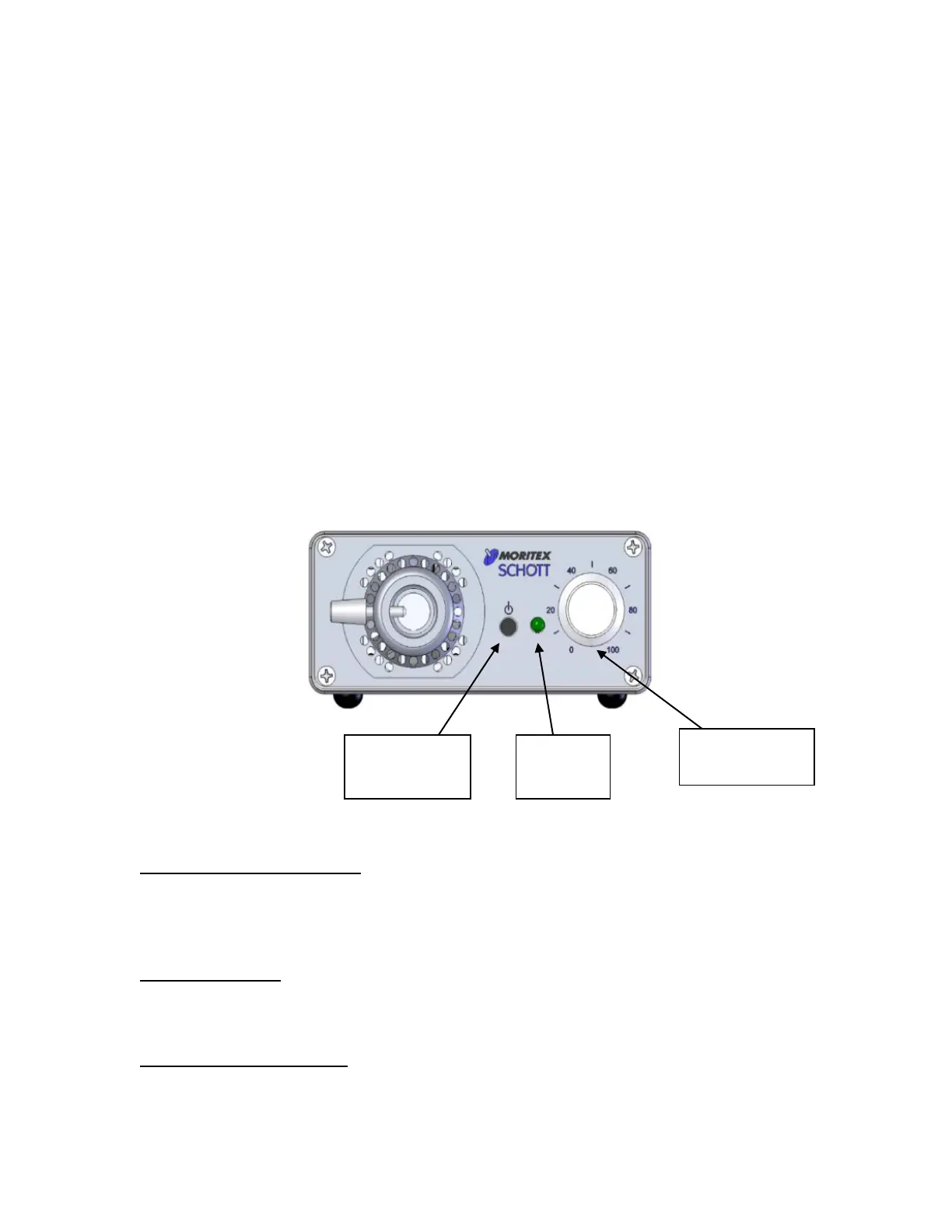
The LLS 3 has a simplified user interface for easy startup operation. To use the light
source in normal operation, press the On/Standby push button and adjust the
intensity control knob. If the light output does not come on, ensure the correct
setting of the rear polarity switch (see section 9.0 for more information). More
advanced control of the light source is available through the three remote control
interfaces.
When power is first applied to the unit, the green status indicator illuminates for a
few seconds while the unit initializes. After initialization, the unit will either be in
Standby Mode or On Mode depending on the last state that the unit was left in when
power was removed.
7.2. Front Panel Controls
On/Standby Push Button:
Press and release to turn the LED on or off. Pressing the push button places the
unit in Local Mode. The ability to turn the LED on or off manually can be locked out
via RS-232 or Ethernet.
Status Indicator:
Indicates the status of the light source. When the status LED is off, the unit is in
Standby Mode. A steady on means the unit is on. Flashing means there is an error.
Intensity Control Knob:
Turn to adjust the intensity of the light output. If the unit is not in Local Mode, turn
the knob full right or left to place the unit in Local Mode. Auto-switching to Local
Mode can be locked out via RS-232 or Ethernet.
Push Button
Indicator
Control Knob



 To Next Page