EasyManua.ls Logo

SCHUBERTH SC10U - Page 44

SCHUBERTH SC10U
53 pages
Print Icon
To Next Page IconTo Next Page
To Previous Page IconTo Previous Page
Loading...
SC10U
44
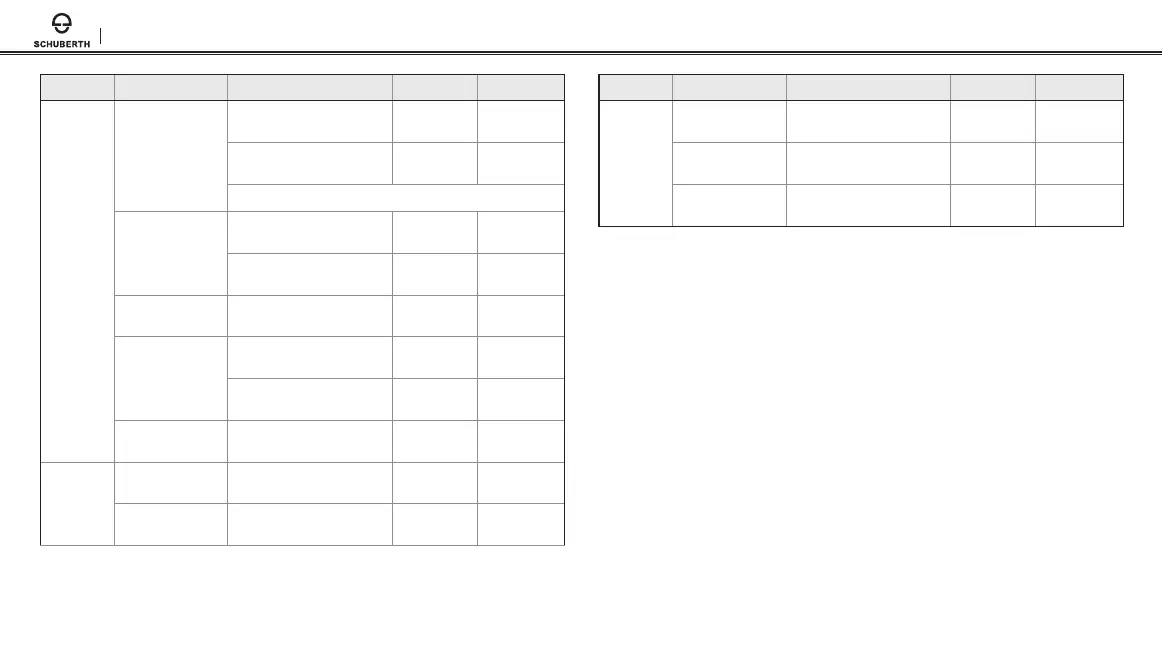
Type Function Button Command LED Beep
Intercom
Intercom pairing
Press the (-) Button for
1 second
- -
T
ap the (+) Button Red ashing
Mid-tone
single beep
Tap the (+) Button of any one of the two headsets
Start/End each
intercom
Press the (-) Button for
1 second
- -
T
ap the (-) Button -
Mid-tone
double beeps
End all intercoms
Press the (-) Button for
3 seconds
-
Mid-tone
double beeps
Start Group
Intercom
Press the (-) Button for
1 second
- -
Pr
ess the (-) Button for
1 second
Blue and r
ed
ashing
-
End Group
Intercom
Press the (-) Button for
3 seconds
- -
Music
Play/Pause
Bluetooth music
Press the (+) Button for
1 second
-
Mid-tone
double beeps
Track forward/back
Press the (+) Button or the (-)
Button for 2 seconds
- -
Type Function Button Command LED Beep
FM Radio
FM radio on/off
Press the (-) Button for
5 seconds
-
Mid-tone
double beeps
Select preset
Press the (+) Button for
3 seconds
-
Mid-tone
single beep
Seek up
Press the (+) Button for
1 second
-
High tone
triple beeps

Table of Contents

Other manuals for SCHUBERTH SC10U

Related product manuals