EasyManua.ls Logo

Schumacher Electric SC-1000A - User Manual

Schumacher Electric SC-1000A
25 pages
Print Icon
To Next Page IconTo Next Page
Loading...
0099000909-01
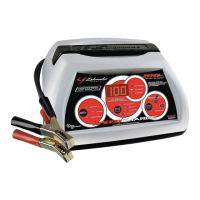
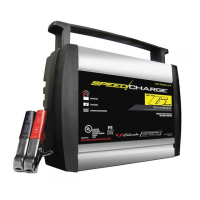
SC-1000A
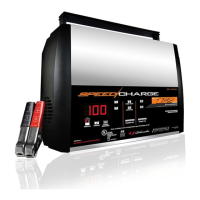
SC-1200A
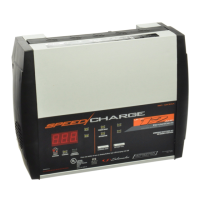
SSC-1500A
SSC-1000A
SC-600A
Automatic Battery Charger / Cargador de batería automático
Models / Modelos: SC-600A, SC-1000A, SC-1200A,
SSC-1000A, SSC-1500A
READ THE ENTIRE MANUAL BEFORE USING THIS PRODUCT.
FAILURE TO DO SO COULD RESULT IN SERIOUS INJURY OR DEATH.
LEA EL MANUAL COMPLETO ANTES DE UTILIZAR ESTE PRODUCTO.
CUALQUIER FALLA PODRÍA RESULTAR EN SERIAS LESIONES O PODRÍA SER MORTAL.
OWNER’S MANUAL
MANUAL DEL USUARIO
DO NOT RETURN THIS PRODUCT TO THE STORE!
Call Customer Service for Assistance: 800-621-5485
¡NO LO DEVUELVA ESTE PRODUCTO A LA TIENDA!
Llame a Servicios al Cliente para Asistencia: 800-621-5485

Questions and Answers

  • T
    Troy WhiteAug 3, 2025
    Why is my Schumacher Electric SC-1000A making a clicking sound?
    • M
      Michele HodgesAug 3, 2025
      If your Schumacher Electric Battery Charger makes an audible clicking sound, this could be due to several reasons. The circuit breaker might be cycling because the settings are wrong, so check them. The battery may be defective, so have it checked. There might be shorted battery cables or clamps, which you should inspect and replace if necessary. A severely discharged battery may also cause this, so allow charging to continue until it recovers, but stop after 20 minutes if it persists and have the battery checked. Finally, reverse connections at the battery can cause this, so shut off the charger and correct the lead connections.
  • B
    bpageAug 8, 2025
    How to fix a Schumacher Electric Battery Charger when the connected light is not on?
    • H
      harriscaitlinAug 8, 2025
      If the CONNECTED (red) or CHECK (red) light is not on, it could be due to a few reasons: the battery is not connected correctly, the connection to the battery is reversed, or the battery voltage is less than one volt. Check for poor connection to the battery and frame, ensuring the connection points are clean. Rock the clips back and forth for a better connection. Correct the connection if it's reversed. If the voltage is too low, replace the battery or try using a manual charger to bring it above one volt.
  • R
    Ryan HansenAug 12, 2025
    What to do if Schumacher Electric SC-1000A is on but not charging?
    • K
      Kristen CrossAug 12, 2025
      If the battery is connected and the Schumacher Electric Battery Charger is on, but not charging, the clamps may not be making a good connection. Check for poor connections at the battery and frame, ensure the connecting points are clean, and rock the clamps back and forth for a better connection.
  • J
    josewilsonAug 16, 2025
    Why Schumacher Electric SC-1000A will not turn on?
    • R
      Rachel RobersonAug 17, 2025
      If your Schumacher Electric Battery Charger will not turn on when properly connected, the AC outlet may be dead, or there may be a poor electrical connection. Check for an open fuse or circuit breaker supplying the AC outlet. Also, check the power cord and extension cord for a loose-fitting plug.
  • A
    Andrea CollinsAug 20, 2025
    Why is the connected red light blinking on my Schumacher Electric Battery Charger?
    • J
      jasminedanielsAug 21, 2025
      If the CONNECTED (red) light on your Schumacher Electric Battery Charger is blinking, the charger may be in abort mode, or the battery may be faulty. This can happen if the battery doesn't reach full charge within 48 hours, possibly due to a very large battery or a bank of batteries requiring more power than the charger can deliver in that time. To resolve this, reset the charger by unplugging it. Then, select the desired CHARGE RATE and battery type again, if necessary.
  • M
    marissatuckerAug 25, 2025
    What to do if charged green light turns on too fast on Schumacher Electric SC-1000A Battery Charger?
    • R
      Russell VasquezAug 26, 2025
      If the CHARGED (green) light turns on too quickly after connecting the battery to your Schumacher Electric Battery Charger, the battery may already be fully charged or recently charged. Alternatively, the battery may be faulty (sulfated). If the battery is in a vehicle, turn the headlights on for a few minutes to reduce the battery voltage and try charging again. Also, try a lower CHARGE RATE selection. A sulfated battery will eventually accept a charge if you continue charging for a few hours. The CHARGING (yellow) LED will blink. If not, have the battery checked or call customer service.
  • V
    vgrayAug 29, 2025
    What does it mean if indicator lights are lit erratically on Schumacher Electric SC-1000A Battery Charger?
    • Y
      Yvonne GouldAug 29, 2025
      If the indicator lights on your Schumacher Electric Battery Charger are lit erratically, not as explained in the Operating Instructions, a button may have been pressed while the charger was being plugged in. Ensure nothing is touching the control panel, then unplug the unit and plug it in again.

Summary

Important Safety Instructions

General Safety Precautions

Covers essential safety rules for charger operation, including electrical hazards, extensions, and maintenance.

Personal Precautions

Handling Batteries and Personal Safety

Outlines crucial personal safety steps, including avoiding sparks, metal items, and handling battery acid.

Preparing to Charge

Battery Acid Handling and Ventilation

Provides instructions on preparing the battery area, cleaning terminals, and handling corrosive battery acid.

Pre-charge Procedures

Details reading instructions, setting voltage, and ensuring secure cable connections before charging.

Charger Location

Safe Placement and Environment

Specifies ideal locations for the charger, avoiding battery gases and ensuring ventilation.

DC Connection Precautions

Connecting DC Clips Safely

Explains how to safely connect and disconnect DC output clips, avoiding shorts and touching.

Charging with Battery in Vehicle

Vehicle Connection Safety and Procedure

Guides on connecting the charger to a battery installed in a vehicle, emphasizing spark prevention and polarity.

Charging with Battery Outside Vehicle

External Battery Connection Procedure

Details the steps for connecting the charger to a battery removed from a vehicle, including marine battery notes.

Grounding and AC Power Cord

Electrical Connections and Grounding

Explains the importance of proper grounding, AC cord connections, and extension cord usage for safety.

Assembly Instructions

Initial Setup Procedures

Instructs users to remove cord wraps and uncoil cables before using the battery charger.

Control Panel

Digital Display Functionality

Describes the digital display's ability to show charge percentage or voltage based on selected mode.

Display Mode Selection

Explains how to use the Display Mode button to set the display to show battery percentage or voltage.

Charge Rate and Battery Size Selection

Details selecting charge rates (Small, Medium, Large) based on battery size and application.

Battery Type Selection

Guides on selecting the correct battery type (6V, 12V, AGM, GEL) for optimal charging.

Operating Instructions

Charging Steps and Indicators

Outlines the main charging steps, indicators like CONNECTED LED, and automatic mode switching.

Aborted Charge Scenarios

Explains what happens when charging aborts for different models and how to reset the charger.

Advanced Charging Modes

Describes Desulfation, Completion, and Maintain modes, including LED indicators and duration.

Battery Voltage Tester Functionality

Details how to use the charger as a battery voltage tester, including specific model functions.

Calculating Charge Time

Understanding Charge Time Factors

Explains how to find battery ratings and charge times, defining CCA, RC, and Ah.

Maintenance Instructions

General Maintenance Procedures

Provides instructions for cleaning battery clips, cords, and the charger case, and notes on servicing.

Moving and Storage Instructions

Proper Storage and Handling

Offers guidance on storing the charger correctly, including unplugging, location, and avoiding damage.

Troubleshooting

Indicator Light Issues

Helps diagnose problems when the CONNECTED or CHECK indicator lights are not functioning as expected.

Charging Performance Issues

Addresses issues like erratic indicator lights, low measured current, and premature CHARGED light status.

Operational and Connection Issues

Solves problems related to clicking sounds, charger not turning on, no charging, and battery clips not sparking.

Before Returning for Repairs

Pre-Return Checks and Support

Guides on performing checks before returning for repair and contacting customer service for troubleshooting.

Limited Warranty

Warranty Terms and Conditions

Details the 5-year limited warranty, exclusions, and manufacturer's obligations.

Warranty Registration and Service Contact

Explains how to activate the warranty and provides contact information for customer service.

Schumacher Electric SC-1000A Specifications

General IconGeneral
Input Voltage120V AC
Output Voltage6V/12V
Automatic OperationYes
Reverse Hook-Up ProtectionYes
Weight3.5 lbs
Battery TypeAGM, Gel
Charging ModesMaintenance

Related product manuals