EasyManua.ls Logo

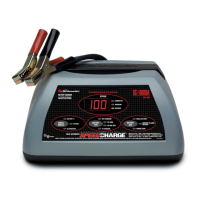
Schumacher SpeedCharge 2500A - User Manual

Schumacher SpeedCharge 2500A
16 pages
Print Icon
To Next Page IconTo Next Page
Loading...
Fully Automatic
Microprocessor Controlled
Battery Charger with
Battery Tester
CAUTION:
Read all Safety Rules and Operating Instructions,
and follow them with each use of this product.
0099000398/1004
OWNER’S MANUAL
Schumacher Electric Corporation
Mount Prospect, IL 60056 U.S.A.
Model 2500A
For 12-Volt Batteries
SpeedCharge
computer
smart
25
amp
FAST
CHARGE
amp
MEDIUM
CHARGE
amp
SLOW
CHARGE
2
12
Send Warranty Product Repairs to:
Customer Service Returns
P.O. Box 280,1025 E. Thompson, Hoopeston, IL 60942-0280
Questions? Call Customer Service: 1-800-621-5485

Questions and Answers

  • C
    Carrie MaysJul 25, 2025
    How to make Schumacher Battery Charger start charging?
    • B
      Brandon WaltersJul 25, 2025
      If your Schumacher Battery Charger is on but not charging, it might not be in charging mode. Press the DISPLAY MODE button until either the Battery % or Voltage light comes on to initiate charging.
  • K
    Karen RileyJul 30, 2025
    What to do if the green CHARGED light turns on too quickly on Schumacher SpeedCharge 2500A Battery Charger?
    • B
      Brandi GibbsJul 30, 2025
      If the green CHARGED light illuminates shortly after connecting your Schumacher Battery Charger to the battery, it's possible the battery is already fully or recently charged, causing a high voltage reading. If the battery is in a vehicle, try turning on the headlights for a few minutes to lower the battery voltage, then attempt charging again. You might also try selecting a lower CHARGE RATE.
  • K
    Karen StewartAug 3, 2025
    Why does the CHECK light keep flashing on my Schumacher Battery Charger?
    • M
      Mark ThompsonAug 3, 2025
      The CHECK (red) light on your Schumacher Battery Charger may flash if the battery doesn't reach full charge within 24 hours. This can occur with very large batteries or battery banks that need more power than the charger can provide in that time, or if the battery is faulty. To resolve this, reset the charger by unplugging it or briefly disconnecting the negative battery clip. If needed, re-select the desired charge rate and battery type.
  • T
    Trevor GreenAug 7, 2025
    Why is the current lower than selected on my Schumacher SpeedCharge 2500A Battery Charger?
    • M
      matthewbrownAug 7, 2025
      If the measured current on your Schumacher Battery Charger is lower than what you selected, it could be because the charger has reached the maximum voltage and is reducing the current or has detected an over-temperature condition and reduced the current to cool down. This is a normal operation. Ensure that the charger's side ventilation holes are not blocked and move it out of direct sunlight into a shaded area.
  • M
    Manuel TrujilloAug 12, 2025
    What to do if Schumacher SpeedCharge 2500A indicator lights are erratic?
    • L
      Lindsey Kane MDAug 12, 2025
      If the indicator lights on your Schumacher Battery Charger are behaving erratically, it could be due to a button being pressed during plug-in or a defect. Ensure nothing is touching the control panel, then unplug the unit and plug it back in. If the issue persists, consider returning it to the place of purchase for a replacement.
  • A
    Ashley RushAug 16, 2025
    Why Schumacher Battery Charger is making clicking sound?
    • M
      Madison MccannAug 17, 2025
      The clicking sound from your Schumacher Battery Charger is normal. It's the sound of a relay turning the current on and off to the battery.
  • M
    Marie MartinAug 20, 2025
    Why does the fan on my Schumacher SpeedCharge 2500A turn on and off?
    • J
      jennifersuarezAug 20, 2025
      The fan turning on and off unexpectedly on your Schumacher Battery Charger is normal. The fan operation is controlled by software and temperature.

Summary

Important Safety Instructions

Explosive Gases Hazard

Warning about explosive gases from lead-acid batteries and the need to follow instructions.

Safe Product Handling

Covers safe handling of cords, battery types, ventilation, and environmental factors.

Personal Safety Precautions

Protective Gear and Assistance

Emphasizes wearing eye protection, clothing, and having aid available.

Acid Spill and Metal Object Safety

Addresses acid spills, removing metal items, and avoiding sparks near batteries.

Before Using Your Battery Charger

Plugging In and Extension Cords

Explains electrical requirements and recommended guidelines for using extension cords.

Preparing Battery for Charging

Details steps for preparing a lead-acid battery, including terminal cleaning and water levels.

Operating Instructions

Charging Battery In The Vehicle

Step-by-step guide for connecting and charging a battery while it remains installed in a vehicle.

Connecting to Vehicle Battery Systems

Instructions for connecting charger clamps to negative or positive-grounded vehicle battery systems.

Charging Battery Removed From Vehicle

Battery Connection and Charging

Procedure for connecting and charging a battery that has been removed from the vehicle.

SpeedCharge Controls and Panel

Display Mode Switch

Selects the digital meter function: battery percentage or voltage.

Charge Rate Switch

Sets the charging current to 2A, 12A, or 25A.

Battery Type Switch

Selects the battery type: Regular, Deep Cycle, or AGM/Gel Cell.

Control Panel Guide

Mode of Operation Indicators

Explains the meaning of LED indicators and digital display states for various operations.

Using the Built-in Battery Tester

Tester Overview and Sequence

Explains the tester's function, how to use it, and the initial testing sequence.

Tester Status LEDs and Calculations

Describes tester status LEDs and how battery percentage is initially calculated.

Using Your Battery Charger

Charging Process Details

Covers charging status, automatic shut-off, aborted charges, and desulfation mode.

Completion and Maintain Mode

Explains completion indicators and the function of Maintain Mode (Float-Mode Monitoring).

Know Your Charger

Charger Components and Features

Details the charger's relay, fan, and overtemperature protection system.

Charging Tips and Strategies

Provides tips for reviving batteries and completing interrupted charging cycles.

Maintenance and Care

Routine Charger Maintenance

Covers cleaning clamps, coiling cords, cleaning the case, and proper storage.

Battery Percent and Charge Time

Factors Affecting Charge Time

Explains how battery state, rating, and charge rate influence charging duration.

Interpreting Battery Charge Display

Provides insights into battery percentage readings in tester and charger modes.

Troubleshooting Common Problems

Charging and Indicator Issues

Addresses problems like no charging, erratic lights, and flashing indicators.

Performance and Unexpected Behavior

Solutions for issues such as the green charged light, clicking sounds, and fan operation.

Limited Warranty

Warranty Terms and Conditions

Details the five-year limited warranty, exclusions, and limitations.

Warranty Validation Procedure

Explains the requirement to complete and mail a warranty validation card.

Schumacher SpeedCharge 2500A Specifications

General IconGeneral
BrandSchumacher
ModelSpeedCharge 2500A
CategoryBattery Charger
LanguageEnglish

Related product manuals