Scientific
PSD7303 20/42
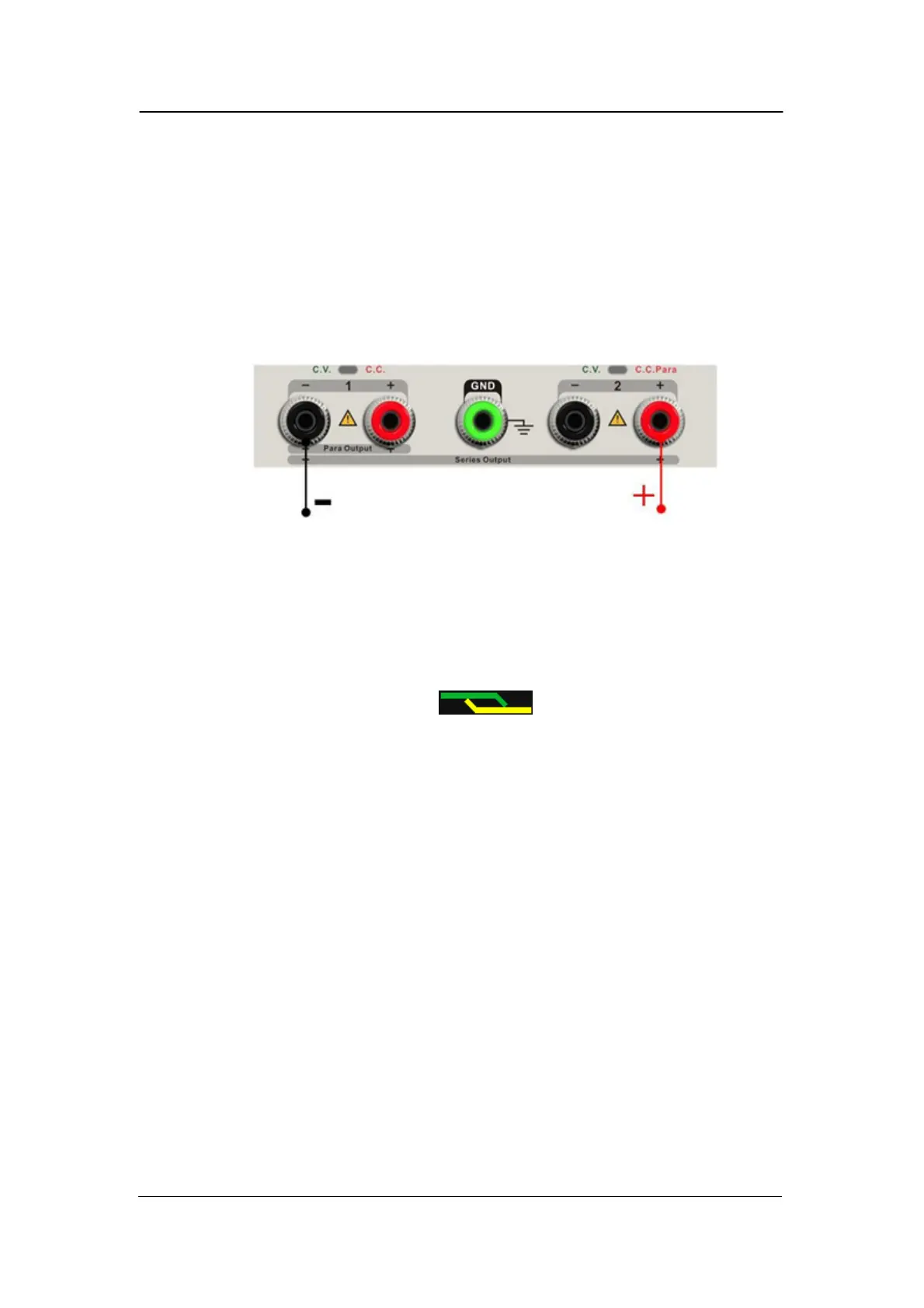
2.4 CH1/CH2 Series mode
Instruction
In the series mode, CH1 and CH2 are linked internally into one channel
which is controlled by CH1, and the output voltage value is twice compared
with that
of single channel.
Output rating 0~64V/0~3.2A
Operation steps:
1. Press the “Ser” button to start the Series mode, the indicator light turns
bright immediately and the logo displays at the top of screen.
2. Connect the load to the positive terminal of CH2 and the negative terminal
of CH1;
3. Set voltage and current value:
a) Press “1” button to select the channel 1
b) Move the cursor through direction button to select the
wanted parameter(voltage, current),
c) Press “Fine” to select the digit position and then revolve
the multi-function knob to change the corresponding parameter.
4. Press “on/off” button corresponding CH1 to turn on the output
Note: You can identify the current working state “CC” or ”CV” by referring to
indicator light of CH1/CH2.(red means CV, yellow means CC)



 To Next Page