ENTERING
PROGRAMING
MODES
Quick Config.
Mode
-
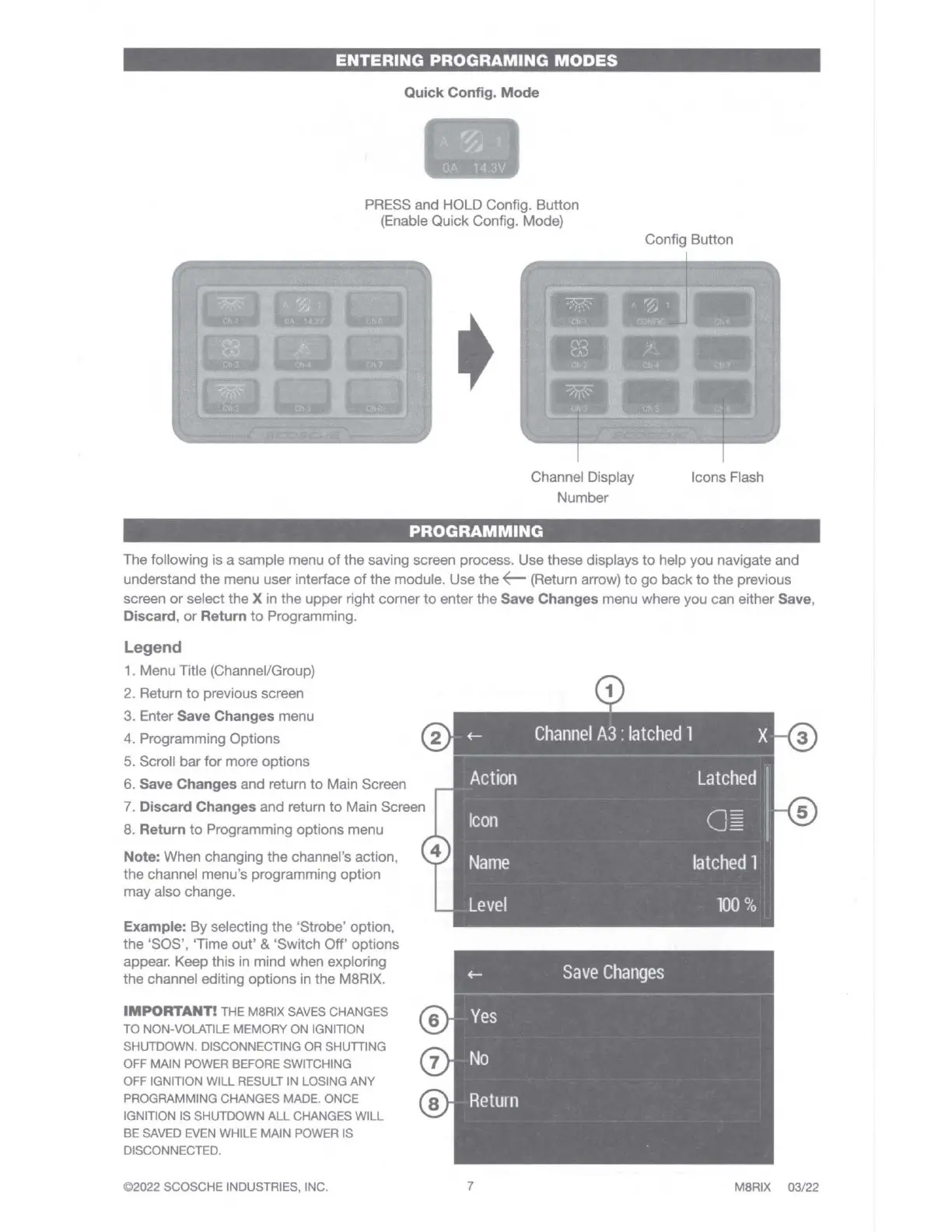
PRESS and HOLD Config. Button
(Enable Quick Config. Mode)
Channel Display
Number
PROGRAMMING
Config Button
Icons Flash
The following is a sample menu
of
the
saving screen process. Use these displays
to
help you navigate and
understand
the
menu user interface
of
the
module. Use the
~
(Return arrow)
to
go
back
to
the previous
screen
or
select the X in the upper right corner
to
enter the Save Changes menu where you can either Save,
Discard,
or
Return
to
Programming.
Legend
1. Menu Title (Channel/Group)
2. Return
to
previous screen
3. Enter Save Changes menu
4. Programming Options
Fl
5. Scroll
bar
for
more options
6. Save Changes and return
to
Main Screen
7. Discard Changes and return
to
Main Screen
8. Return
to
Programming options menu
Note: When changing
the
channel's action,
the
channel menu's programming option
may also change.
Example: By selecting
the
'Strobe' option,
the
'SOS', 'Time
out'
& 'Switch Off' options
appear. Keep this in mind when exploring
the
channel editing options in the M8RIX.
IMPORTANT!
THE M8RIX SAVES CHANGES
TO
NON-VOLATILE MEMORY
ON
IGNITION
SHUTDOWN. DISCONNECTING OR SHUTTING
OFF MAIN POWER BEFORE SWITCHING
OFF IGNITION WILL RESULT IN LOSING
ANY
PROGRAMMING CHANGES MADE. ONCE
IGNITION IS SHUTDOWN
ALL
CHANGES WILL
BE
SAVED EVEN WHILE MAIN POWER IS
DISCONNECTED.
©2022 SCOSCHE INDUSTRIES, INC.
a
D
+-
Channel
A3
:
latched
1
X
El
Action
Latched
Icon
o=
B
Name
latched
1
Level
100
%
7
M8RIX
03
/22



 To Next Page