CU50
Service Manual
March 2010
Page 12
Harvest Time Adjustment
The harvest time can be adjusted so that all the
ice harvests during the cycle, plus a few seconds
extra. This is done by a button press sequence.
Note: Do not set harvest time shorter than the
actual time it takes to release all the cubes.
To adjust Harvest Time:
1. Shut the machine off by holding the On/Off
button in until it shuts off (Ice Making light off).
2. Press and hold the On button again for 5
seconds, then release (Ice Making light will switch
off).
3. View the lights. Compare to the table below.
Harvest Time Table
On/Off Water Clean
Default off off off
Add 10 seconds on off off
Add 20 seconds off on off
Add 30 seconds off off on
Add 40 seconds on on on
- 10 seconds ash off off
- 20 seconds off ash off
- 30 seconds off off ash
- 40 seconds ash ash ash
4. Select the amount of change.
5. Push and release the Clean button until the
correct light pattern is displayed.
6. Push and release the On button to select that
setting.
7. Push and release On/Off to return to ice making.
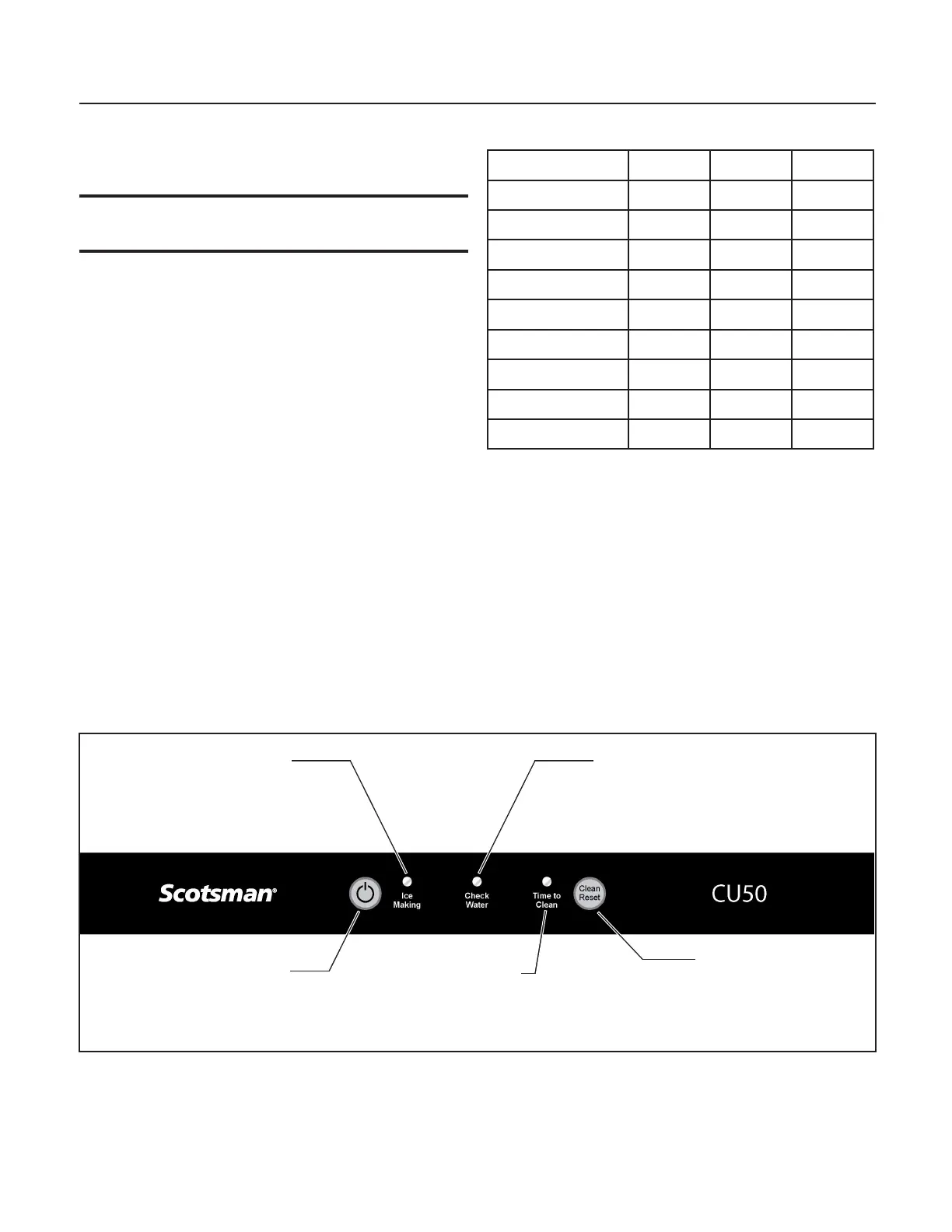
Control Panel
Ice Making
Indicator Light
On - Off
Button
Clean - Reset
Button
Check Water
Indicator Light
Time To
Clean Unit
Indicator Light



 To Next Page