HotFind-D Infrared Camera Operation Manual
29
and continuously press “C” until it exits from “Menu” mode.
5.5.2 Temperature measurement
SDS HotFind-D can simultaneously measure four spots’ temperature,
tracking and displaying the highest/lowest temperature and alarm. The
specific operation see follows.
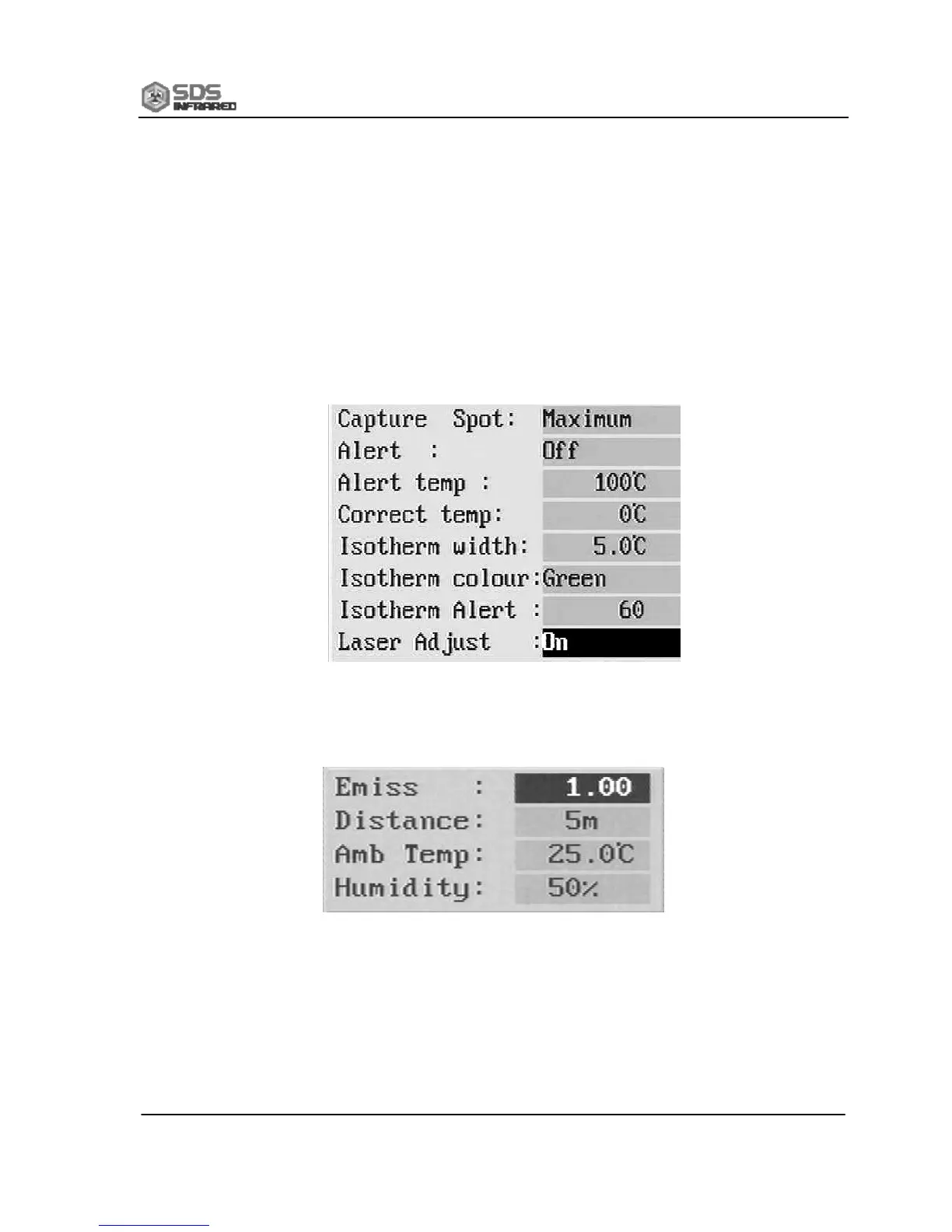
(1) Set “Analysis” Menu,Select “Setup Analysis” of “Setup” menu,
and set as the following examples.
(2) Set Object Parameters
Select “Obj Par” under Analysis menu, and make setups according
to the specific condition as below.
(3) Temperature Measurement Operations
Enter “Analysis” menu, select one or any of “Spot 1”, “Spot 2”,
“Spot 3” and “highest/lowest spot”. Now one or more cursors will
appear on the screen. Meanwhile the specific temperature data appear
at the up-right corner of the screen. According to the setups, highest


 To Next Page