Sharing Your Pictures and Videos Example: Uploading Pictures to Facebook
Seagate Dashboard User Guide 18
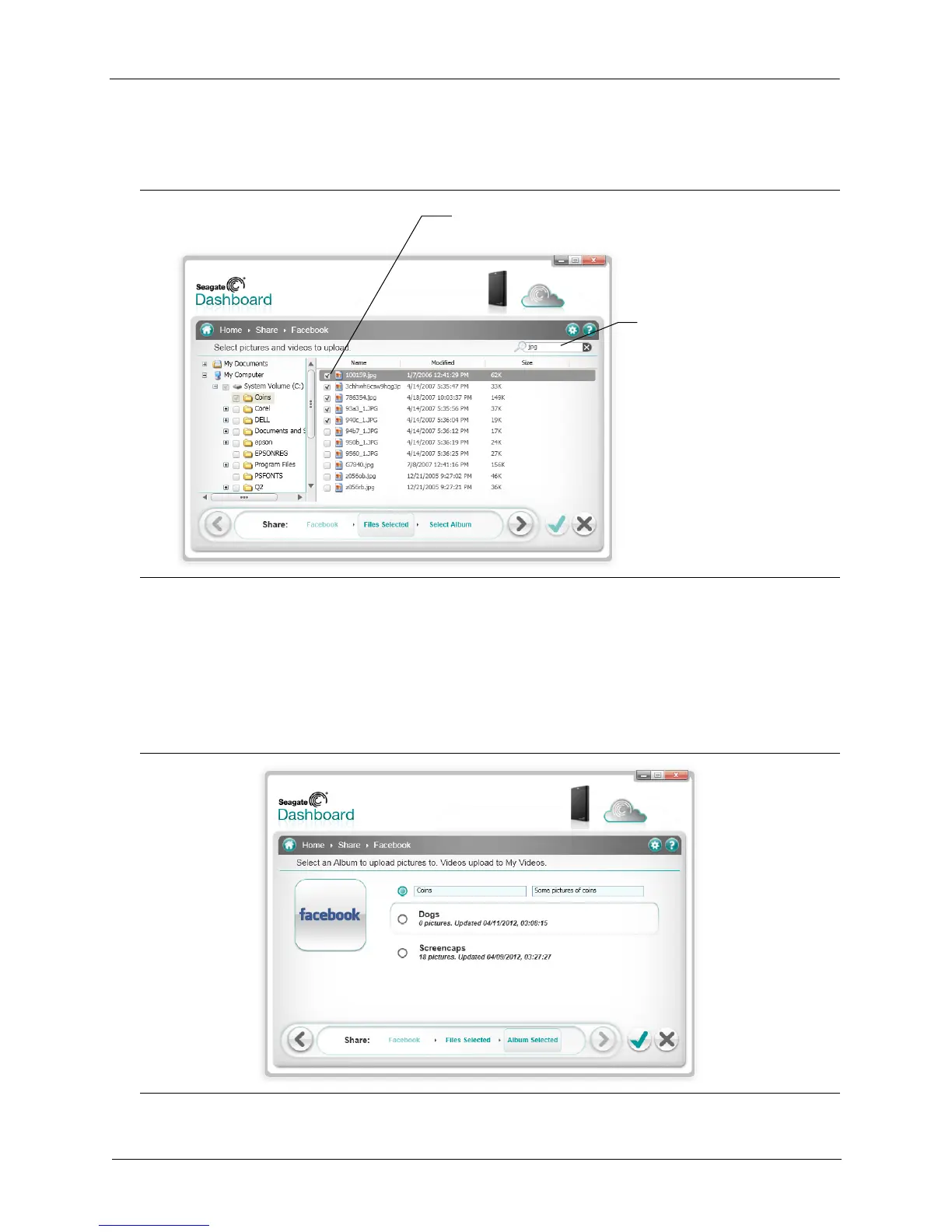
on) in each folder. You can filter the display by entering text in the Search field. For example,
entering jpg in the Search field shows only those files in the folder with jpg in the file name.
6. Place a checkmark next to the files and folders you want to upload. If you place a checkmark
next to a folder, it selects all of the files in the folder. Once you are done selecting files to
upload, click the > button to continue.
7. On the album selection screen, select the album where you want to upload the pictures. You
can select an existing album, or you can enter the name and description for a new album.
Figure 13: Seagate Dashboard File Selection Screen
Figure 14: Seagate Dashboard Album Selection Screen
Enter text here to show only
files with this text in the name
Place a checkmark next to the files
and folders you want to upload











 To Next Page