40 Barracuda 18XL Product Manual, Rev. A
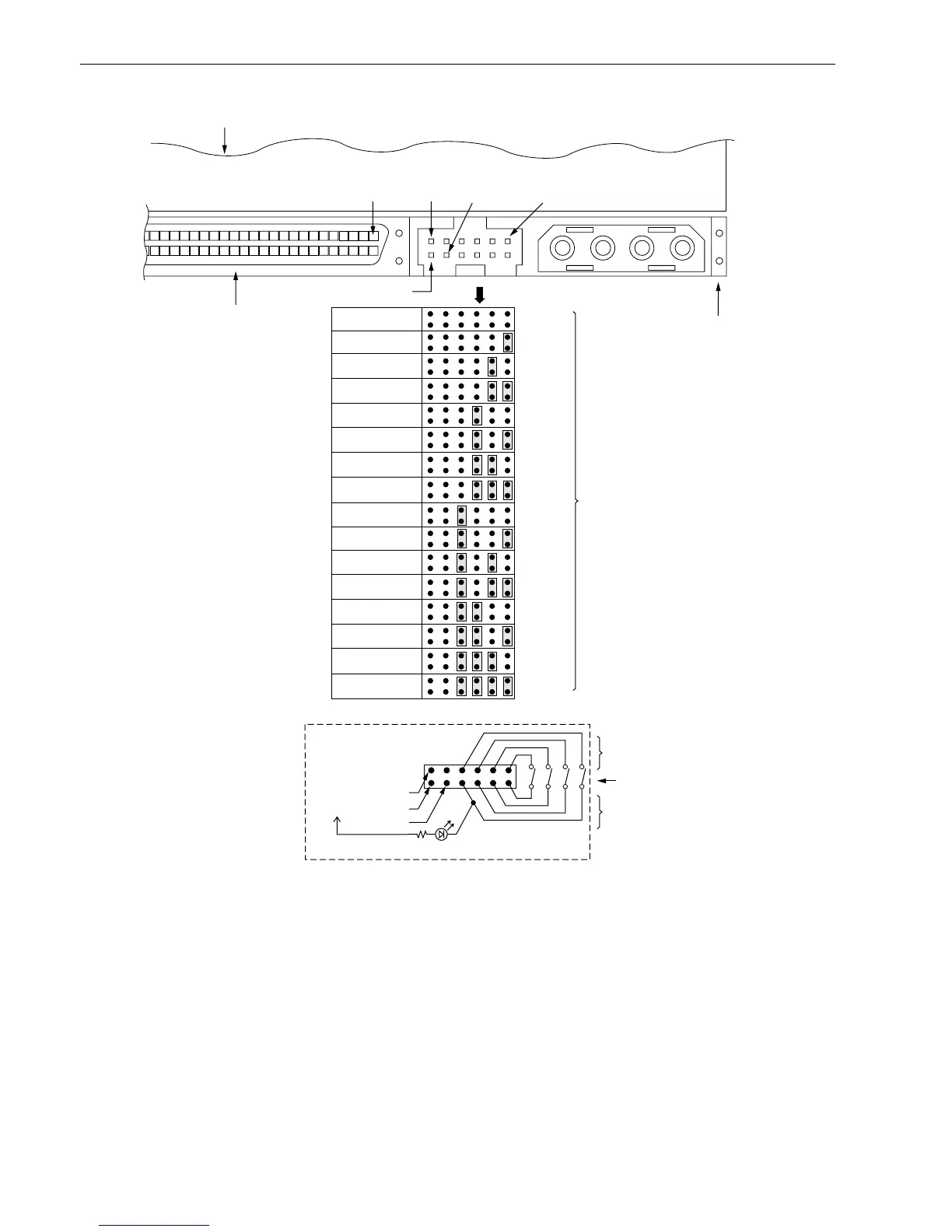
Figure 7c. Barracuda 18XL family drive ID select header J5 for W/LW/LWV models (J5 Pins 1–12)
SCSI ID = 8
SCSI ID = 9
SCSI ID = 10
SCSI ID = 11
SCSI ID = 12
SCSI ID = 13
SCSI ID = 14
SCSI ID = 15
A
3
A
2
A
1
SCSI ID = 0 (default)
SCSI ID = 1
SCSI ID = 2
SCSI ID = 3
SCSI ID = 4
SCSI ID = 5
SCSI ID = 6
SCSI ID = 7
A
0
J1-DC Power
68 Pin
SCSI I/O Connector
J1
J5
Pin 1
Drive HDA (rear view, PCBA facing downward)
Pin 1
PCBA
Pin 12
1P2P3P4P
+5V Ground
Host Alternate
Usage Plug
Pins 1, 3, 5, and 7 are
optional connections to
switching circuits in host
equipment to establish
drive ID.
Remote Switches
For ID selection use
jumpers as shown or
connect a cable for
remote switching as
shown below.
Dashed area is optional host circuitry (external to the
drive) connected to host supplied optional usage plug.
[1] Voltage supplied by drive.
Pins 2, 4, 6, and 8 are
normally not grounded.
They are driven low (ground)
for 250 ms after a Reset
or PWR ON to allow drive to
read SCSI ID selected.
A
0
A
1
A
2
A
3
1197531
12 10 8 6 4 2
[1] +5V
Drive Activity LED
+5V
N.C.
Ground



 To Next Page