Seaory S22 Desktop Dual-sided Card Printer
Excellent quality, Perfect service
www.seaory.com 37 / 53
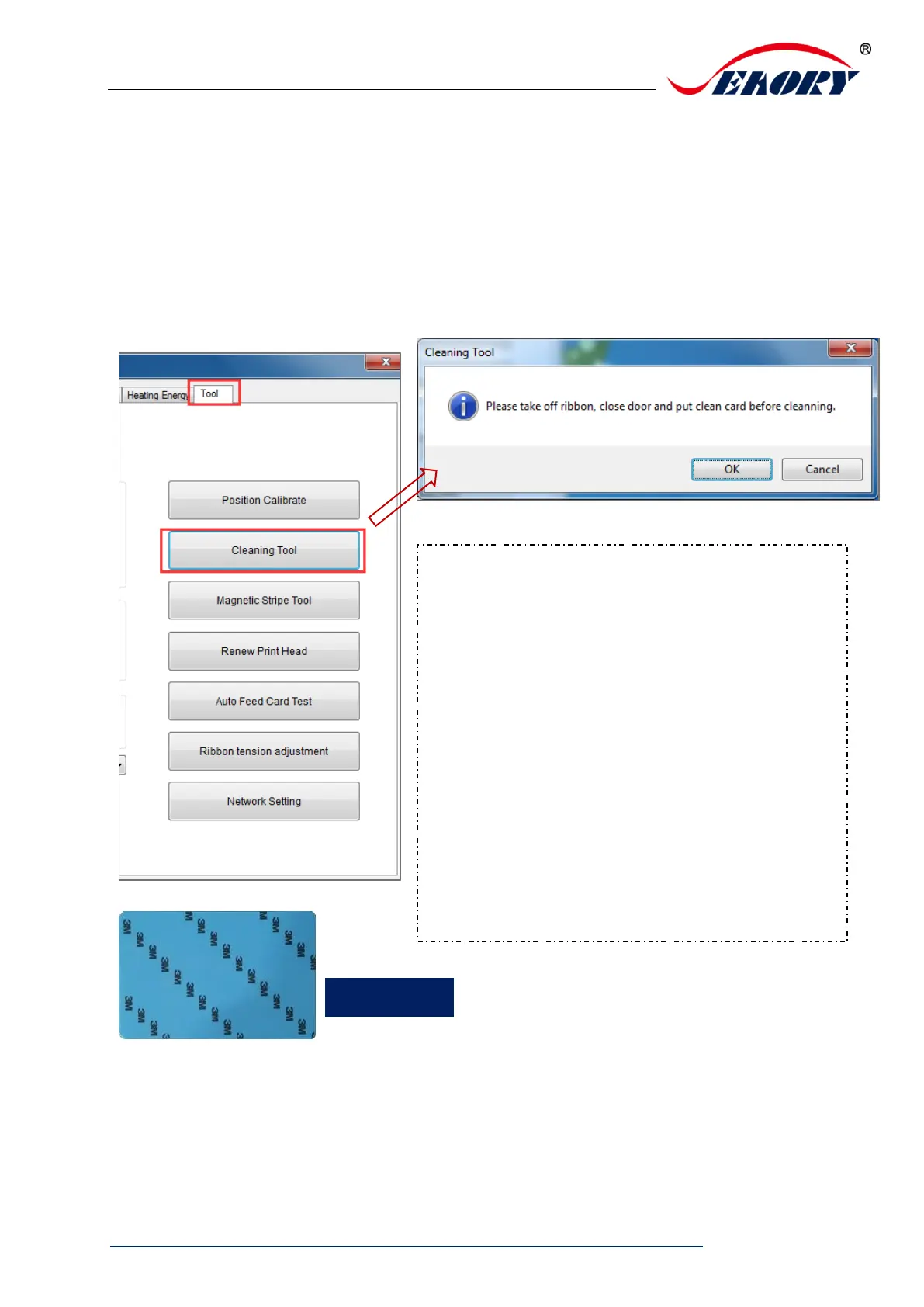
7.15 Cleaning tool
Deposition of dust or contaminants inside the card printer may cause
damage to important parts and affect the printing effect. Therefore, it’s
recommended to clean the printer when changing the ribbon or at least
clean one time a month.
Cleaning steps according to the driver
leads are as follows:
Step 1: Take out the cleaning card from
the accessory box and remove the 3M
hyaline layer on cleaning card’s both
sides.
Step 2: Open card printer upper cover,
take out the ribbon cartridge and then
close the upper cover.
Step 3: Put the cleaning card into the
input hopper
Step 4: Click “OK”. The card printer will
start to clean itself.
Step 5: After finished cleaning, please
install the ribbon cartridge into card
printer.


 To Next Page