3-6
n
Kenmore Elite 2013 Stainless Steel Tall Tub Dishwasher
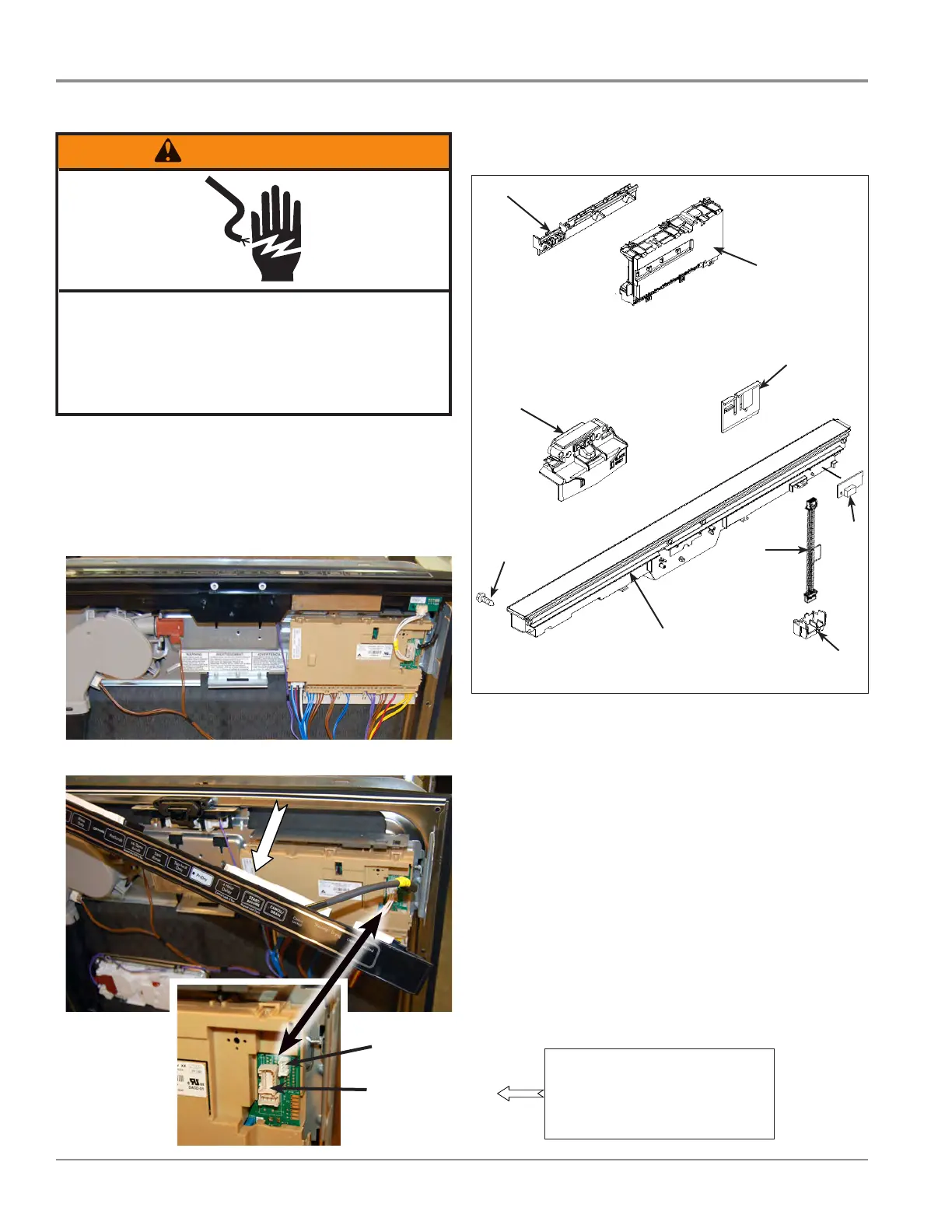
COMPONENT ACCESS
1. Unplug dishwasher or disconnect power.
2. Remove the outer panel from the door.
3. Remove user interface assembly from door panel.
4. Disconnect the user interface wiring harness, and on some
models, the LED status light harness, see gures 2 and 3.
Control Board and User Interface
Removing User Interface
WARNING
Electrical Shock Hazard
Disconnect power before servicing.
Failure to do so can result in death or
electrical shock.
Replace all parts and panels before operating.
Figure 1
Figure 2
Figure 3
Figure 4
User Interface
Status LED Board
(if available)
Control & UI Components
A. Console Assembly
B. Control Clip
C. Box Connector
D. Screw
E. Latch Assembly
F. Electronic Control
G. Connector Brace
H. Status Light
I. 4-Wire Jumper
F
C
D
E
A
B
G
I
H
NOTE: This gure represents
the conguraon for capacive
touch UI and status LED board.
Connector conguraon may vary
depending on model and UI.



 To Next Page