3.4 Glonass Sites Output
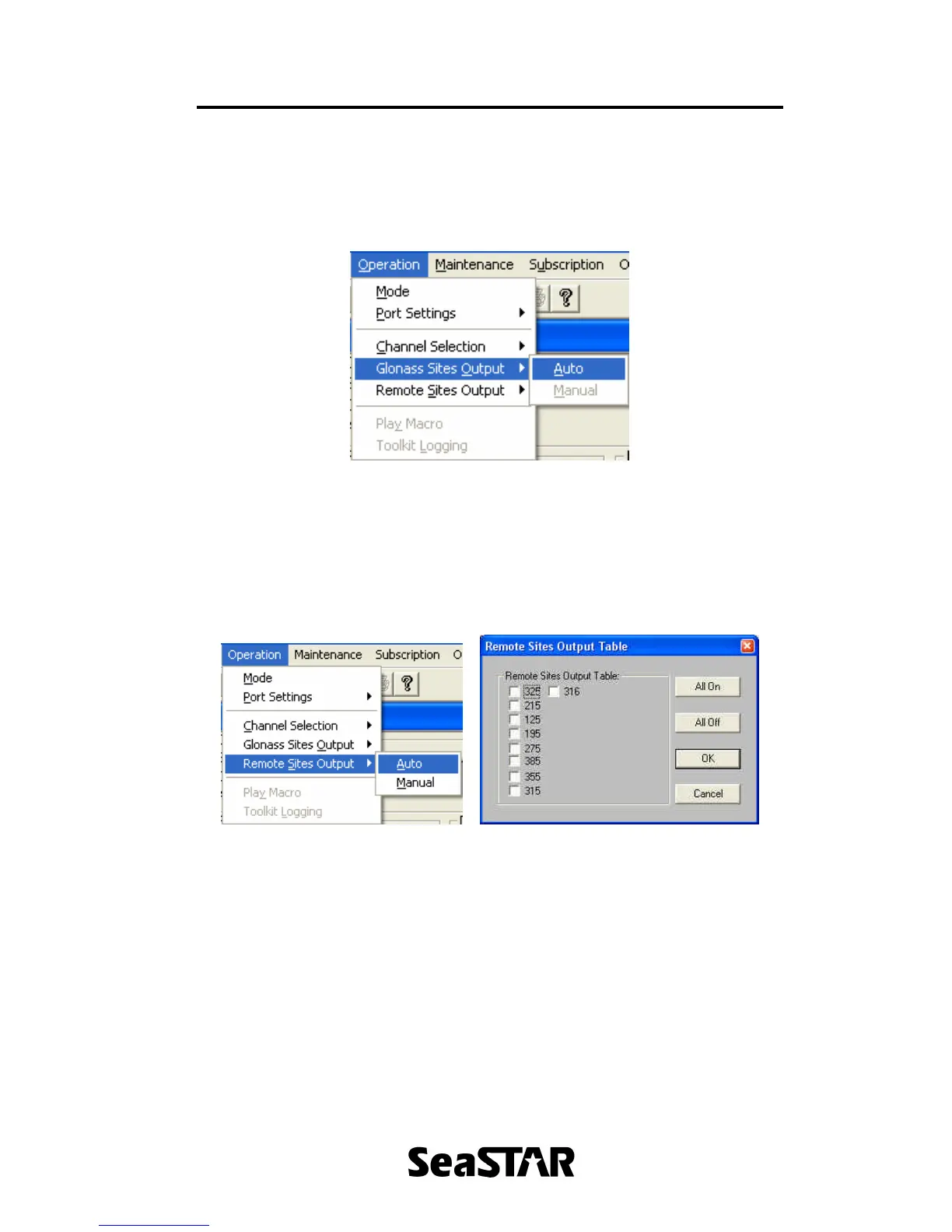
To select the sites for Glonass output, click ‘Operation’ menu followed by ‘Glonass
Sites Output’ as shown in Figure 16. Currently only ‘Auto’ can be selected, which
will automatically select the nearest Glonass site.
Figure 16.
3.5 Remote Sites Output
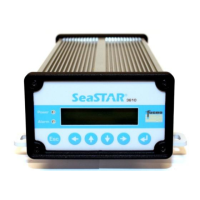
To select the remote sites to use, click ‘Operation’ menu followed by ‘Remote
Sites Output’. In here select ‘Auto’ to automatically select which remote sites to
use in RTCM mode or select ‘Manual’. This is shown in Figure 17. Selecting
‘Manual’ will bring up the window as shown in Figure 18.
Figure 17. Figure 18.
Set the required sites in the list to use for DGPS corrections. Click ‘OK’ to save
these settings.
4. Maintenance Menu
The ‘Maintenance’ menu allows the download of firmware into the receiver and talk
directly to the receiver. To open the ‘Maintenance’ menu click ‘Maintenance’ in the
menu bar as shown in Figure 19.


 To Next Page