47Cockpit
For the sake of the environment
Changing up into higher gears sooner, following the recommended gear in-
dications ⇒ Fig. 40 will help you to reduce fuel consumption, emissions and
also engine noise.
Speedometer
The speedometer is equipped with an odometer and a trip recorder, in addi-
tion to a service intervals display.
During the running-in period, the instructions shown on ⇒ page 174
should be followed.
Setting the digital clock*
The digital clock is located in the instrument panel display.
– Turn the setting knob ⇒ Fig. 34
5
clockwise until the first
“click” to set the hour. The hour will flash. To change the hour,
press the button.
– Turn the setting knob clockwise to the second “click” to set the
minutes. The minutes will flash. To change the minutes, press
the button.
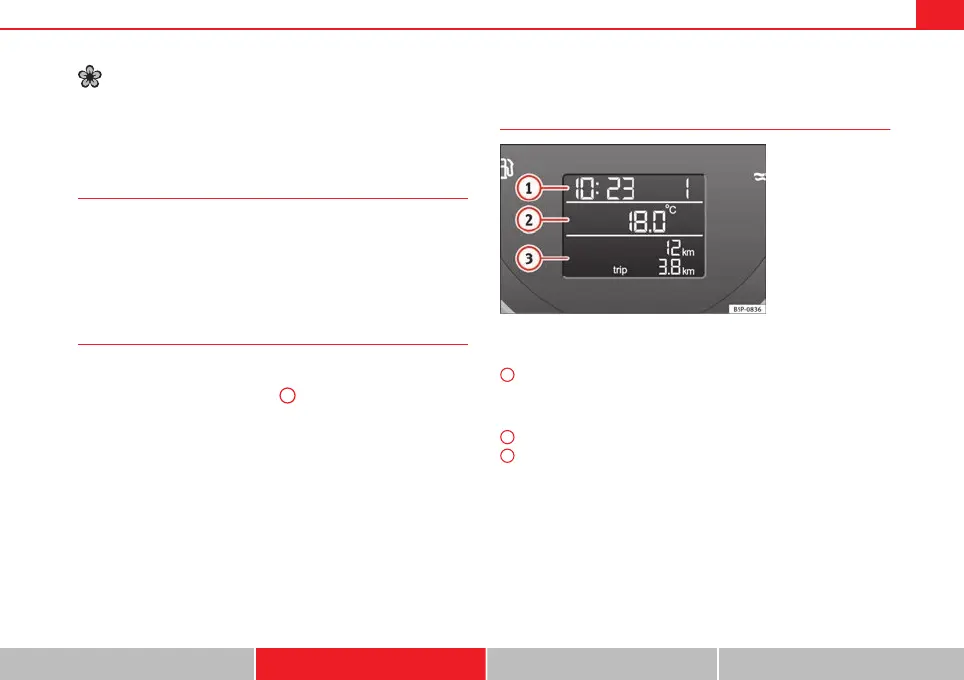
Digital instrument panel display
Display (without warning or information texts)
Fig. 38 Detailed view of
the instrument panel:
screen with different in-
dicators.
The display in the instrument panel shows, amongst other things, the time,
total distance and trip distance as well as the selector lever position.
Digital clock display ⇒ page 47. On the right of the display: Selector
lever position display for the automatic gearbox*. The current position
of the selector lever or the gear which is engaged (for tiptronic)* is
highlighted.
Outside temperature.
Odometer or flexible service interval display*.
1
2
3
Safety Operation Advice Technical specifications



 To Next Page