95Lights and visibility
Lights and visibility
Lights
Switching lights on and off
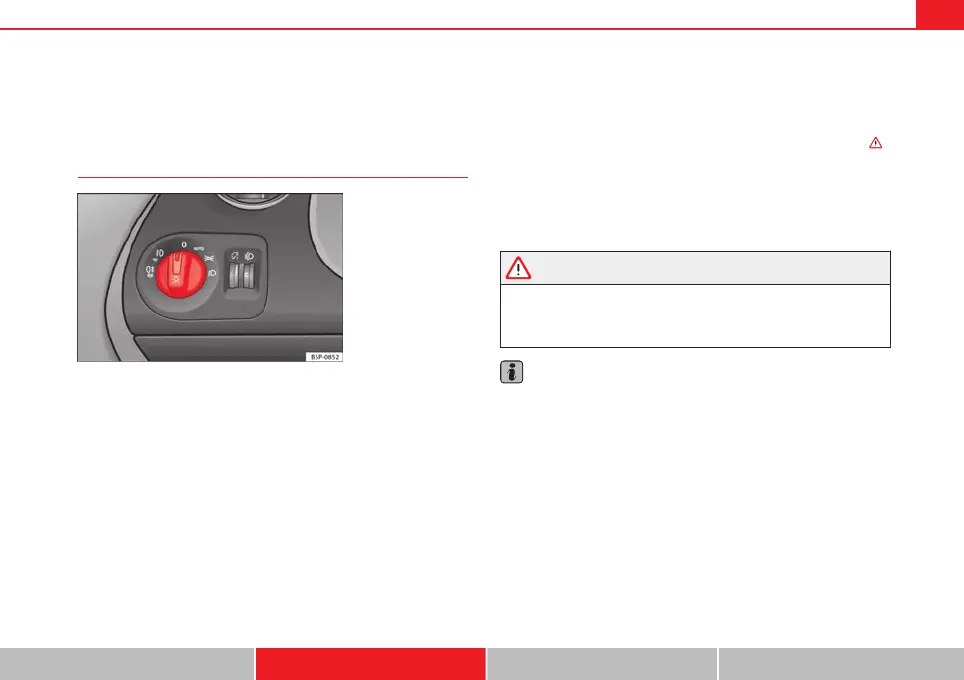
Fig. 68 Detailed view of
the dash panel: lights,
fog lights and rear fog
light switch.
Switching on the side lights
– Turn the light switch ⇒ Fig. 68 to position .
Switching on dipped beam headlights
– Turn the light switch to position .
Switching off the lights
– Turn the light switch to position 0.
Switching on front fog lights*
– Pull the switch out of position or to the first stop. The
symbol of the light control lights up.
Switching on the rear fog lights (vehicles with front fog lights)
– Pull the switch out of position or to the second stop ⇒
.
A control lamp lights up in the instrument panel.
Switching on the rear fog lights (vehicles with no front fog lights)
– Pull the light switch from position to the last stop. A control
lamp lights up in the instrument panel.
WARNING
Never drive with just the side lights on. Risk of accident. The side lights
are not bright enough to illuminate the road ahead and to ensure that
other road users are able to see you. Always use your dipped beam head-
lights if it is dark or if visibility is poor.
Note
● The dipped beam headlights will only work with the ignition on. The side
lights come on automatically when the ignition is turned off.
● If the lights are left on after the key has been taken out of the ignition
lock, an audible warning will sound while the driver door remains open. This
is a reminder to switch the lights off.
● The rear fog light is so bright that it can dazzle drivers behind you. You
should use the rear fog light only when visibility is very poor.
● If you are towing a trailer equipped with a rear fog light on a vehicle with
a factory-fitted towing bracket, the rear fog light on the vehicle will automat-
ically be switched off.
Safety Operation Advice Technical specifications



 To Next Page