52 Cockpit
6. To close the menu “Winter tyres”
– In the menu select Back.
The function “Winter tyres” sends an optical and an acoustic signal when
the vehicle reaches the set speed.
Example menu “Winter tyres”
In the menu
Winter tyres
Function
Name of menu displayed
X km/h The current set speed is displayed
or --- or dashes will be shown if the function is deactivated.
On / Off If the function is activated or deactivated
+10 km/h The set value increases by 10 km/h
-10 km/h The set value decreases by 10 km/h
Back The menu “Winter tyres” is closed and the last dis-
played menu is shown.
Note
For electronic and vehicle equipment one or more of these menus will be
displayed.
Main menu
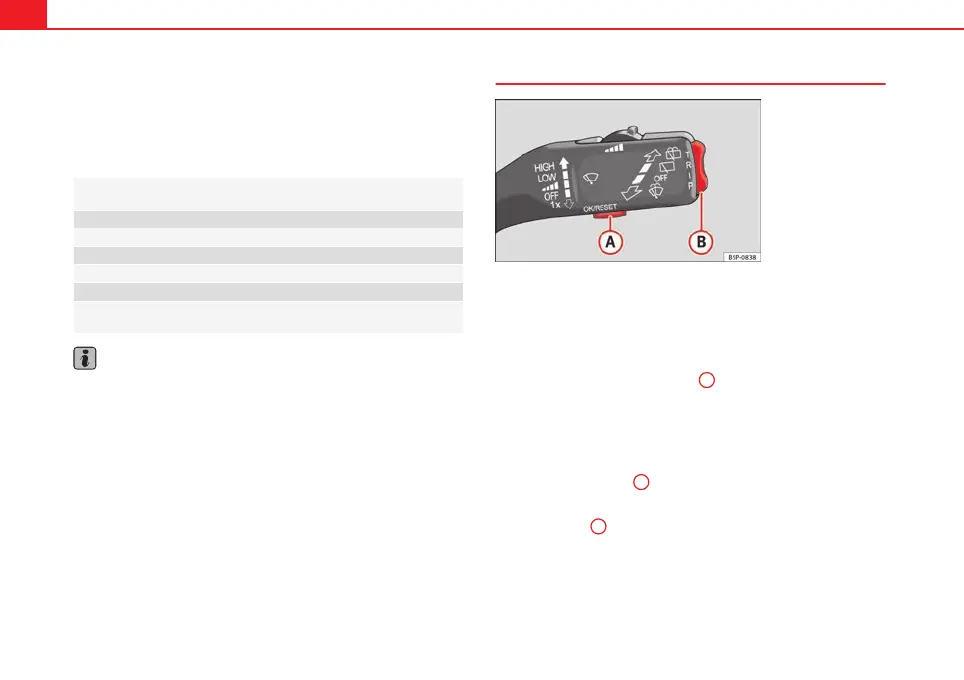
Fig. 43 Windscreen wip-
er lever: control buttons.
The menu provides access to the different display functions (only
with the MFI lever).
Open main menu
– Switch the ignition on.
– Press and hold the eject button
B
for 2 seconds. It may be nec-
essary to repeat this operation until the main menu is dis-
played.
Select a menu from the main menu
– To choose an option from the menu, press the upper or lower
end of rocker switch
B
. The selected option is displayed be-
tween two horizontal lines.
– Press button
A
to select the entry.
Example of menu use
⇒
page 51


 To Next Page