The essentials
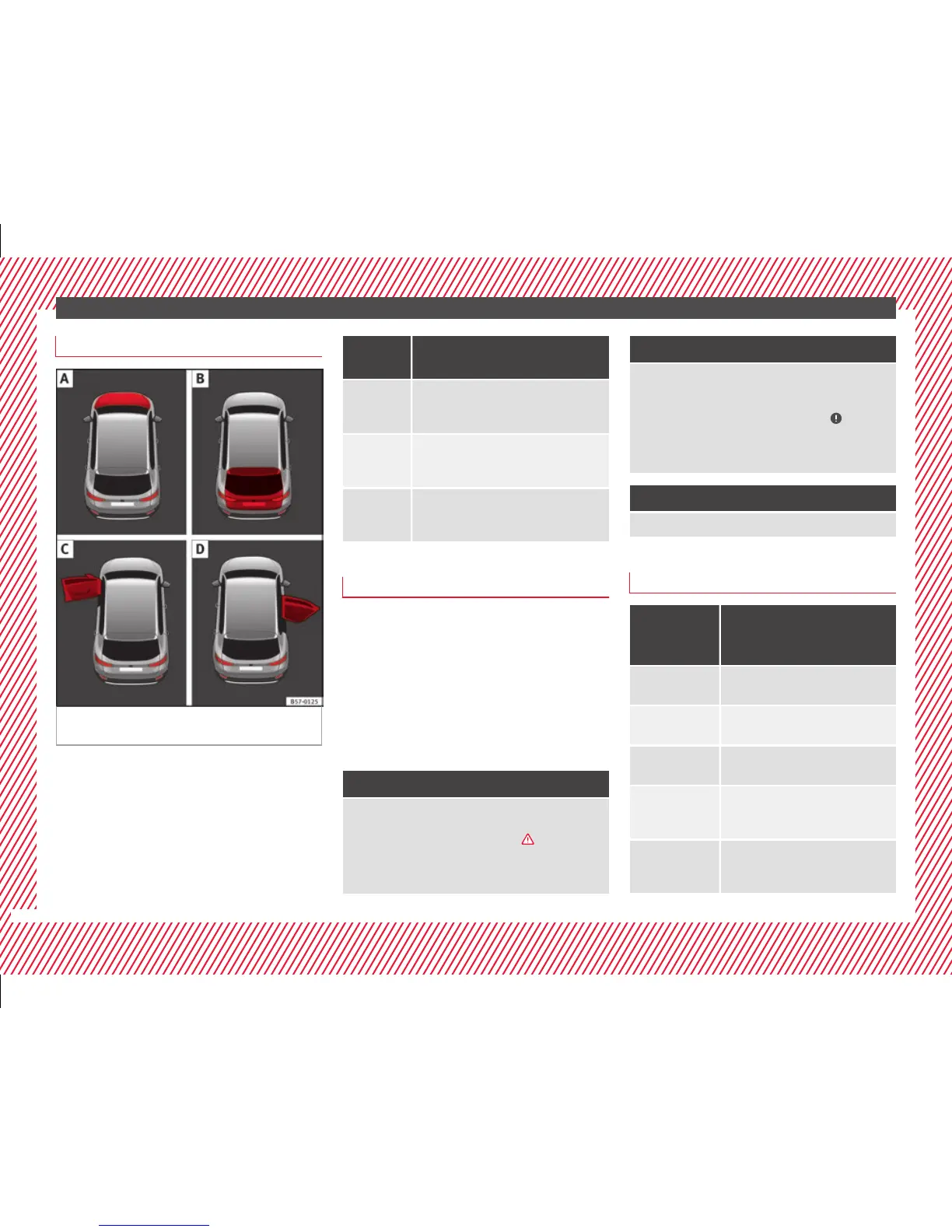
Bonnet, rear lid and doors open
Fig. 46 A: bonnet open; B: rear lid open; C:
fr
ont
left door open; D: right rear door open.
When the ignition is switched on or when
driv
in
g, the bonnet, rear lid or doors that are
open will be indicated on the instrument pan-
el display, and, as applicable, this will be in-
dicated audibly. The display may vary accord-
ing to the type of instrument panel fitted.
Illustra-
tion
Key to ››› Fig. 46
A
Do not continue driving!
The bonnet is open or is not properly
closed ››› page 282.
B
Do not continue driving!
The rear lid is open or is not properly
closed ››› page 123.
C, D
Do not continue driving!
A vehicle door is open or is not properly
closed ››› page 112.
Warning and information messages
The system runs a check on certain compo-
nents
and f
unctions when the ignition is
switched on and while the vehicle is moving.
Faults in the operation are displayed on the
screen using red and yellow symbols and
messages on the instrument panel display
(›››
page 106) and, in some cases, with
audible warnings. The display may vary ac-
cording to the type of instrument panel fitted.
Priority 1 warning (red symbols)
Symbol flashing or lit; partly combined with audible
warnings.
Stop the vehicle! It is dangerous ››› in Warning
and control lamps on page 107!
Check the function that is faulty and repair it. If necessa-
ry, request assistance from specialised personnel.
Priority 2 warning (yellow symbols)
Symbol flashing or lit; partly combined with audible
warnings.
A faulty function, or fluids which are below the correct
levels may cause damage to the vehicle! ›››
in Warn-
ing and control lamps on page 107
Check the faulty function as soon as possible. If neces-
sary, request assistance from specialised personnel.
Informative text
Information relating to different vehicle processes.
Submenu Assist systems
Assist
systems
menu
Function
ACC
Adaptive cruise control (ACC) dis-
play ››› page 197.
Front Assist
Switching the monitoring system on
and off ››› page 207.
Lane Assist*
Switching the Lane Assist system on
or off ››› page 215.
Detection of
traffic
signs
Display of traffic signs ››› page 228:
Fatigue de-
tection*
Switching the fatigue detection on
or off (pause recommendation)
››› page 231.
32



 To Next Page