The essentials
Ambient light*: light guide on door panel.
Lighting can be sel
ect
ed fr
om 8 possible col-
ours via the
menu and the SETTINGS
function butt
on.
›
›
› page 157
Windscreen wipers and window
wiper blade
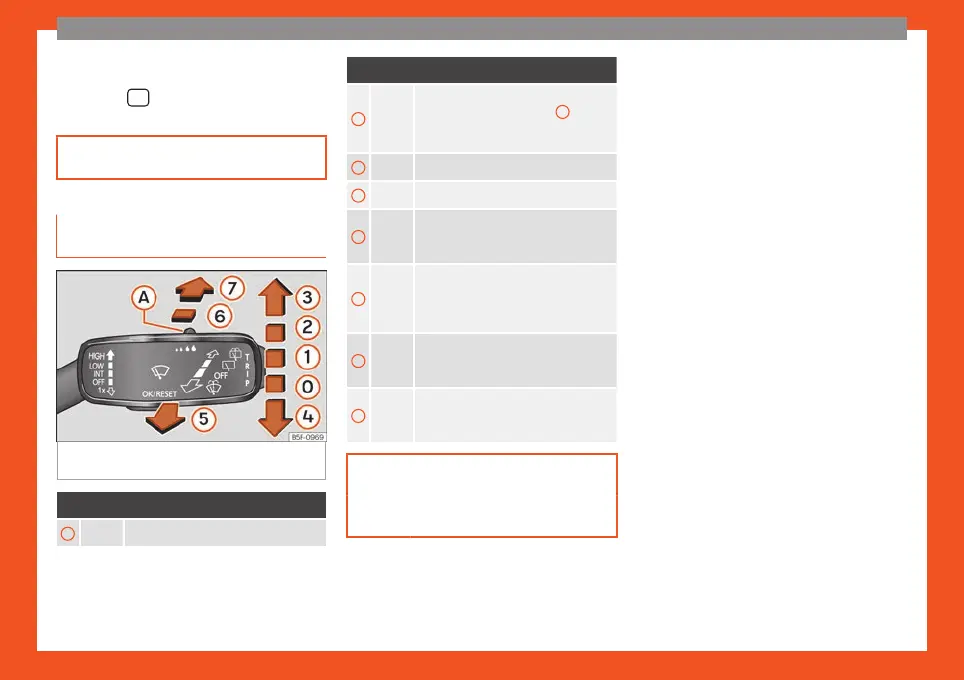
Fig. 48
Operating the windscreen wiper and
r
ear wiper
.
More the lever to the required position:
0
Windscreen wipers off.
More the lever to the required position:
1
Windscreen wipers interval wipe.
Using the control ››
› Fig. 48
A
adjust
the interval (vehicles without rain sen-
sor), or the sensitivity of the rain sensor.
2
Slow wipe.
3
Continuous wipe.
4
Short wipe. Brief press, short clean.
Hold the lever down for more time to in-
crease the wipe frequency.
5
Automatic wipe. The windscreen wash-
er function is activated by pushing the
l
ever forwards, and simultaneously the
windscreen wipers start.
6
Interval wipe for rear window. The wip-
er will wipe the window appro
ximately
every six seconds.
7
The rear window wash function is acti-
vated by pr
essing the lever, and the
rear wiper starts simultaneously.
››› page 158
››› page 62
35



 To Next Page