The Manufacturer will repair or replace this
product, or any part of this product, free of
charge on the following conditions:
• The product is shown within 1 year of its purchase
to have failed to perform its normal function.
• The failure can be shown to result from defective
workmanship or materials, including working parts.
• The claim under this Guarantee is supported by proof
of purchase in the form of a written or printed receipt.
• The product is returned carriage paid to the
manufacturer.
• The product has been packed for transit to the
manufacturer with sufficient care to avoid all
reasonably foreseeable damage or loss.
THE GUARANTEE DOES NOT APPLY:
If the product has been opened or taken apart other
than by a repairer authorised by the manufacturer;
or if the product has been used for any purpose other
than domestic use; nor for cosmetic deterioration
resulting from fair wear and tear (including the
natural ageing of constituent materials).
This Guarantee is additional to the consumer’s legal
rights and does not affect those rights in any way in
relation to a faulty product or a product that is not as
described. Advice about your legal rights is available
from your local Citizens Advice Bureau or Trading
Standards Office.
In the unlikely event that you experience any
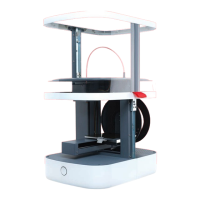
problems with your Vector 3 printer please contact:
3Dprinter@eaglemoss-service.com
DATA BASE FACTORY
Unit 4, Pullman Way,
Pullman Business Park,
Ringwood, Hampshire, BH24 1HD
Manufacturer:
KIA SCIENCE AND TECHNOLOGY
CORPORATION LTD
5th Street, Kanghua Road
Qiaochang, Tongqiao Township
Zhongkai High-Tech District
Huizhou City, Guangdong Province, China
©EaglemossLtd2015
warranty
ABS: Acrylonitrile butadiene
styrene is a recyclable plastic,
an alternative to PLA.
BUILD PLATE: The acrylic
surface on which the V3 builds
up an object.
BUILD PLATFORM: The
support for the build plate.
DRIVE GEAR: The gear that
drives the filament into the
extruder.
EXTRUDER: The assembly
that melts filament and pushes
it through the nozzle onto the
build plate.
EXTRUDER FAN: The fan
that automatically cuts in to
keep the motor assembly cool
and disperse heat from the
heat sink.
GANTRY: The fixed metal
frame supporting the extruder
assembly and moving parts.
HEAT SINK: The component
that dissipates heat from the
nozzle heater.
MOTOR ASSEMBLY: The
motor and the drive gear that
push filament into the
extruder.
NOZZLE: The opening at the
end of the extruder, from
which heated filament
emerges onto the build plate.
PLA: Polylactic acid is a
renewable bioplastic, the
source material for the
filament supplied with your V3.
REEL HOLDER: Ensures that
filament is fed evenly to the
extruder.
SD CARD: The Secure Digital
memory card, which can store
digital data and be read by
the V3 printer.
SLICING: The process of
turning a 3D model into
instructions for your V3.
STL: Standard Tessellation
Language – a universal file
format used for creating 3D
models.
USB CABLE: The cable that
allows the V3 to communicate
with a computer using the
computer’s USB interface.
3d glossary
220V~240V 50–60 Hz (UK / EU / AUS)
100V~110V 50–60 Hz (JPN / USA)
Factory Model: STR Version 1.0
Warning – hazardous moving parts.
Keep fingers and other body parts away.
Warning – hot surface. Do not touch.
See installation instructions before
connecting to the supply.
Vector 3 faQs
Is the support material easy to
remove from a model?
Supportstrutsareattachedtothemodelsatpinpointsandfor
easyremoval.Somemodelsmayrequiregreaterpost-production
andnishingtoachievethedesiredresult.
What is the difference between
ABS and PLA plastic?
PLAisarigidliquidformulatedtobebiodegradable.Ithasa
glossy-lookingnish.ABSisacrystallisedliquidandisfully
recyclable.ABSismoreexiblethanPLAandlesslikelytosnap
understress.Thetwomaterialshavedifferentmeltingpoints.
I don’t know how to design yet;
can I still find objects to print?
Yes,absolutely.Thereisalargecommunityofdesignerswho
sharelesonline.Thesecanbedownloadedandimportedinto
the3DCreate&Printsoftware.
What software settings should
I use for the printer?
Thesoftwarecomeswiththeoptimumsettingsforprintingin
PLAasadefault.IfyouwishtoswitchtoABS,pleasefollowthe
instructionsinthefull-lengthguide.
A full-length guide is available as a PDF from www.3dprinter-collection.com.
Please download and consult this full-length guide for further information on
your printer and additional guidance on its use.
important data
Thenalcompleteversionmaydifferfromthephotographs–pleaseseewww.3dprinter-collection.com


 To Previous Page
 Loading...