9
5. loading & eXtruding filament
3
2i
4
5
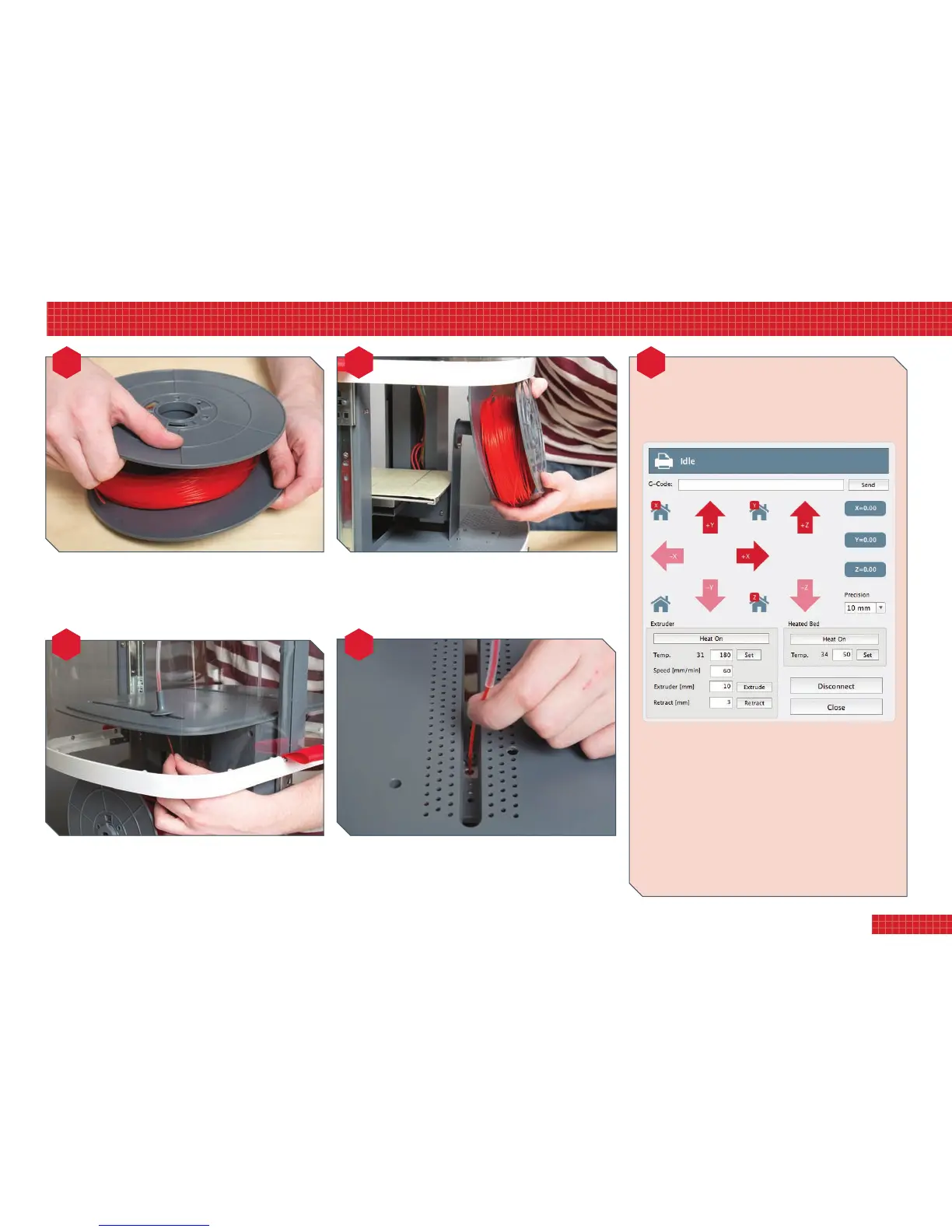
Withthehoodlockedintheraisedposition,easethespool
ontothesupportarm.Itdoesnotmatterwhichwayroundyou
attachit:thefreeendcanrisetoleftorright.Butcheckthe
lamentiswoundfreelyonthespoolandnottangled.
Twist-lockthespoolcentreontoonespoolside.Fixwiththree
screws.Removethelamentrollfromitsplasticwrapperand
layitoverthespoolcentre,thenlockandscrewthesecond
sideintoplace.Nowsnipthecabletiefromthelamentroll.
Feedthefreeendupthroughtheguideinthelid.Attachthe
guidetubetotheguideandfeedlamentintoituntilabout
5cmprotrudesfromtheotherend.Usingscissors,sniptheend
offthelamentatanangle,tosharpenthetip.
Feedthelamentintotheprinthead.Afterextrudinglament
(seeright),push-ttheguidetubeendintoplace.Finally,
lowerthehood,andgointoCong/PrinterSettingsto
unchecktheboxmarkedDisableHoodSafetySwitch.
Beforeprintingforthersttime,yourprintheadmustbe
primedwithlament.Thisstepneednotberepeated
(exceptwhenyouchangelaments).
• Select Manual Printer Control.
• Click the Heat On button (see image above). Once the
nozzle has heated to the indicated working temperature,
click the Extrude button. A length of filament will ooze
from the nozzle. Dispose of this.
• Repeat this operation once or twice as necessary, until you
see the filament coming through the nozzle.
TIP: If nozzle does not extrude, you may need to temporarily
unplug the guide tube and apply a little pressure on the
filament from above until it engages with the drive gear.
eXtruding filament


 To Next Page