Configuration • 91
17-10-07-653-100_01-2020B
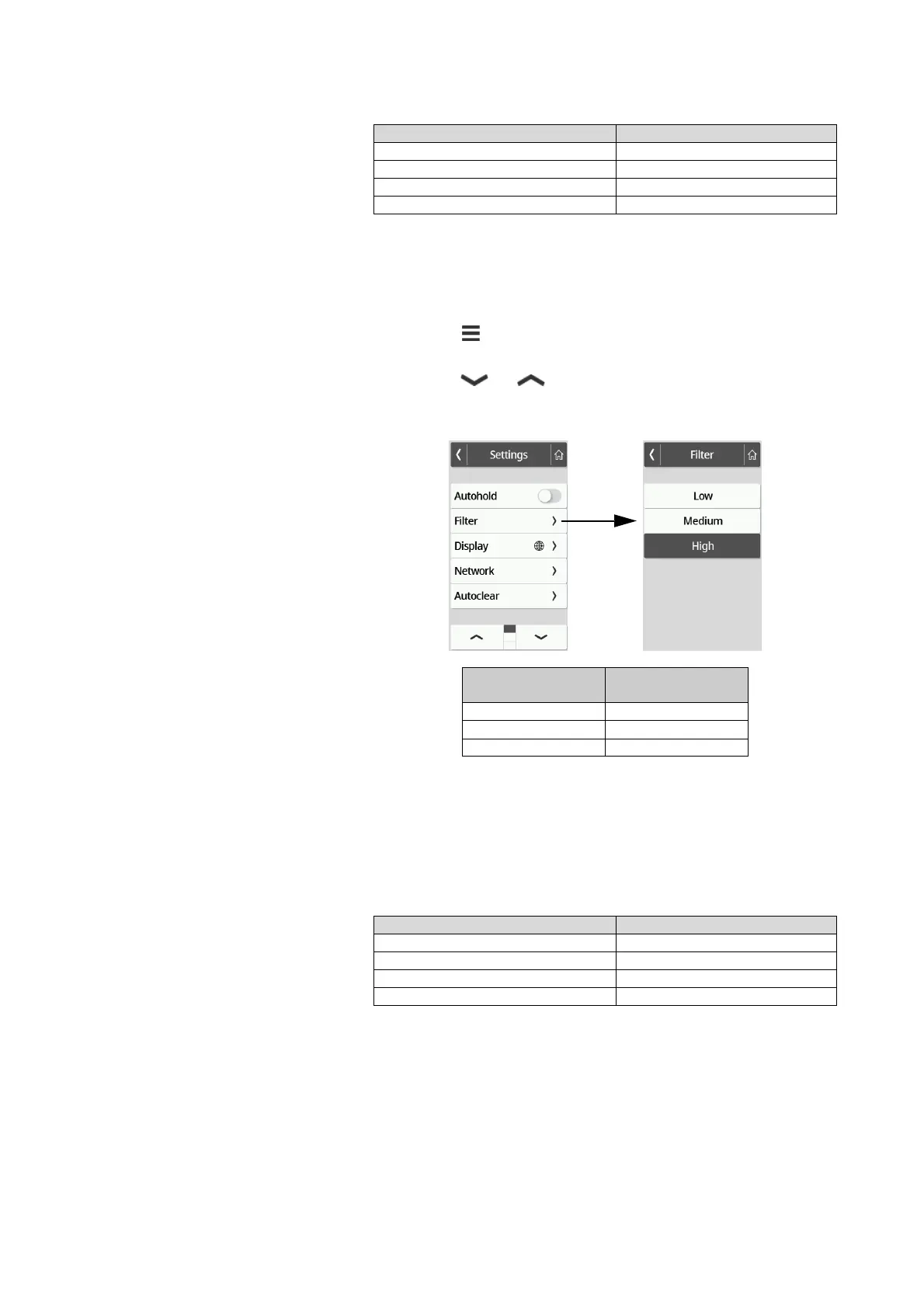
Setting filter
The Filter function can be used to avoid interferences during weight determi-
nation. The selected setting has the following influences on measurements
with the Hold/Autohold function activated:
• Sensitivity with which the weight display reacts to patient movements
• Period of time until a weight value is displayed permanently.
1. Press the key.
The Settings menu is displayed.
2. Press the or key until the Filter menu item is displayed.
3. Press the Filter item.
The current setting is displayed.
4. Press the desired filter level.
The setting is active.
NOTE
With the Low setting, it may occur that no weight value is displayed
permanently despite the activated Hold function in the case of
patients who are not very steady on their feet.
Selecting BMI/BSA/Waist circumf.
You can specify whether the device calculates the Body Mass Index (BMI) or
the Body Surface Area (BSA) as soon as the patient's weight and height are
available.
The device can also be set so that the waist circumference (Waist circumf.)
can be entered manually.
Device mode Available
Basic –
Advanced •
Expert •
Service •
Filter
Weight
determination
Low Fast
Medium Medium
High Slow
Device mode Function available
Basic –
Advanced –
Expert •
Service •



 To Next Page