Configuration • 93
17-10-07-653-100_01-2020B
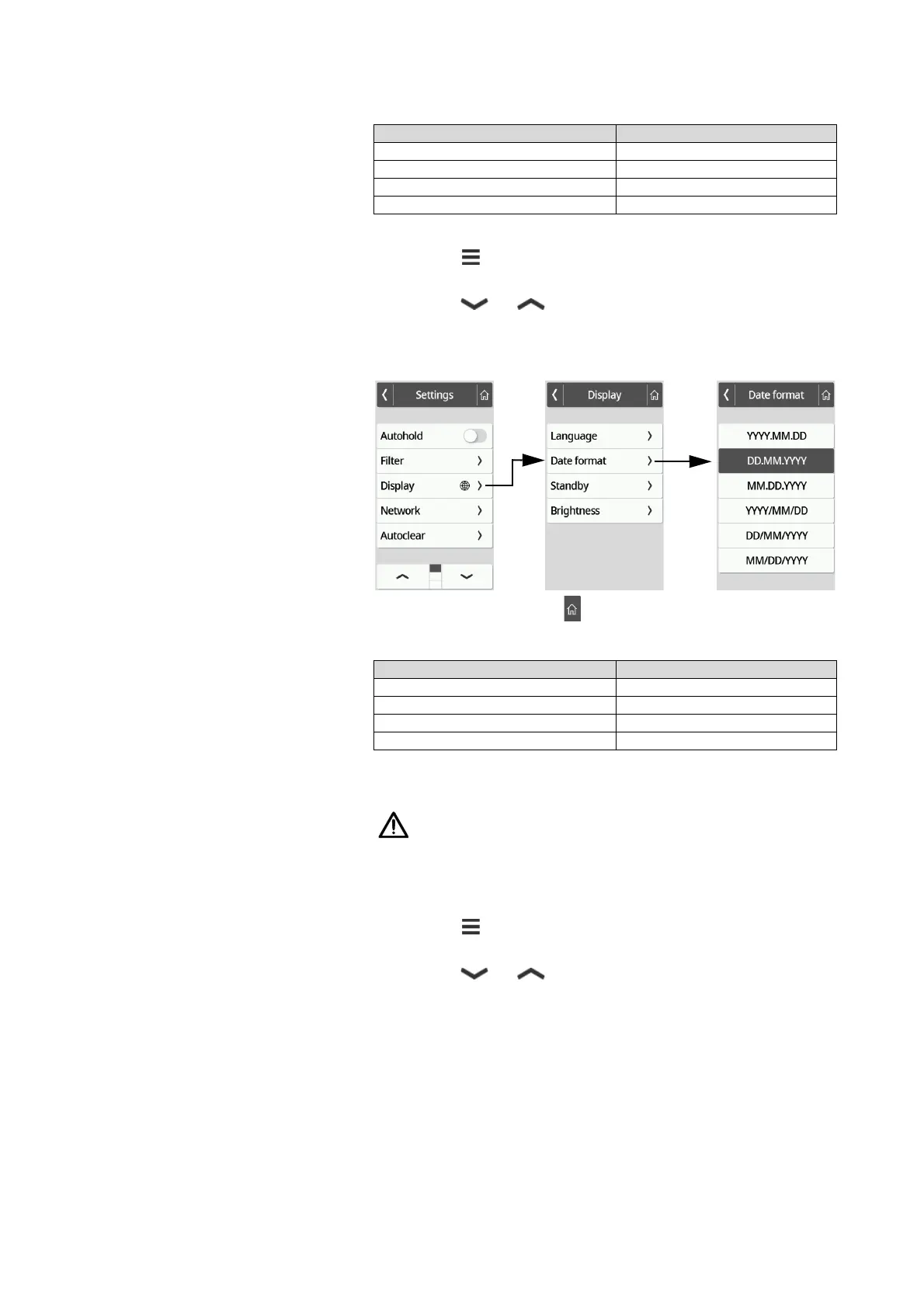
Setting the date format
The format in which the patient's date of birth is displayed can be set.
1. Press the key.
The Settings menu is displayed.
2. Press the or key until the Display menu item is displayed.
3. In the Display menu, select the Date format item.
4. Press the desired date format.
The setting is active.
5. To exit the menu, press the key.
Setting the standby time
The period of time after which the multifunctional display goes off (standby)
can be set.
WARNING!
Electric shock
The device is not de-energized when the display goes off.
► The device is not equipped with an on/off switch. Remove the
power supply connector if the device has to be de-energized, e.g.
for hygiene processing or maintenance work.
1. Press the key.
The Settings menu is displayed.
2. Press the or key until the Display menu item is displayed.
3. In the Display menu, select the Standby item.
Device mode Function available
Basic –
Advanced •
Expert •
Service •
Device mode Function available
Basic –
Advanced •
Expert •
Service •



 To Next Page