English
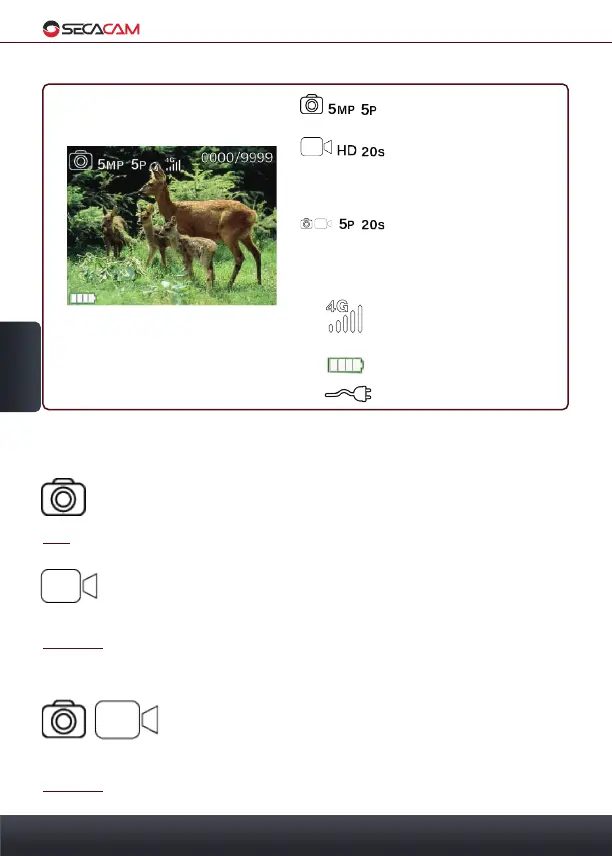
Statusinformation on Display
Camera is shooting 5
photos with 5 MP
A video of 20 seconds in
720p is being recorded.
If both icons are active,
the camera first takes the
pre-selected amount of
photos, then records the
pre-selected length of
video.
The camera is logged into
the 4G net with strong
reception
Internal energy supply
external energy supply
5. Menu
50
5. Menu
5.1 Cam Mode
There are three recording options to choose from:
Photo: The camera records images corresponding to the settings in
"Multi Shot" and "Image Size"
Tip: For mobile use, we recommend the photo mode.
Video: (This option is only usable with the mobile function
switched off) Videos are recorded corresponding to the settings in
"Video size" and "Video length"
Caution: Videos are too big to be send and will only be saved on the memory
card!
Photo+Video: If the camera is set to this mode it first
shoots one or more photos which are then followed by a
video. The number of photos or the video length depend on
the settings in "Multi shot" and in "Video length".
Caution: With this mode, the mobile transmission of pictures can be delayed
due to the time the video takes to be saved on the SD-card.


 To Next Page