EasyManua.ls Logo

Seccua UrSpring - Using the UrSpring; 2.1 User Interface

Seccua UrSpring
108 pages
Print Icon
To Next Page IconTo Next Page
To Previous Page IconTo Previous Page
Loading...
2. Using the UrSpring
2.1 User interface
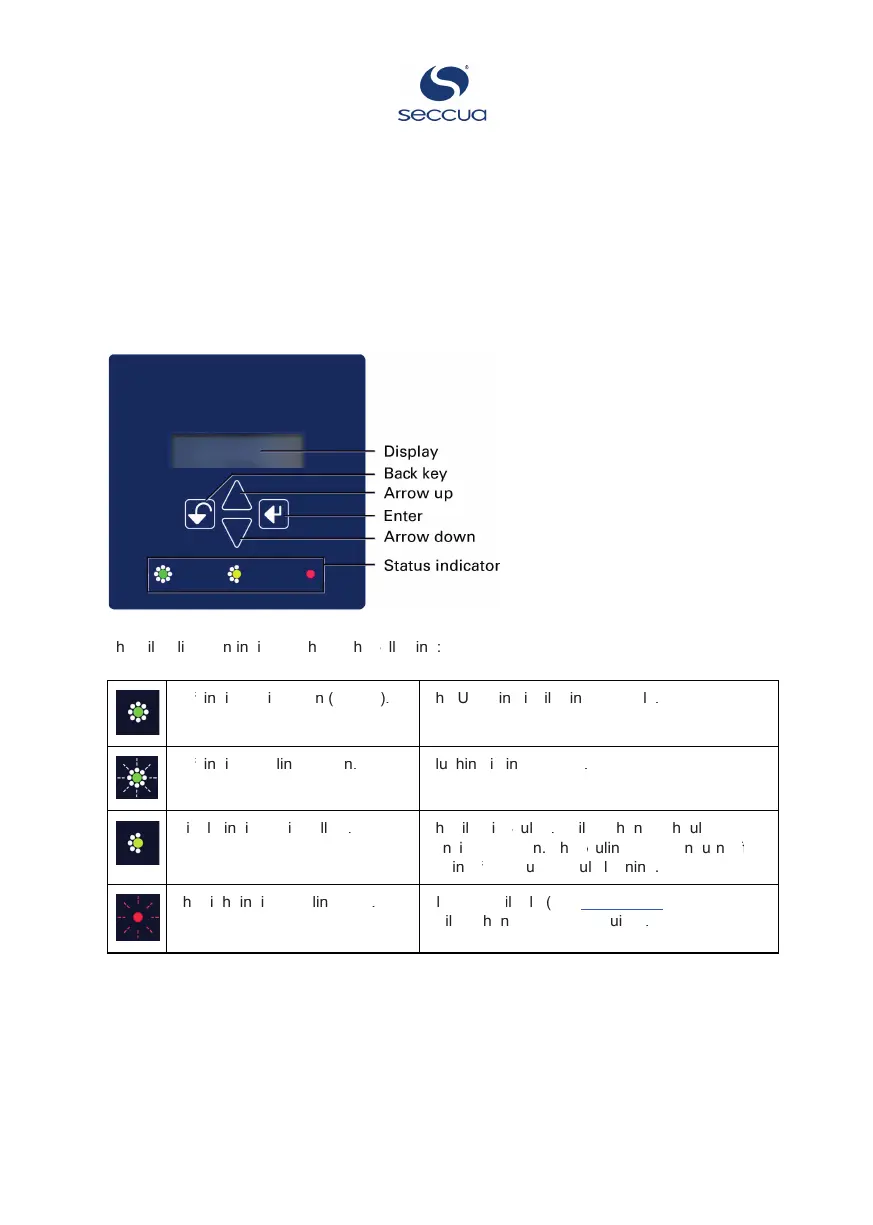
The UrSpring user interface on the control unit is shown in the image below.
T
h
e
F
i
l
t
e
r
l
i
f
e
s
p
a
n
i
n
d
i
c
a
t
o
r
s
h
o
w
s
t
h
e
f
o
fo
f
l
l
o
w
i
n
g
:
L
e
f
t
ft
f
i
n
d
i
c
a
t
o
r
i
s
g
r
e
e
n
(
s
t
e
a
d
y
)
.
T
h
e
U
r
S
p
r
i
n
g
i
s
f
i
l
t
e
r
i
n
g
c
o
r
r
e
c
t
l
y
.
L
e
f
t
ft
f
i
n
d
i
c
a
t
o
r
b
l
i
n
k
s
g
r
e
e
n
.
F
l
u
s
h
i
n
g
i
s
i
n
p
r
o
g
r
e
s
s
.
M
i
d
d
l
e
i
n
d
i
c
a
t
o
r
i
s
y
e
l
l
o
w
.
T
h
e
f
i
l
t
e
r
i
s
f
o
fo
f
u
l
e
d
.
A
f
i
l
t
e
r
c
h
a
n
g
e
s
h
o
u
l
d
b
e
c
o
n
s
i
d
e
r
e
d
s
o
o
n
.
T
h
e
f
o
fo
f
u
l
i
n
g
L
E
D
c
a
n
t
u
r
n
o
f
f
ff
f
a
g
a
i
n
a
f
t
ft
f
e
r
a
s
u
c
c
e
s
s
f
u
l
c
l
e
a
n
i
n
g
.
T
h
e
r
i
g
h
t
i
n
d
i
c
a
t
o
r
b
l
i
n
k
s
r
e
d
.
A
l
a
r
m
s
a
v
a
i
l
a
b
l
e
(
s
e
e
Error codes).
A
f
i
l
t
e
r
c
h
a
n
g
e
m
a
y
b
e
r
e
q
u
i
r
e
d
.
P
a
g
e
9
/
5
0

Table of Contents