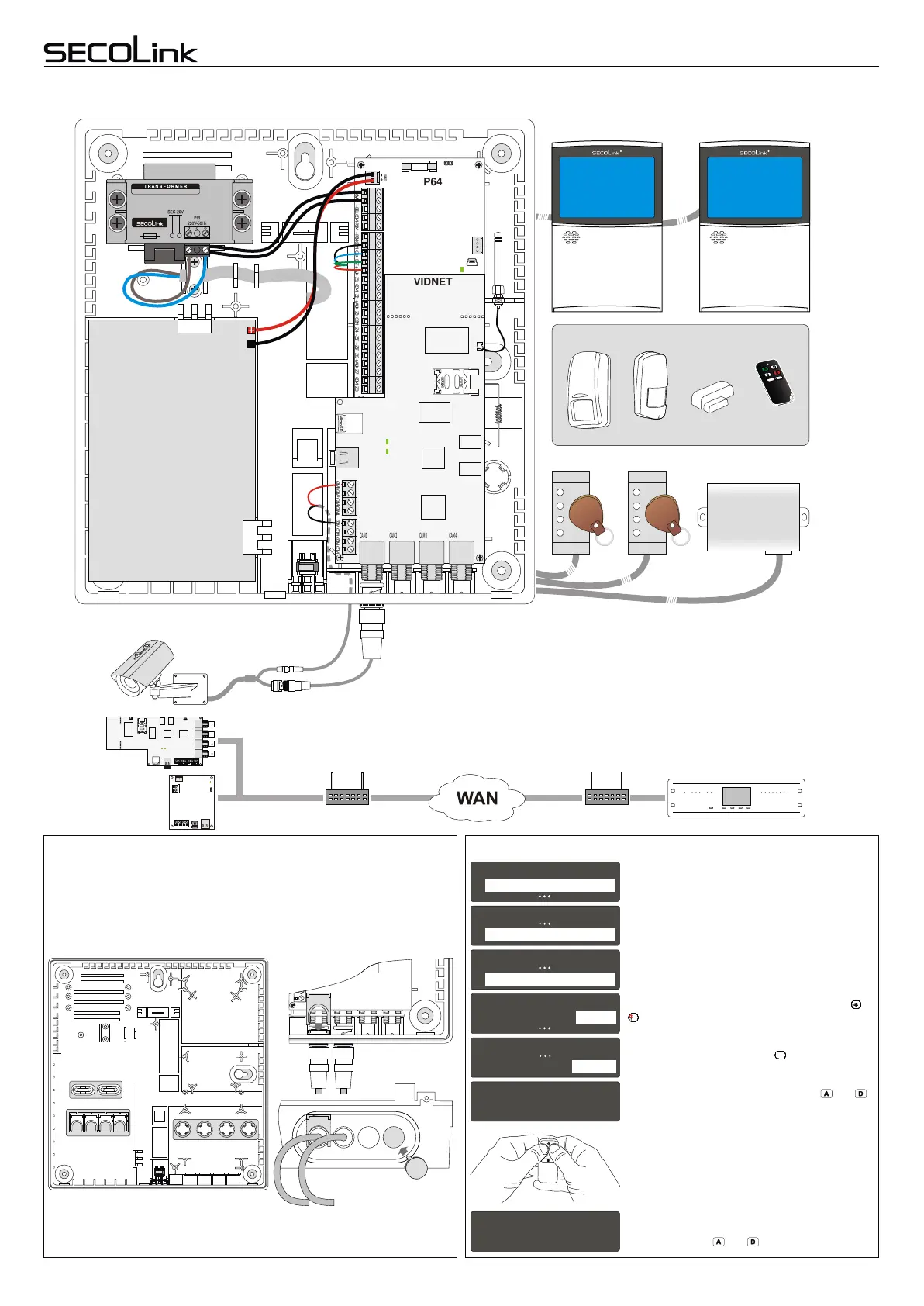
Typical system installation example - SECOLINK P64
Plastic cabinet CAS6 has few plastic components for power cable fastening,
video cable locking, and bottom covers, when video module VIDNET is not being
used. Locate plastic components in the bottom of the plastic cabinet and cut them
with a cutter.
Safety warning in case the alarm system uses LAN800 or VIDNET modules!
LAN800 and VIDNET are designed to be used together with a router which is placed in the same room or premises. It’s
prohibited to connect LAN800 or VIDNET directly to Wide Area Network (MAN, WAN) or building IT infrastructure cables.
RouterRouter
Plastic components Assigning a remote control unit to the user
OPENOPEN
LOCKLOCK
CAM2 CAM3 CAM4 COM COM COMCAM1 COM
CAM1 CAM2 CAM3 CAM4
+12V
COM
CLK
DAT
+12V
COM
CLK
DAT
RING TIP
LAN800
VIDNET
Receiver
Cover
Video cable
locking
component
Covers
CAM2 CAM3 CAM4
Typical system installation example - SECOLINK P64
Plastic cabinet CAS6 has few plastic components for power cable fastening,
video cable locking, and bottom covers, when video module VIDNET is not being
used. Locate plastic components in the bottom of the plastic cabinet and cut them
with a cutter.
Safety warning in case the alarm system uses LAN800 or VIDNET modules!
LAN800 and VIDNET are designed to be used together with a router which is placed in the same room or premises. It’s
prohibited to connect LAN800 or VIDNET directly to Wide Area Network (MAN, WAN) or building IT infrastructure cables.
RouterRouter
Plastic components Assigning a remote control unit to the user
OPENOPEN
LOCKLOCK
CAM2 CAM3 CAM4 COM CO M COMCAM1 COM
CAM1 CAM2 CAM3 CAM4
+12V
COM
CLK
DAT
+12V
COM
CLK
DAT
RING TIP
LAN800
VIDNET
Receiver
Cover
Video cable
locking
component
Covers
CAM2 CAM3 CAM4
COM
Typical system installation example - SECOLINK P64
Plastic cabinet CAS6 has few plastic components for power cable fastening,
video cable locking, and bottom covers, when video module VIDNET is not being
used. Locate plastic components in the bottom of the plastic cabinet and cut them
with a cutter.
Safety warning in case the alarm system uses LAN800 or VIDNET modules!
LAN800 and VIDNET are designed to be used together with a router which is placed in the same room or premises. It’s
prohibited to connect LAN800 or VIDNET directly to Wide Area Network (MAN, WAN) or building IT infrastructure cables.
RouterRouter
Plastic components Assigning a remote control unit to the user
OPENOPEN
LOCKLOCK
CAM2 CAM3 CAM4 COM CO M COMCAM1 COM
CAM1 CAM2 CAM3 CAM4
+12V
COM
CLK
DAT
+12V
COM
CLK
DAT
RING TIP
LAN800
VIDNET
Receiver
Cover
Video cable
locking
component
Covers
CAM2 CAM3 CAM4
COM
Locking
component
BAT
CLK DAT +AUX Z1 COM Z2 +AUX Z3 COM Z4 -Z5F +Z5F Z6 +AUX Z7 COM Z820VAC COM -PGM +PGM+BELL COM
OPENOPEN
LOCKLOCK
CAM1 CAM2 CAM3 CAM4
P64
VIDNET
PROX8 PROX8
KM24GKM24G
+12V
COM
CLK
DAT
+12V COM CLK DAT
Module LED
EXM800
CAM1 CAM2 CAM3 CAM4 COM COM COMCOM
Typical system installation example - SECOLINK P64
Plastic cabinet CAS6 has few plastic components for power cable fastening,
video cable locking, and bottom covers, when video module VIDNET is not being
used. Locate plastic components in the bottom of the plastic cabinet and cut them
with a cutter.
Safety warning in case the alarm system uses LAN800 or VIDNET modules!
LAN800 and VIDNET are designed to be used together with a router which is placed in the same room or premises. It’s
prohibited to connect LAN800 or VIDNET directly to Wide Area Network (MAN, WAN) or building IT infrastructure cables.
RouterRouter
Plastic components Assigning a remote control unit to the user
OPENOPEN
LOCKLOCK
CAM2 CAM3 CAM4 COM COM COMCAM1 COM
CAM1 CAM2 CAM3 CAM4
+12V
COM
CLK
DAT
+12V
COM
CLK
DAT
RING TIP
LAN800
VIDNET
Receiver
Cover
Video cable
locking
component
Covers
CAM2 CAM3 CAM4
COM
Locking
component
BAT
CLK DAT +AUX Z1 COM Z2 +AUX Z3 COM Z4 -Z5F +Z5F Z6 +AUX Z7 COM Z820VAC COM -PGM +PGM+BELL COM
OPENOPEN
LOCKLOCK
CAM1 CAM2 CAM3 CAM4
P64
VIDNET
PROX8 PROX8
KM24GKM24G
+12V
COM
CLK
DAT
+12V COM CLK DAT
Module LED
EXM800
CAM1 CAM2 CAM3 CAM4 COM COM COMCOM
Typical system installation example - SECOLINK P64
Plastic cabinet CAS6 has few plastic components for power cable fastening,
video cable locking, and bottom covers, when video module VIDNET is not being
used. Locate plastic components in the bottom of the plastic cabinet and cut them
with a cutter.
Safety warning in case the alarm system uses LAN800 or VIDNET modules!
LAN800 and VIDNET are designed to be used together with a router which is placed in the same room or premises. It’s
prohibited to connect LAN800 or VIDNET directly to Wide Area Network (MAN, WAN) or building IT infrastructure cables.
RouterRouter
Plastic components Assigning a remote control unit to the user
OPENOPEN
LOCKLOCK
CAM2 CAM3 CAM4 COM COM COMCAM1 COM
CAM1 CAM2 CAM3 CAM4
+12V
COM
CLK
DAT
+12V
COM
CLK
DAT
RING TIP
LAN800
VIDNET
Receiver
Cover
Video cable
locking
component
Covers
CAM2 CAM3 CAM4
COM
Locking
component
BAT
CLK DAT +AUX Z1 COM Z2 +AUX Z3 COM Z4 -Z5F +Z5F Z6 +AUX Z7 COM Z820VAC COM -PGM +PGM+BELL COM
OPENOPEN
LOCKLOCK
CAM1 CAM2 CAM3 CAM4
P64
VIDNET
PROX8 PROX8
KM24GKM24G
+12V
COM
CLK
DAT
+12V COM CLK DAT
Module LED
EXM800
CAM1 CAM2 CAM3 CAM4 COM COM COMCOM
Video jungties
fiksatoriai
12V battery
7Ah/20HR
Analog camera (resolution D1)
Power cable
fastening
component
Simultaneously hold down the buttons and .
Message Done should appear on keypad's LCD
when remote control unit is enrolled succesfully.
Release buttons and .
Advance to the next user with keypad keys or
.
7
PQRS
7
PQRS
7
PQRS
7
PQRS
7
PQRS
7
PQRS
7
PQRS
7
PQRS
7
PQRS
7
PQRS
7
PQRS
Choose New RCU and press .
ENTENTENTENTENTENTENTENTENTENTENT
11
Main Menu
Settings
22
22
Settings
Users
Users
Edit users
U01 User 01
Controls
New RCU
66
Waiting ...
Done
U01 User 01
Name
User 01
11
Page 7
Intruder alarm system
Wiring manual
Control Panels P16, P32, P64
BK1, BK2,
BK3, BK4,
BV3, BT1
LT5
BP1 BP2


 To Next Page