BK1
BK4
Use Supports Wireless detector loop (zone) ID number
Built-in reed switch
(used in conjunction
with a magnet)
200
255
Normally closed
circuit contact loop
wired to ...
Roller detector
loop wired to ...
Vibration detector
loop wired to ...
BK3
BK2**
BK4
210
211
111
Input 1
Input 1
220
221
121
Input 2
Input 2
230
231
131
Input 3
Input 3
212 222 232
213 223 233
215 225 235
217 227 237
219
...
119
229
...
129
239
...
139
Zone response (speed) time of 0,4 sec.
211 - last digit defines the number of Roller pulses.
111 - last digit x 10 defines the zone response (speed)
time (example: 1 x 10 = 10 msec).
Built-in
temperature
sensor
BT1
BK3
BK2**
BV3
BK4
Input 1 Input 2 Input 3
BV3
Delete detector
in particular zone
Delete all
detectors
in particular
wireless module
All
All
201
254
Wireless detector loop (zone) enrolling ID numbers
BP1
BP2
Passive infrared
sensor
(PIR sensor)
180
Built-in
temperature
sensor
Wireless
input/output device
181
BP1
BP2
BS100
102 - last digit defines the PGM output number in the
module. Use this digit to program PGM output
address MA_P, where MA is a module address in the
system and P is a PGM output number in the module.
102
103
104
105
Any not used in
the module
SECOLINK wireless detectors
11
Service mode
System setup
Enable wireless zone by changing Not used
loop type to any other loop type. If the system
uses a keypad produced before 2014, an
installer is obliged to change the loop type to
NO/DEOL or Vibration.
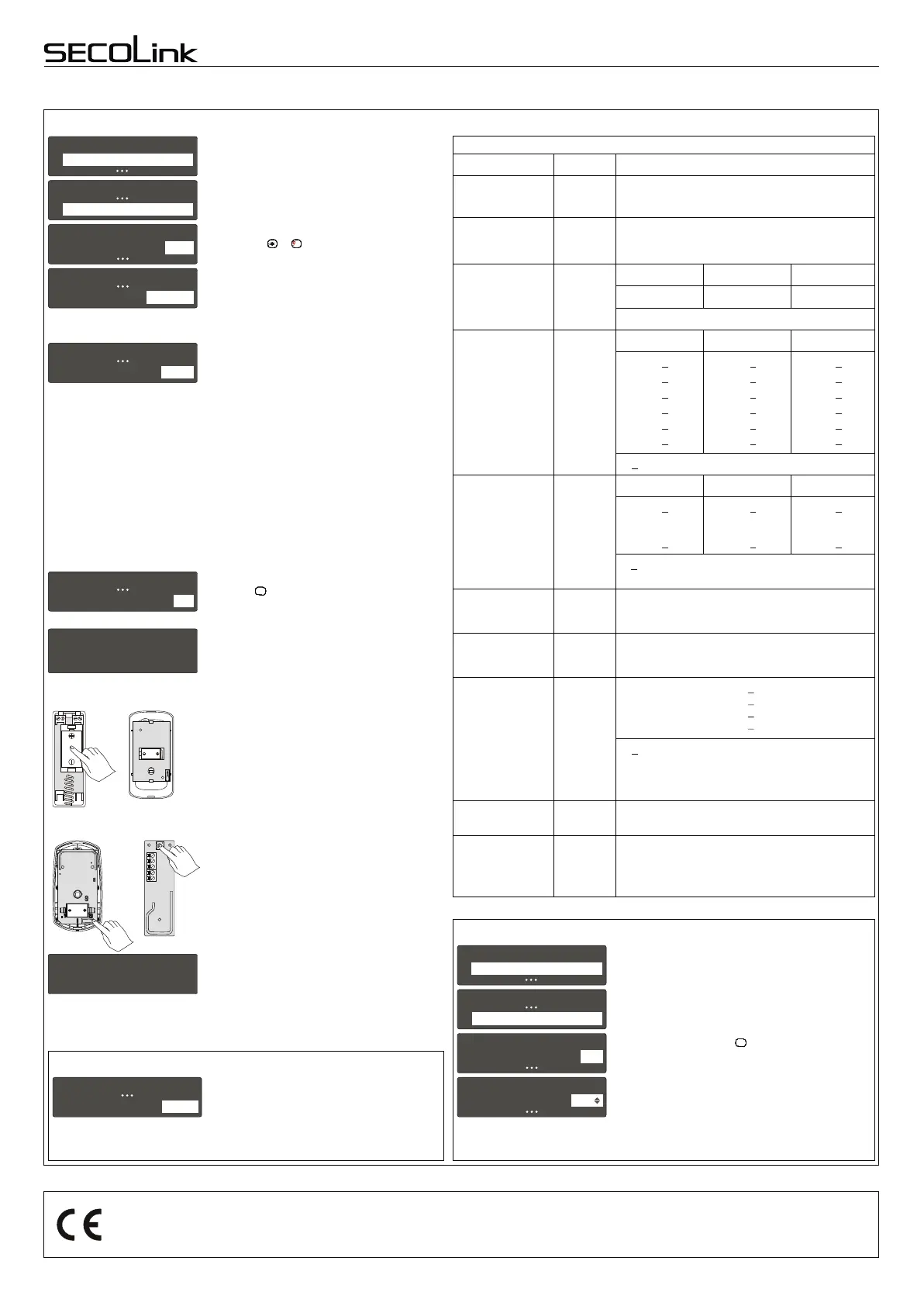
Advance to the next unlearned zone with
keypad keys or .
7
PQRS
7
PQRS
7
PQRS
7
PQRS
7
PQRS
7
PQRS
7
PQRS
7
PQRS
7
PQRS
7
PQRS
7
PQRS
11
Z01 Door
Name
Door
33
System setup
Zones
Z01 Door
Loop type
NO/DEOL
33
Z01 DoorZ01 Door
WL det. loop (zone) ID WL det. loop (zone) ID 201
44
Z01 Door
Address
06_1
33
Enter zone address MA_Z, where MA is a
module address in the system and Z is a zone
number in the module.
Note: for wireless zones MA_1 – MA_8, the
system will automatically assign NO/DEOL loop
type and for wireless zones MA_9 – MA_16 the
Vibration loop type. Don't change the loop type
of the zone!
Module address:
EXT116S - address is 06 (default) or one that
is given during the registration.
Virtual module EXT116S address depends on
control panel's type:
P16 - address 12;
P32 - address 12 and 13;
P64 - address 12, 13, 14 and 15.
Enter wireless detector loop (zone) ID number
and press key to start enrolling. This field can
also be used to delete the sensor from the
module.
ENTENTENTENTENTENTENTENTENTENTENT
Immediately after the enrollment has started
press the tamper switch for a short period of time
(~ 1 sec).
BKx, BT1, BV3: press the detector battery as
shown in the picture until you will feel a click.
This action activates the tamper switch on the
back side of the detector.
BP1, BP2: press the tamper switch as shown
in the picture until you will feel a click.
BS100: press the tamper button as shown in
the picture until you will feel a click.
Waiting for
WL detector
Done
If the wireless detector has successfully
enrolled, message Done will appear on a
screen. No additional transmissions are needed
for confirmation.
Enrolling the wireless detector to the system zone
Rev.28/11/16_KF
Page 8
Kodinis Raktas UAB, manufacturer of SECOLINK Intruder Alarm System, offers a Warranty for a term of twenty-four months. Itr declares, that products
P16, P32, and P64 comply with essential EU directives and EU standards EN 50131-1, Grade 1, Environmental Class II; EN 50131-3, EN 50131-6. For
more information visit manufacturer’s website at www.kodinis.lt or www.secolink.eu for a complete text of declaration. SECOLINK Intruder Alarm System
is designed and manufactured in Lithuania.
System compliance and warranty
Immunity to attenuation
Due to the fact that there may be changes in the
passive environment after installation, it is possible
to temporarily attenuate the radio frequency link
during installation or maintenance. In order to
temporarily attenuate the radio frequency change
the setting Attenuation.
Change setting's Attenuation value to 3dB. Save
changes by pressing the key.
Caution: Each wireless detector is supervised by a
check-in signal that is sent to the receiver at 60
minutes interval. During this check-in
communication the detector will receive new
settings and will start to work according to them. DO
NOT FORGET to change the Attenuation setting's
value to 0dB when installation or maintenance
works are finished.
ENTENTENTENTENTENTENTENTENTENTENT
11
Service mode
System setup
77
System setup
Wireless settings
11
11
Wireless settings
Wireless settings
Attenuation
Attenuation
3dB
0dB
Intruder alarm system
Wiring manual
Control Panels P16, P32, P64
BKx, BT1,
BV3
BP1
BP2 BS100
SAB
BAT
Vdd
GND
SL
** wireless detector loop (zone) ID number for input 3 is not used.
Used for Interior, Interior Night Armed,
Follower, Follower Night Armed zones. Use
[] or [] to change wireless PIR BP2
sensitivity: 1 pulse (the most sensitive mode),
2 pulses, or Adaptive (the less sensitive
mode).
Z01 DoorZ01 Door
PIR modePIR mode 1 pulse
1515
PIR sensitivity settings


 To Previous Page