EasyManua.ls Logo

Secure SCS317 - Setting the TIME and DATE

Secure SCS317
22 pages
Print Icon
To Next Page IconTo Next Page
To Previous Page IconTo Previous Page
Loading...
Setting the TIME and DATE
Pressing BACK at any time in this process will return you to
normal operating mode
If an incorrect date is entered the wrong day will appear in the
normal operating screen.
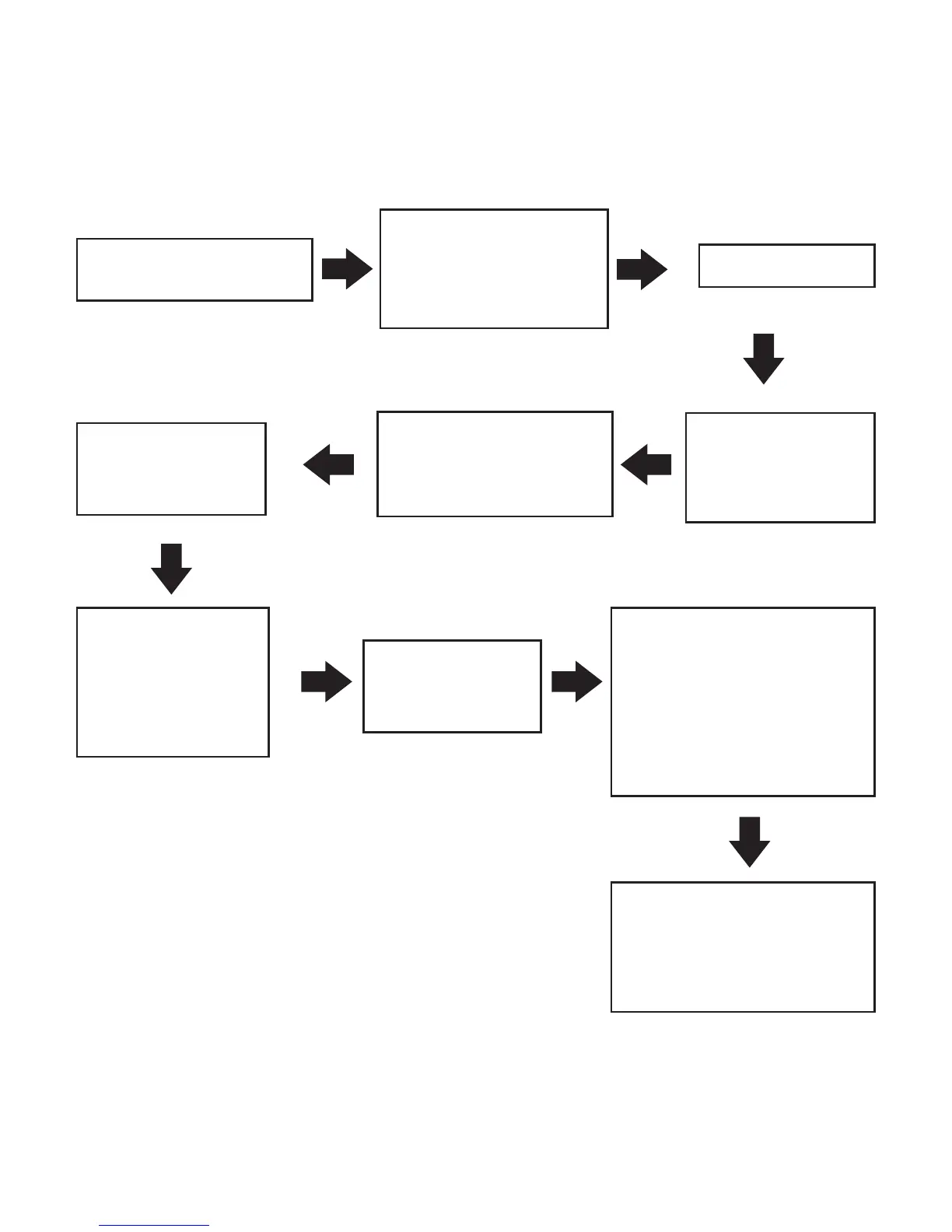
Press ENTER twice
The hours for
the time of day
will flash
Press ENTER
Press '-' or '+' to
adjust hours then
press ENTER
Press '-' or '+' until
Time/Date appears
on the display
The minutes for
the time of day
will flash
Press '-' or '+' to
adjust minutes
then press
ENTER
The day of the
date will now
flash
Press '-' or '+' to adjust
the day to match
today's date Pressing
ENTER to change
between Day, Month
and Year
Time and Date are
both set and the unit
will return to normal
operating mode
12

Related product manuals