EasyManua.ls Logo

Secure SCS317 - Setting the Tamper Setting

Secure SCS317
22 pages
Print Icon
To Next Page IconTo Next Page
To Previous Page IconTo Previous Page
Loading...
Setting the TAMPER SETTING
This setting allows the unit to be locked to the programmes set
and can only be reactivated by entering the pin code.
None of the buttons will operate until the security code is entered
Pressing BACK at any time in this process will return you to
normal operating mode
19
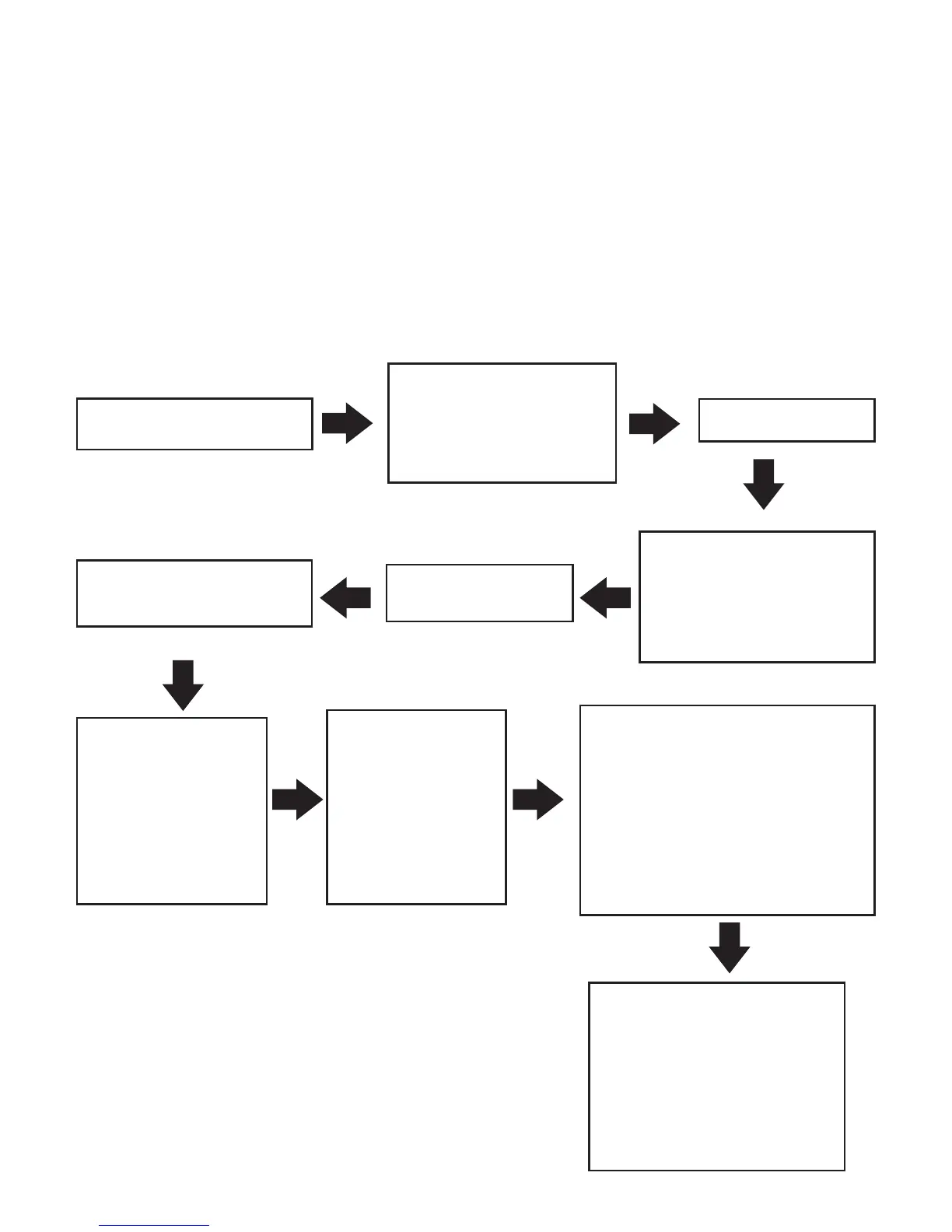
Press ENTER twice
Press ENTER
Press '-' or '+' until
Tamper Setting
appears on the
display
Press '-' or '+' until
Set Up appears on
the display
The first digit of
FOUR will now flash
Press ENTER
Press '-' or '+' to
adjust to a
number of your
choice (0-9),
then press
ENTER
PLEASE MAKE A NOTE
OF THIS CODE AND
KEEP IN A SAFE
PLACE. THIS WILL BE
REQUIRED TO MAKE
ANY CHANGES IN THE
FUTURE
A message will
appear briefly
confirming 'Tamper
code set when this
message clears'
Repeat the
previous step
for the second,
third and fourth
digits

Related product manuals