Home
SEDEA
Security Camera
iFS510
Page 23
SEDEA iFS510 - Page 23
99 pages
Manual
Go to English
Save Page as PDF
To Next Page
To Next Page
To Previous Page
To Previous Page
Loading...
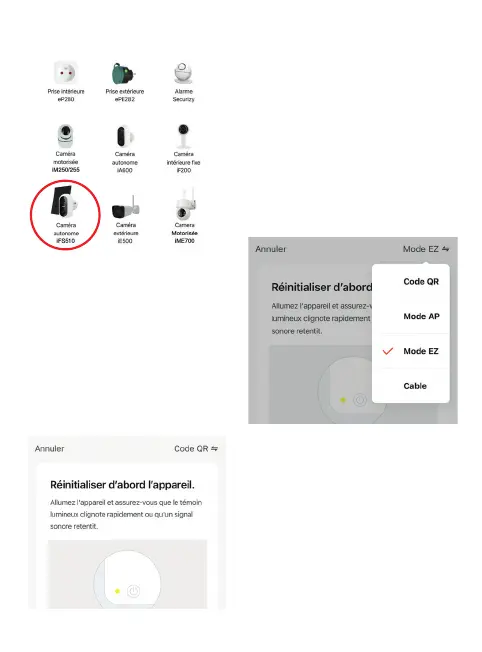
5.2.2 Then choose your product from the list:
5.2.3 Click on «QR Code» at the top
right of your screen and choose
«
EZ Mode
» :
The application will then guide you to
check the status of your camera and
connect it to your WiFi network.
22
24
Table of Contents
Main Page
Guide D'installation Rapide
2
Contenu du Kit
3
Installation de la Caméra
3
Panneau Solaire
12
Caractéristiques Techniques
13
Recyclage des Piles
14
Garantie
14
Déclaration de Conformité
14
Précautions D'utilisation
14
Contents of the Kit
17
Installing the Camera
17
Step 1: Charging the Batteries
17
Solar Panel
26
Technical Specifications
27
Battery Recycling
28
Warranty
28
Declaration of Conformity
28
Precautions for Use
28
Inhalt des Sets
31
Installation der Kamera
31
Schritt 1 : Aufladen der Akkus
31
Solar Panel
40
Technische Daten
41
Garantie
42
Inhoud Van de Kit
45
Installatie Van de Camera
45
Technische Specificaties
55
Verklaring Van Overeenstemming
56
Voorzorgsmaatregelen Voor Gebruik
56
Contenuto del Kit
59
Installazione Della Telecamera
59
Pannello Solare
68
Specifiche Tecniche
69
Garanzia
70
Dichiarazione DI Conformità
70
Precauzioni Per L'uso
70
Guía de Instalación Rápida
72
Contenido del Kit
73
Instalación de la Cámara
73
Panel Solar
82
Especificaciones Técnicas
83
Declaración de Conformidad
84
Precauciones de Uso
84
Conteúdo Do Kit
87
Instalação da Câmara
87
Painel Solar
96
Especificações Técnicas
97
Declaração de Conformidade
98
Precauções de Utilização
98


 To Next Page