17
FO2 MODE
After Activation, the XP 5 will operate as an Air computer
without displaying information associated with oxygen cal-
culations, unless it is set for a percentage of oxygen (FO2)
other than Air (numerical value between 21 and 50 %).
NOTE: Setting FO2 is described on Page 27.
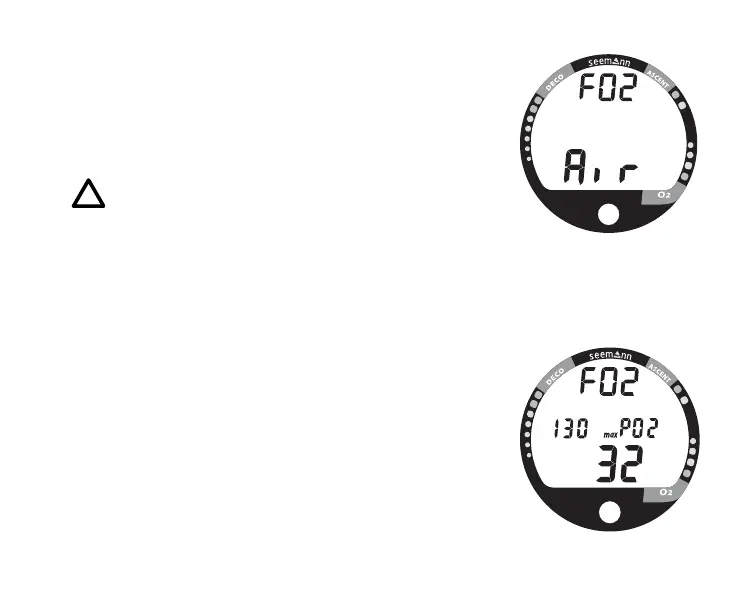
When set with an FO2 value of 'Air' (Fig. 9), the XP 5 will
perform calculations the same as if FO2 were set for 21%
oxygen, internally accounting for oxygen loading for any
subsequent Nitrox dives. However, oxygen related dis-
plays, warnings, and the O2 bar graph will not appear on
the display for that dive, or subsequent dives, unless FO2
is set for a numerical value (21 - 50).
Once a dive is made with the unit set as a nitrox computer
(FO2 set for a numerical value), the unit cannot be pro-
grammed to operate as an 'Air' computer until 24 hours af-
ter the last dive. 'Air' will not be displayed as an option in
the FO2 Mode. However, you can set FO2 for 21% for use
with Air.
When FO2 is set at a value of 21% (Fig. 10), the unit will
remain set at 21% for subsequent nitrox dives until FO2 is
set to a higher value, or until it automatically turns off and is
reactivated.
Fig. 9 - FO2 Air
Fig. 10 - FO2 of 21%



 To Next Page