SERVICE MANUAL FOR ST-150(F)
37/47 SeeTech
5.4 How to calibrate (UV Setting)
→ ARGOS Version 0305
1. Long press “START/STOP” key
2. Select “4. Machine Setting”
3. Enter the password “1111” + “SET” Key
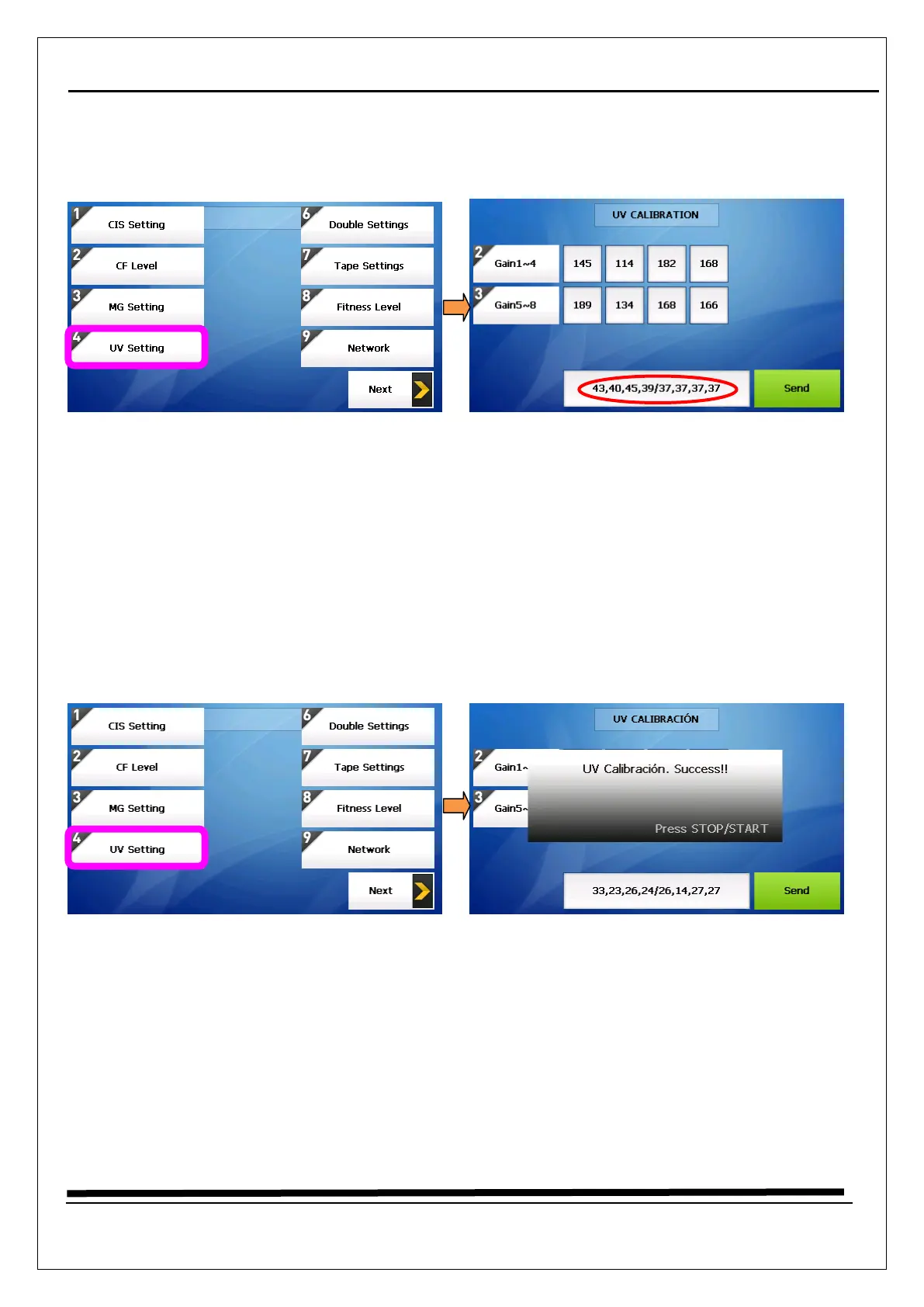
4. Select “4. UV Setting”
5. Put on the UV calibration paper (just one piece) on the hopper and Press “Send” key
6. The Gain 1~4 are transparency levels, and at the bottom values should be 40(39~41)
7. The Gain 5~8 are reflection levels, and at the bottom values should be 37(36~38)
8. So, the values at the bottom should be 40,40,40,40/37,37,37,37 (±1)
9. Try to calibrate until all values reach to be right.
→ ARGOS Version 030b
1. Long press “START/STOP” key.
2. Select “4. Machine Setting”
3. Enter the password “1111”
4. Select “4. UV Setting”
5. Put on the UV calibration paper (just one piece) on the hopper and Press “Send” key.
6. The values at the bottom reached to be 20~35 / 25~40, calibration is done automatically


 To Next Page