SERVICE MANUAL FOR ST-150(F)
39/47 SeeTech
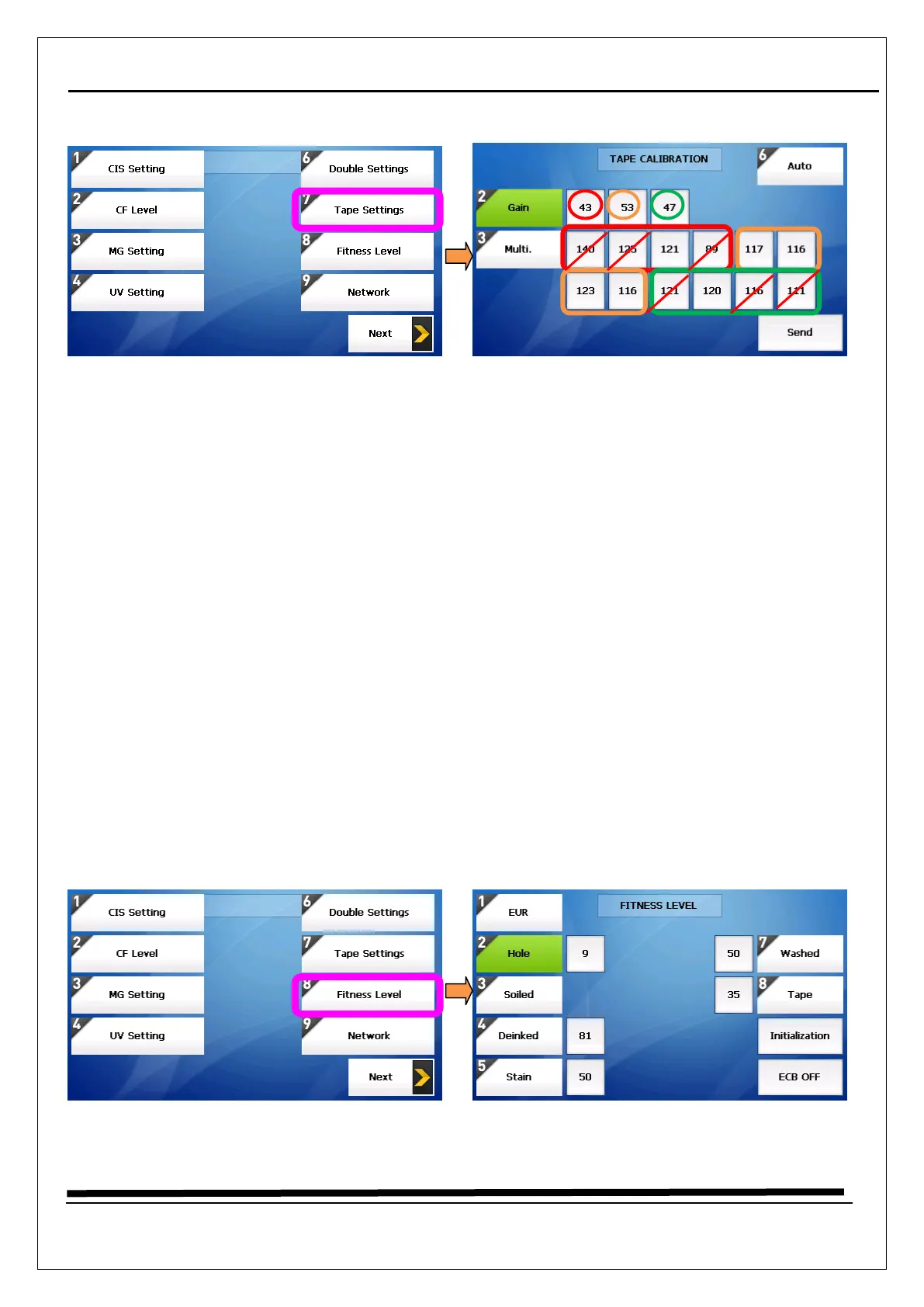
5.6 How to calibrate (Tape Setting) → Only for Fitness Model
1. Long press “START/STOP” key
2. Select “4.Machine Setting”
3. Enter the password “1111” + “SET” Key
4. Select “7. Tape Setting”
5. Prepare a white paper that should never been used
6. Move cursor to “send” menu and then put a paper (just one piece) on the hopper, then machine
operates automatically.
7. Press “6.Auto” key, then the Multi value will be changed.
8. The Multi value should be about 100 (100~120)
9. But, ignore the Multi value in 0 and 11 channels. And 1.3,8,10 channels might be able to be a little
different because those channels are related with rubber on the tape sensor
<If the Multi value is too low, decrease the Gain value>
The Gain 1 is related with Multi channel 0,1,2 and 3
The Gain 2 -> Multi channel 4,5,6 and 7
The Gain 3 -> Multi channel 8,9,10 and 11
5.7 How to calibrate (Fitness Level) → Only for Fitness Model


 To Next Page