SERVICE MANUAL FOR ST-150(F)
35/47 SeeTech
11. Try to process from “6” and “7” until the values reach to be right
12. If the Gray value is higher than 236, decrease Gray Level bypressing “SET”, “CLEAR”, “NUMERIC”
Key
13. Try to process from “6” and “7” until the values reach to be right
14. If the values reach to be right, after the same method set the IR Value & Gray Value of every other
currencies
15. If the machine has another currency, Press “CURR” key, the currency will be changed
→ After API Version R120614
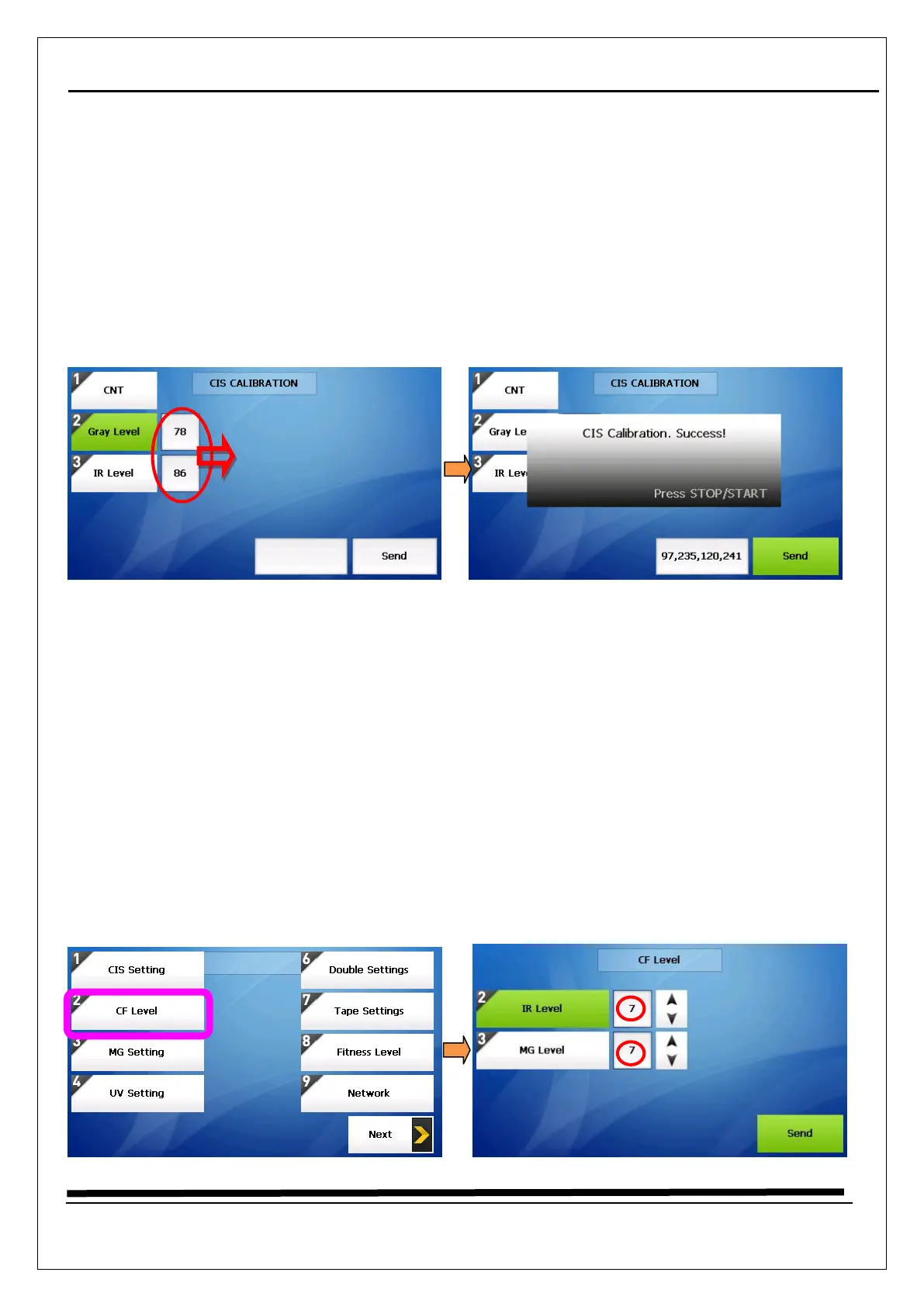
1. Long press “START/STOP” key
2. Select “4. MACHINE SETTING”
3. Enter the password “1111” + “SET” Key
4. Select “1. CIS Setting”
5. Select “CNT” by pressing “CURR” key
6. Don’t need to change Gray Level & IR Level because of calibration is done automatically
7. Put a CIS calibration paper (just one piece) on the hopper
8. Press “Send” key
9. Try to process from “7” and “8” until “Calibration, Success” message appears
10. If the message appears, after the same method set auto calibration of every other currencies
11. If the machine has another currency, Press “CURR” key, the currency will be changed
5.2 How to calibrate (CF Level)



 To Next Page