SERVICE MANUAL FOR ST-150(F)
36/47 SeeTech
1. Long press “START/STOP” key
2. Select “4. MACHINE SETTING”
3. Enter the password “1111” + “SET” Key
4. Select “2. CF Level”
5. IR Level value is 7 and MG Level value is 7 (Default)
5.3 How to calibrate (MG Setting)
1. Long press “START/STOP” key
2. Select “4. MACHINE SETTING”
3. Enter the password “1111” + “SET” Key
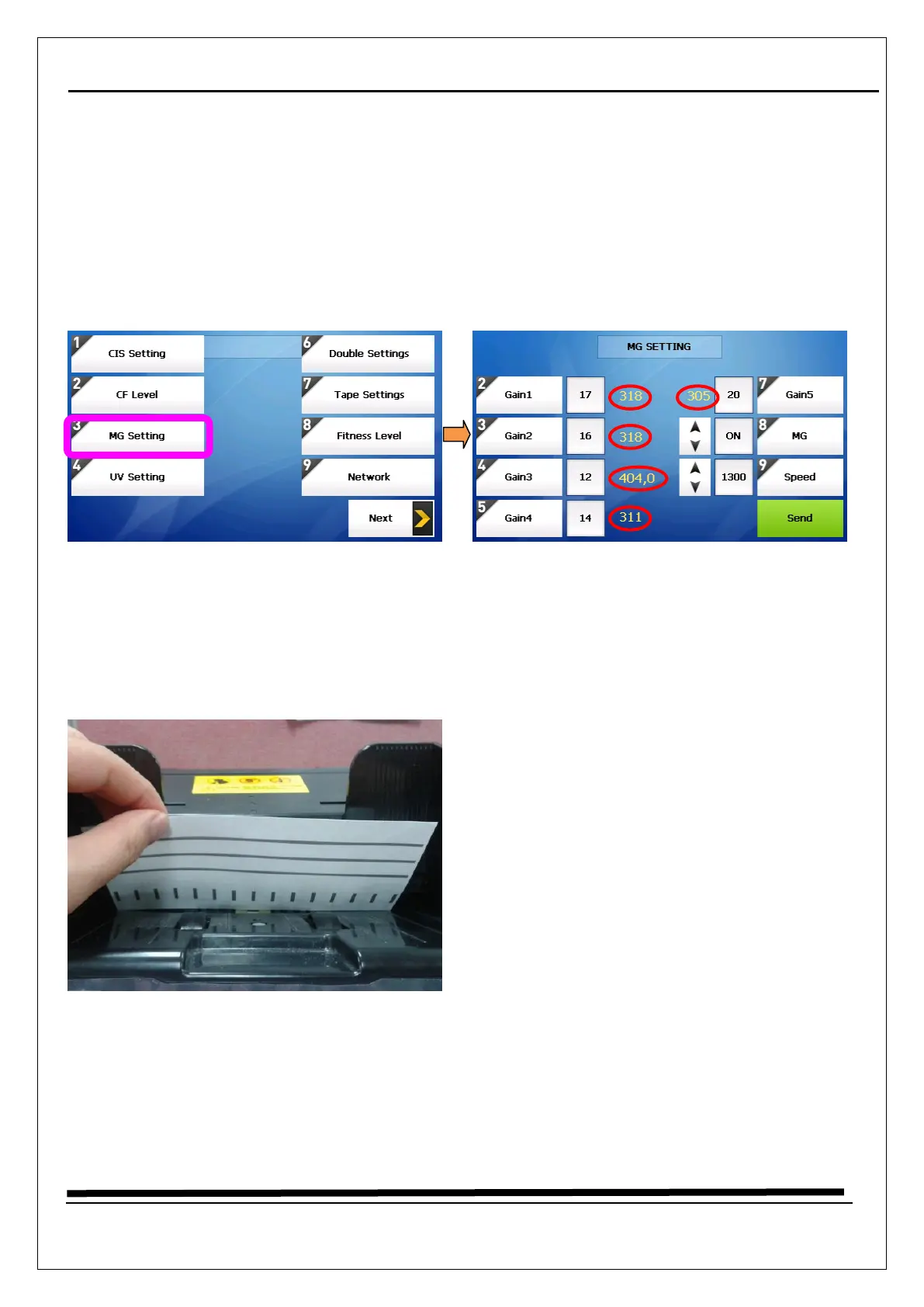
4. Select “3. MG Setting” (it needs all speed : 1000, 1300, 1500 notes/min)
5. Put on the MG paper (just one piece) in the direction as a picture below on the hopper and Press
“Send” key
6. The Gain 1,2,4,5 values are set around 310~330, Gain 3 value is set around 370~390
7. The Gain 3 has two values, behind number is angle of the MG paper, we recommend the value is “0”
during calibration
8. All speed needs calibration, So press “9.Speed” and the press “↑” or “↓” key, the speed will be changed
9. After changing the speed, try to process from “5” and “6” until the values reach to be right



 To Next Page