EasyManua.ls Logo

Sega MISSION IMPOSSIBLE ARCADE - User Manual

Sega MISSION IMPOSSIBLE ARCADE
167 pages
Print Icon
To Next Page IconTo Next Page
Loading...
IMPORTANT
Before using this product, read this manual carefully to understand the
contents herein stated.
After reading this manual, be sure to keep it near the product or in a
convenient place for easy reference when necessary.
OWNER'S & SERVICE MANUAL
420-0036UK
MISSION IMPOSSIBLE SUPER DELUXE
Sega Amusements International Limited.
42 Barwell Business Park, Leatherhead Road, Chessington, Surrey, KT9 2NY. United Kingdom.
Telephone: +44 (0) 208 391 8090 Facsimile: +44 (0) 208 391 8099
email: sales@segaarcade.com Web: http://www.segaarcade.com
© SEGA
Errors and omissions excepted (E&OE)
1
st
PRINTING
April 2021
OWNER’S & SERVICE MANUAL

Table of Contents

Question and Answer IconNeed help?

Do you have a question about the Sega MISSION IMPOSSIBLE ARCADE and is the answer not in the manual?

Overview

This document is the owner's and service manual for the "MISSION IMPOSSIBLE SUPER DELUXE" arcade game, identified by part number 420-0036UK, and was first printed in April 2021. It provides comprehensive information for owners, operators, and maintenance personnel to ensure safe and proper operation, installation, and servicing of the product.

Function Description

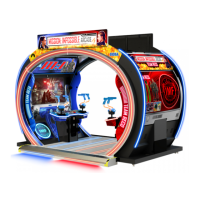
The MISSION IMPOSSIBLE ARCADE is a rail-shooting game that allows up to four players to compete in missions. A key feature is the "Agent Data System," which tracks and records player progress and speed, using this data as a benchmark for new players to compete against virtually. The game consists of three missions, each with three stages, requiring players to interact with both the controllers and panel buttons. Players assume the role of an IMF agent, experiencing the thrill of the Impossible MissionForce.

Important Technical Specifications

The game cabinet has the following dimensions and weight:

  • Single Monitor Cabinet: 1.95m (76.8in) width x 1.10m (43.3in) depth x 2.77m (109.0in) height.
  • Assembled Floor: 1.88m (74.0in) width x 2.10m (82.6in) depth x 0.154m (6.06in) height.
  • Fully Assembled Dimensions: 4m (157.5in) width x 2.61m (102.7in) depth x 2.86m (112.6in) height.
  • Weights:
    • Monitor Cabinet 1: 300kg (661.3lb.)
    • Monitor Cabinet 2: 300kg (661.3lb.)
    • INST KIT (pallet 1): 325kg (716.5lb.)
    • INST KIT (pallet 2): 325kg (716.5lb.)
    • Total Assembled Weight: 1250kg (2755.7lb.)
  • Electrical Consumption:
    • AC230V: 2A [460W]
    • AC120V: 3.83A [460W]
  • Display: The product uses a 54.6-inch Color TFT-LCD Module P550HVN02.0 with an active matrix type liquid crystal panel, 1920x1080 pixels resolution, and a diagonal size of 54.6 inches. Each pixel is divided into Red, Green, and Blue sub-pixels arranged in vertical stripes. It supports 10-bit color depth and uses a 10-bit 2-channel LVDS interface.
  • Operating Environment: The machine is designed for indoor use, with an ambient temperature range of 5 to 30 degrees Celsius.

Usage Features

  • Basic Control: Players use the Controller Unit to aim and pull the trigger to shoot. Moving the controller automatically moves the target sights on the screen. The BLUE target represents player 1 (left side), and the RED target represents player 2 (right side). Players have unlimited ammunition. Holding both triggers simultaneously enables rapid fire, while a single trigger provides more accurate shooting.
  • Game Flow: The game starts with an attract mode, followed by a lobby where players can join. If no other player joins within a set time, the game enters Single Cabinet Play Mode. Players can skip the lobby by pressing the Start button.
  • Mission Select: After starting, players choose a mission. "Special Mission" unlocks after completing one mission. Each mission has three stages, and the game concludes after all nine stages are completed.
  • Continue/Game Over: If a player's life gauge is depleted, a "Continue Game" screen appears, allowing them to insert more coins and press START to continue. If the countdown reaches zero without continuing, the game is over.
  • Action Sequence Controls: The game includes mini-games called "Action Sequence Controls" that require player interaction with the Start Button. Some sequences require rapid tapping, while others require precise timing to stop a moving hexagon within a red frame. Failure in these actions can increase game difficulty.
  • Network Play: The game supports linked play, allowing up to four players across two cabinets. One cabinet acts as the "Server" (ID=1) controlling network operation, while the other is the "Client" (ID=2).
  • Customization: Game assignments such as difficulty, revival settings, controller reaction (solenoid feedback), continue countdown, lobby countdown, damaged effects (color), enemy boost, minimum game play time, kids mode (weapon display), mission selection, and subtitles can be adjusted via the TEST MODE.

Maintenance Features

  • Safety Precautions: The manual emphasizes critical safety warnings, including always turning off power before servicing, avoiding wet hands when plugging/unplugging, not exposing power cords, using specified fuses, and grounding the product. It also warns against unauthorized modifications and operating damaged equipment.
  • Installation Checks: Before operation, inspect the cabinet for damage, ensure casters and adjusters are correctly set (casters raised approximately 5mm from the floor), verify electrical specifications, and confirm all wiring connections are secure.
  • Periodic Inspections: Regular checks are recommended for cabinet surfaces, electronic components, floor surface, monitor, adjusters, controllers (for damage, cracks, loose screws), cash box (empty coins), speakers, rumble packs, LEDs, coin selector, game PC, external structure (loose fixings), power plug, and inside the cabinet.
  • Cleaning:
    • Cabinet Surfaces: Clean with a soft cloth dipped in water or diluted chemical detergent. Avoid thinner, benzene, ethyl alcohol, abrasives, or bleaching agents.
    • LCD Screen: Gently wipe with a dry, lint-free, soft cloth. For tougher stains, use a soft lint-free cloth moistened with heavily diluted detergent or a 50-50 mixture of isopropyl alcohol and water. Do not use water jets or clean while powered on.
    • Coin Acceptor (Mechanical/SR3): Clean smears with a damp soft cloth. Remove the cradle and clean the rotary shaft. Do not use machine oil.
  • Test Mode: The game features a comprehensive TEST MODE accessible via the TEST button. This mode allows for:
    • System Information: Displays software/firmware versions, security key, machine ID, and error logs.
    • Input Test: Checks the functionality of controllers (X/Y movement, triggers), start buttons, PIR sensor, coin input, and service/test buttons.
    • Output Test: Checks the functionality of lamps (start lamps), cabinet lighting (CTR/Woofer/Edge), control panel lighting, roof/floor lighting, billboard lighting, and controller feedback.
    • Calibration: Adjusts controller alignment on screen.
    • Coin Settings: Configures coin/credit settings, game cost, continue cost, and freeplay options.
    • Sound Test: Checks audio output from speakers and bass shakers.
    • Screen Test: Displays color bars, brightness, and grid alignment for visual output checks.
    • Network Test: Configures and checks the communication link between cabinets.
    • Bookkeeping: Provides summary data on coin credits, service credits, total credits, and play time histograms.
  • Repair and Replacement: Instructions are provided for replacing the trigger switch, controller I/O PCB, and up/down sensors. It is stressed that only qualified personnel should perform complex repairs. The manual also provides contact information for Sega Amusements International Limited and Play It! Amusements, Inc. for parts, service, and technical support.
  • Moving the Machine: The manual explicitly states that the product should not be moved in its fully assembled state due to its weight and size. It must be disassembled into several separate assemblies, including removing the roof structure and splitting the cabinets from the ASSY FLOOR, to prevent structural and electrical damage or personal injury. Specific warnings are given about delicate areas not to be used for leverage during movement.

Sega MISSION IMPOSSIBLE ARCADE Specifications

General IconGeneral
BrandSega
ModelMISSION IMPOSSIBLE ARCADE
CategoryArcade Game Machines
LanguageEnglish

Related product manuals