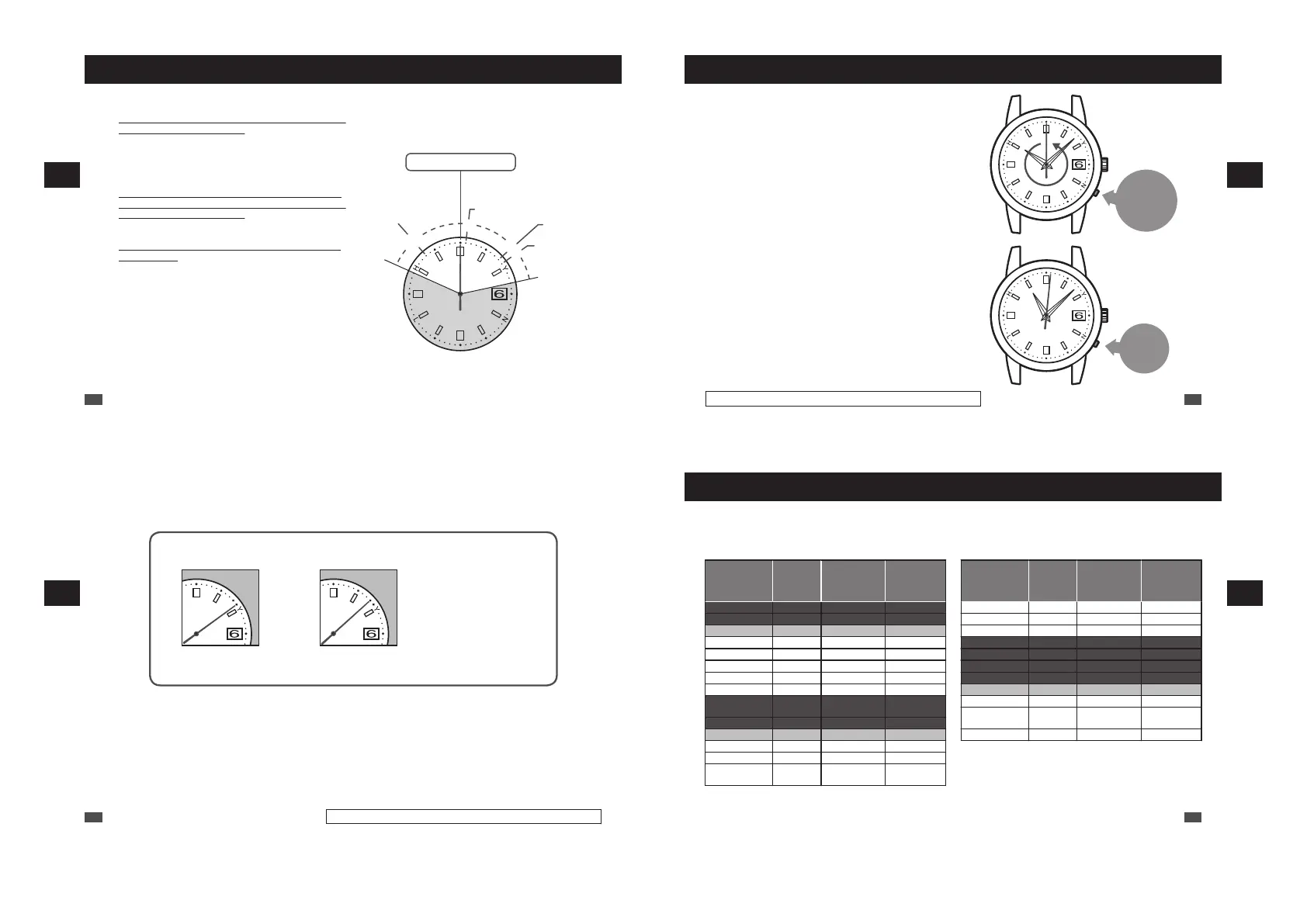
Time difference adjustment function (When using overseas)
■ Time difference adjustment function characteristics
•
Set the time difference in the time difference adjustment mode
to display an overseas local time.
The watch can display an overseas local time in one-hour units.
The time difference is set based on UTC (Coordinated
Universal Time).
The range of time differences around the world based on UTC
is [from -11 hours to +13 hours].
•
In the time difference adjustment mode, the time difference
based on UTC (Coordinated Universal Time) is displayed by
the position of the seconds hand.
To set the time difference, turn the crown to move the seconds
hand to the correct position.
•
A radio signal transmitting station is selected by setting the
time difference.
When setting the time difference for a region other than the
radio signal reception ranges, the radio signal reception
function will not work.
Examples
:
When using the watch in Japan, set the seconds
hand to the [9-second position: Tokyo] to receive a
radio signal from Japan.
When using the watch in China, set the seconds
hand to the [8-second position: Beijing].
“Setting the time difference (Setting the radio signal
transmitting station)” → P.33
“List of time zone differences in major regions of the world” → P.35
<How to read the seconds hand position and time
difference (Radio signal transmitting station)>
* The numbers in parenthesis are time differences based on UTC.
1
8
9
53
-11
13
0-second position: UTC
Denver (-7):
WWVB
Berlin (+1):
DCF77
Beijing (+8):
BPC
Tokyo (+9):
JJY
EN
32
4
TIME DIFFERENCE ADJUSTMENT FUNCTION
Setting the time difference (Setting the radio signal transmitting station)
Press and hold the
button for 8 seconds
and then release it
Press
the
button.
1
Continue to press the button (for 8 seconds), and
when the seconds hand starts to move
counterclockwise, release it.
The watch enters the time difference setting mode and the
seconds hand stops pointing at the time difference index
currently set.
*
Though the seconds hand may move to the 0-second position after
3 seconds of pressing the button, keep the button pressed.
*
If the watch is left untouched for 1 minute after the seconds hand
stops, the watch automatically returns to the TIME display mode. If
this happens, restart the operation from procedure 1.
*
Keeping the button pressed for a short period may start manual
reception.
*
Press the button using an object with a long tapered tip. → P.16
2
Press the button to set the seconds hand to point
at the time difference index of the target area.
With each pressing of the button, the seconds hand
advances 1 second (+ 1 hour) in the clockwise direction and
the time advances 1 hour.
The position of the seconds hand shows the difference. Please
set it by referring to P.35.
*
Also while the watch is working, the seconds hand can
be moved.
EN
33
Only the 1B22 and 1B32 are date-displaying models.
4
TIME DIFFERENCE ADJUSTMENT FUNCTION
The radio signal transmitting station can be changed by setting the time difference. When setting a
time difference for regions other than the radio signal reception ranges, the radio signal reception
function will not work.
* When setting the Daylight Saving Time (DST), add one hour to the time difference of the target area.
BP
C
JJY
BPC
JJY
In Japan In China In the other countries
Set to the 9-second
position
Set to the 8-second
position
“List of time zone
differences in major
regions of the world”
→ P.35
* When the seconds hand is at 13 seconds (UTC +13 hours), press the button to move it to the 49-second position (UTC -11 hours).
3
Wait for one minute after the hour hand stops. (The watch exits the time difference setting mode.)
After one minute, the watch switches to the one-second interval movement.
* When the date is changed, it is also moved.
EN
34
Only the 1B22 and 1B32 are date-displaying models.
4
TIME DIFFERENCE ADJUSTMENT FUNCTION
List of time zone differences in major regions of the world
Refer to the table below to set the time difference area in the Time Difference Adjustment mode.
* When setting a time difference for a region where no receivable official standard frequency is mentioned in the
table below, the radio signal reception function will not work.
(As of August 2020)
Time difference
setting
seconds hand
position
Time
difference
from UTC
Time zone
representative
city
Reception
frequency
0 seconds ±0 hours London DCF77
1 second +1 hour Paris / Berlin DCF77
2 seconds +2 hours Cairo DCF77 △
3 seconds +3 hours Jeddah -
4 seconds +4 hours Dubai -
5 seconds +5 hours Karachi -
6 seconds +6 hours Dhaka -
7 seconds +7 hours Bangkok -
8 seconds +8 hours
Beijing/
Hongkong
BPC
9 seconds +9 hours Tokyo JJY
10 seconds +10 hours Sydney JJY △
11 seconds +11 hours Noumea -
12 seconds +12 hours Wellington -
13 seconds +13 hours
Nuku’alofa
(Tongatapu)
-
Time difference
setting
seconds hand
position
Time
difference
from UTC
Time zone
representative
city
Reception
frequency
49 seconds -11 hours Midway Island -
50 seconds -10 hours Honolulu -
51 seconds -9 hours Anchorage -
52 seconds -8 hours Los Angeles WWVB
53 seconds -7 hours Denver WWVB
54 seconds -6 hours Chicago WWVB
55 seconds -5 hours New York WWVB
56 seconds -4 hours Santo Domingo WWVB △
57 seconds -3 hours Rio de Janeiro -
58 seconds -2 hours
Fernando de
Noronha
-
59 seconds -1 hour Azores Islands -
To use Daylight Saving Time (DST) where this is observed, select the time zones with a △ mark in the Reception
frequency columns.
EN
35
4
TIME DIFFERENCE ADJUSTMENT FUNCTION



 To Next Page