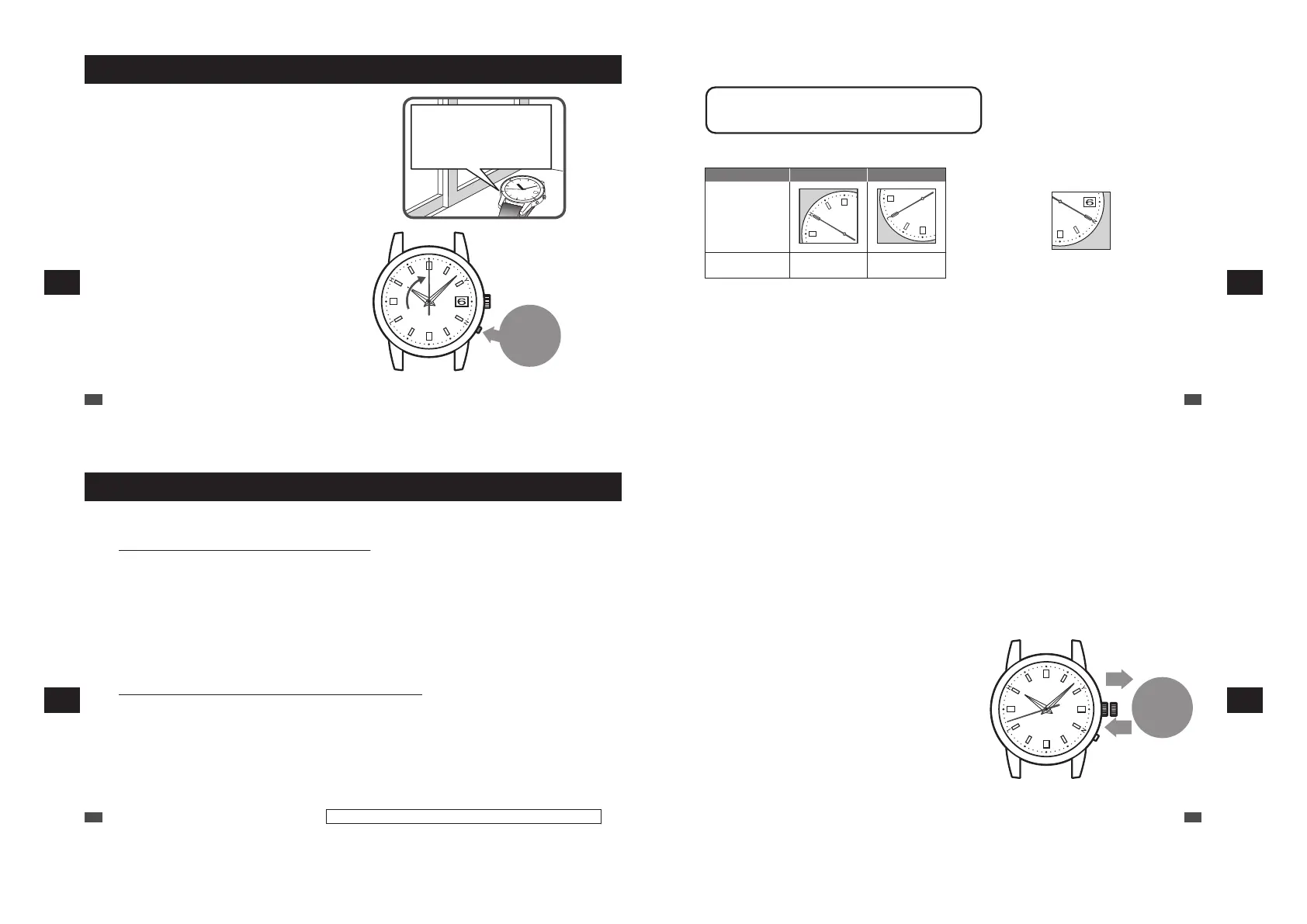
How to conduct manual reception (Receive a radio signal manually)
The antenna for receiving radio signals
inside the watch is at the 8 o’clock
position. Turning the antenna toward the
outside of the window enables the watch
to receive radio signals more easily.
Press and
hold for
3 seconds
1
Place the watch.
Place the watch where it can easily receive a radio signal.
“To improve radio signal reception” → P.27
“Environments in which it is difficult to receive a radio
signal” → P.28
*
The watch cannot receive a radio signal outside the radio
signal reception range. “Radio signal reception range
indication” → P.22
2
Continue to press and hold the button for
3 seconds, and then release it when the
seconds hand moves to the 0-second position.
Reception starts after the seconds hand moves and stops
at the 0-second position.
*
When the time difference is set for a region other than radio
signal reception range, the seconds hand does not move to
the 0-second position. (A radio signal cannot be received
manually.) Check the time difference set currently.
“Setting the time difference (Setting the radio signal
transmitting station)” → P.33
*
Press the button using an object with a long tapered tip.
→ P.16
EN
60
7
TROUBLESHOOTING
3
Place the watch and wait for a few minutes (max. 12 minutes).
When the seconds hand moves at the one-second interval, the reception is finished.
<Display until the reception is finished>
The seconds hand indicates the reception level.
Reception level High : H Low : L
Display
Receiving state of
a radio signal
Easy to receive
Difficult to
receive
<If the reception has failed>
The seconds hand indicates the reception result “N”.
Reception result : N
After 5 seconds, the watch switches to the time display
mode.
“If reception has failed: The seconds hand points to N”
→ P.31
4
When the seconds hand starts to move at one-second intervals, check that the reception is successful.
When the reception is finished, check that the reception is successful.
“How to display the reception results” → P.30
It takes time to receive a radio signal (max. 12 minutes).
* The required time varies depending on the receiving state of a
radio signal.
EN
61
7
TROUBLESHOOTING
When a radio signal cannot be received
When a radio signal cannot be received, refer to the following.
•
Not receivable within the radio signal reception range
Check that the time difference of the area where the watch is used is set.
When the time and date are misaligned even after the time difference is correctly selected, refer to
Troubleshooting. “Reception of a radio signal” → P.74
Since a radio signal cannot be received, the time and date became misaligned. In this case, set the time
and date manually.
“How to manually set the time (1B21: non date-displaying model)” → P.63
“How to manually set the time (1B22 / 1B32: date-displaying models)” → P.66
“How to manually set the date (1B22 / 1B32: date-displaying models)” → P.69
* For the radio signal reception ranges, refer to “Radio signal reception range indication” → P.22.
• When the watch is used outside the radio signal reception range
Select the time difference of the area where the watch is used.
“Setting the time difference (Setting the radio signal transmitting station)” → P.33
When the watch does not display the correct time and date even after setting the time difference, manually
set the time and date.
EN
62
Only the 1B22 and 1B32 are date-displaying models.
7
TROUBLESHOOTING
■ How to manually set the time (1B21: non date-displaying
model)
If the watch is continually used in an environment in which a radio signal cannot be received (a region other than the
radio signal reception ranges, etc.), set the time manually.
“Radio signal reception range indication” → P.22
•
When the watch is used in an environment in which a radio signal can be received again, receive a radio signal to
set the time. “Automatic reception and manual reception” → P.21
* Even if a radio signal cannot be received, the watch can be used with the same accuracy as that of a normal quartz watch.
(Average gain/loss ±15 seconds per month)
* When the watch receives radio signals after the time is manually adjusted, it displays the time received from radio signals.
01
Pull the
crown to the
first click
and push it
back in.
1
Pull the crown to the first click and push it
back in.
The seconds hand stops.
*
When the crown is a screw lock type, unlock it. → P.17
*
When a no movement state of the seconds hand is kept for
one minute or more, the watch automatically switches to the
time display mode. When the watch switches to the time
display mode, re-attempt operation.
EN
63
7
TROUBLESHOOTING



 To Next Page