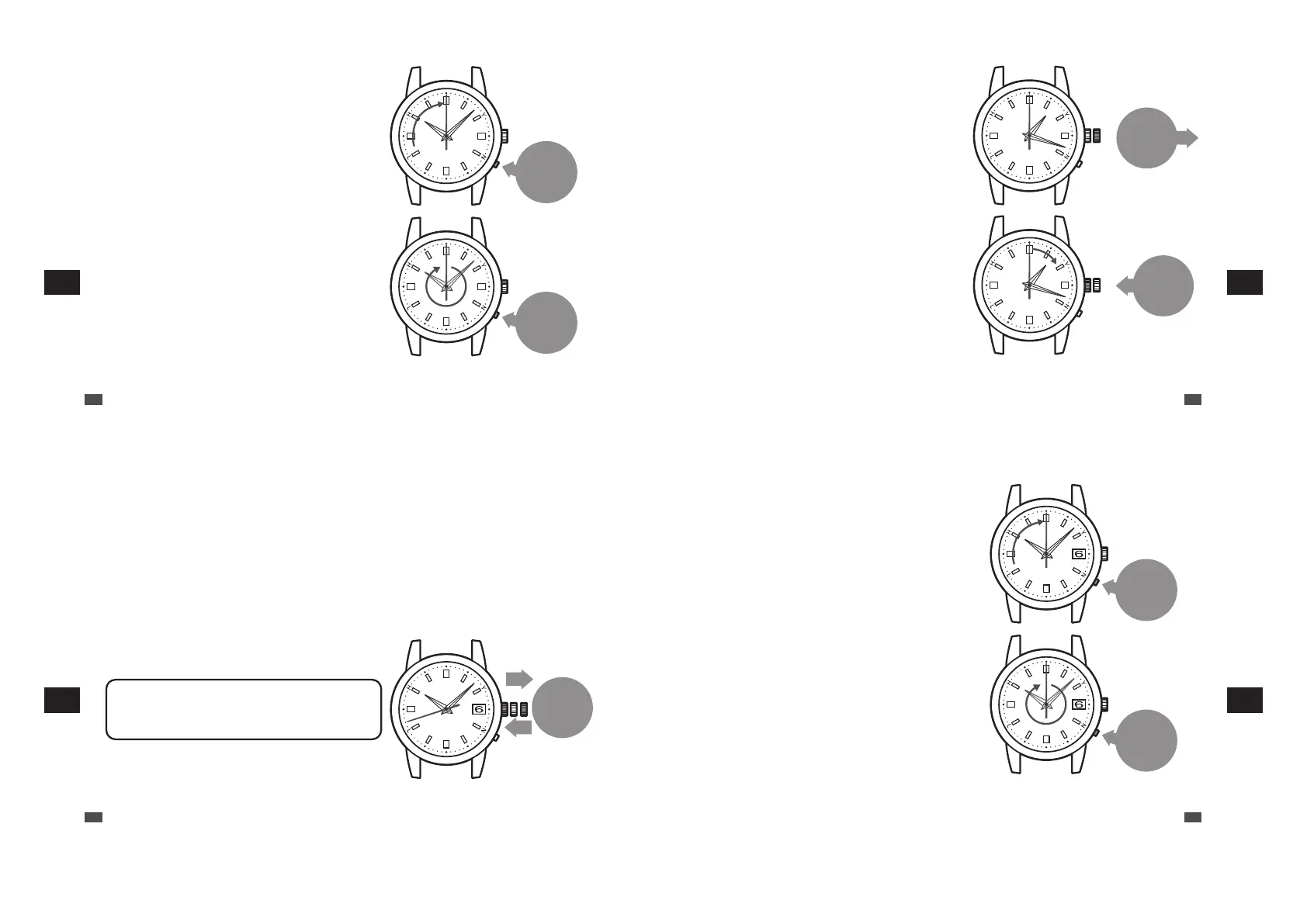
Press the
button and
then release it
Pressing the
button once
advances the time
by one minute.
When the button is held
down for two seconds,
the seconds hand starts
to move. When the
button is pressed again,
the seconds hand stops.
2
Press the button and then release it
The seconds hand moves to the zero second position and
stops.
The watch switches to the manual time setting mode.
*
When this condition is kept for one minute or more, the watch
automatically switches to the time display mode. When the
watch switches to the time display mode, re-attempt
operation from 1.
*
When the watch switches to the manual time setting mode,
the reception result data is lost. Therefore, the reception
result is indicated as “N”.
*
Press the button using an object with a long tapered tip.
→ P.16
3
Press the button to set the time
By pressing the button once, the seconds hand makes a
full rotation and the watch advances the time by one
minute.
*
The hands do not move by turning the crown.
*
Advance the hand to set the time. The hand cannot be
turned reversely.
EN
64
7
TROUBLESHOOTING
01
Pull out the
crown to the
first click
01
Push the
crown
back in
When the watch is used in an environment in which a radio signal can be received again, receive a radio signal to set
the time.
“Automatic reception and manual reception” → P.21
4
After the operation 3 pull the crown to the
first click.
5
Push the crown back in according to the time
signal, etc.
The operation is completed.
The watch starts to work.
*
When the crown is a screw lock type, lock it. → P.17
EN
65
7
TROUBLESHOOTING
■ How to manually set the time (1B22 / 1B32: date-
displaying models)
If the watch is continually used in an environment in which a radio signal cannot be received (a region other than the
radio signal reception ranges, etc.), set the time manually.
“Radio signal reception range indication” → P.22
•
When the watch is used in an environment in which a radio signal can be received again, receive a radio signal to
set the time. “Automatic reception and manual reception” → P.21
* Even if a radio signal cannot be received, the watch can be used with the same accuracy as that of a normal quartz watch.
(Average gain/loss ±15 seconds per month)
* When the watch receives radio signals after the time is manually adjusted, it displays the time received from radio signals.
01 2
Pull the
crown to the
second click
and push it
back in.
1
Pull the crown to the second click and push
it back in.
The seconds hand stops.
When pulling the crown, do not stop at the first click but pull
it to the second click immediately. If the seconds hand does
not stop when pushing the crown back in, re-attempt
operation 1.
*
When the crown is a screw lock type, unlock it. → P.17
*
When a no movement state of the seconds hand is kept for
one minute or more, the watch automatically switches to the
time display mode. When the watch switches to the time
display mode, re-attempt operation.
EN
66
7
TROUBLESHOOTING
Press the
button and
then release
it
Pressing the
button once
advances the time
by one minute.
When the button is held
down for two seconds,
the seconds hand starts
to move. When the
button is pressed again,
the seconds hand stops.
2
Press the button and then release it
The seconds hand moves to the zero second position and
stops.
The watch switches to the manual time setting mode.
*
When this condition is kept for one minute or more, the watch
automatically switches to the time display mode. When the
watch switches to the time display mode, re-attempt
operation from 1.
*
When the watch switches to the manual time setting mode,
the reception result data is lost. Therefore, the reception
result is indicated as “N”.
*
Press the button using an object with a long tapered tip.
→ P.16
3
Press the button to set the time
By pressing the button once, the seconds hand makes a
full rotation and the watch advances the time by one
minute.
*
The hands do not move by turning the crown.
*
Advance the hand to set the time. The hand cannot be
turned reversely.
*
The moment the date changes is midnight (12 AM). Please
be sure to set the time after ensuring that AM/PM is set
correctly.
*
The date cannot be set in this operation.
“How to manually set the date (1B22 / 1B32: date-
displaying models)” → P.69
EN
67
7
TROUBLESHOOTING



 To Next Page