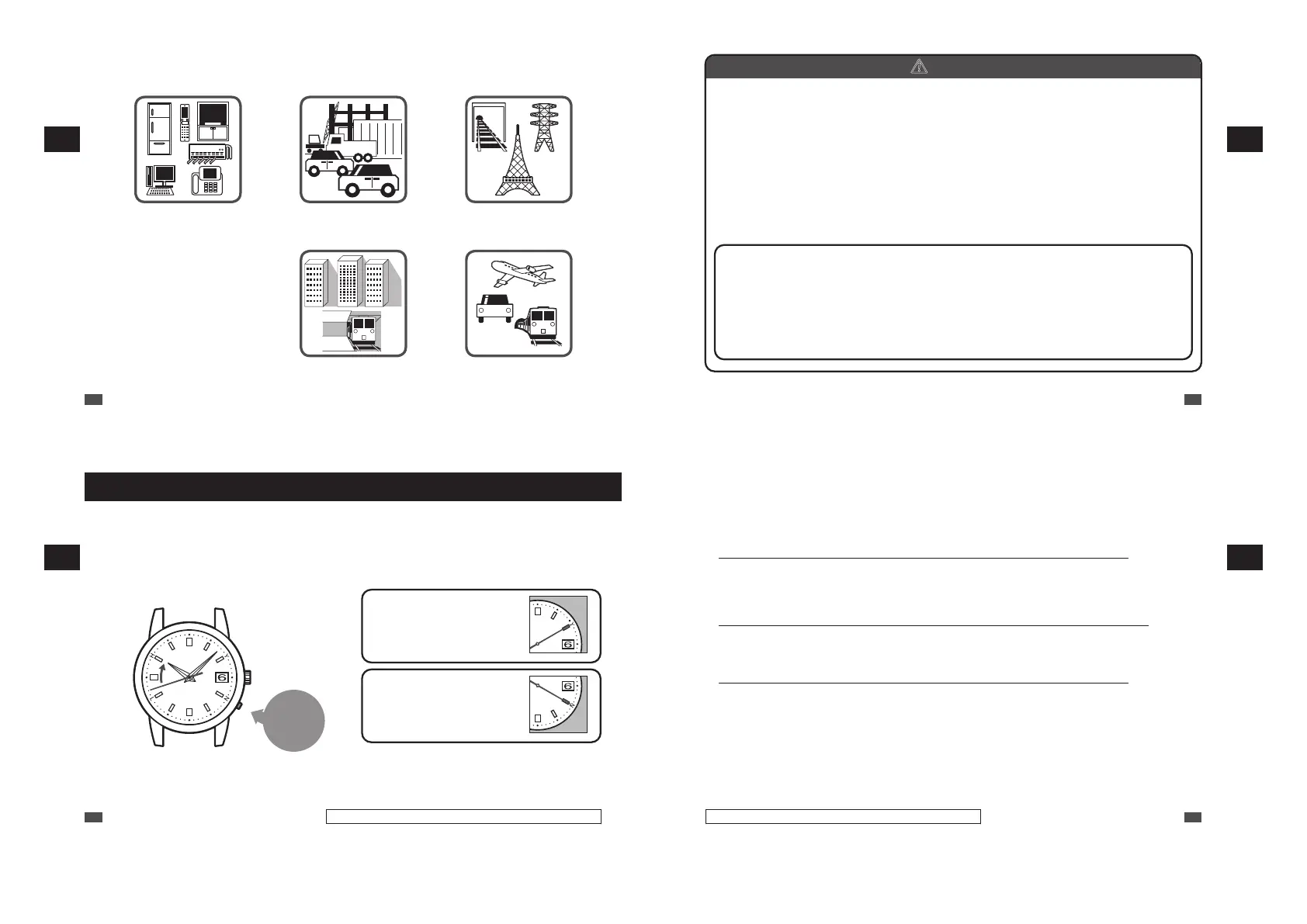
■ Environments in which it is difficult to receive a radio signal
Avoid putting the watch in such places when it receives radio signals.
• Close to home electrical
appliances such as TV’s,
refrigerators or air conditioners
• Close to OA equipment such as
mobile phones, personal
computers or fax machines
• Close to steel desks or other
furniture made of metal
• In places generating radio
interference, such as construction
sites or places with heavy traffic
• Close to overhead power lines, TV
stations, train cables
• Inside a building, between tall
buildings, underground
• Inside a vehicle, train, or airplane
EN
28
3
HOW TO SET THE TIME (RADIO SIGNAL RECEPTION)
b
CAUTION
• The watch may display the wrong time if it fails to receive radio signals properly
because of interference.
The watch may also fail to receive radio signals properly depending on the location or
radio wave receiving conditions.
In this case, move the watch to another place where it can receive radio signals.
• When the watch is out of reception range, its accurate quartz movement (loss / gain:
±15 seconds per month on average) will continue to keep the time.
• The time signal transmission may be stopped during maintenance of the facilities of
the (each) transmitting station or because of a lightning strike.
In such a case, see the (each) station’s website for further information or contact
SEIKO CUSTOMER SERVICE CENTER.
• Websites of transmission stations (As of August 2020)
Japan : National Institute of Information and Communications Technology (Japan
Standard Time Project) http://jjy.nict.go.jp/
China : NTSC http://www.ntsc.cas.cn/
U.S.A. : NIST https://www.nist.gov/pml/time-and-frequency-division/radio-
stations/wwvb
Germany : PTB https://www.ptb.de/cms/en.html
EN
29
3
HOW TO SET THE TIME (RADIO SIGNAL RECEPTION)
How to check the reception status
■ How to display the reception results
The seconds hand indicates the latest reception results (Yes/No) of a radio signal for 5 seconds.
1
Press the button once and then
release it.
The seconds hand indicates the reception results.
Press the
button once
and then
release it
* When the button is held down, the watch starts
manual reception.
* Press the button using an object with a long tapered
tip. → P.16
2
Check if the reception was successful
(within 5 seconds).
If a reception was successful:
The seconds hand points to Y
(Yes: the 10-second position)
If a reception has failed: The
seconds hand points to N
(No: the 20-second position)
* If the button is pressed after 5 seconds have
elapsed or while the seconds hand is moving to
display the reception results, the reception results
display function is cancelled and the watch returns
to the TIME display mode.
EN
30
Only the 1B22 and 1B32 are date-displaying models.
3
HOW TO SET THE TIME (RADIO SIGNAL RECEPTION)
If a reception was successful: The seconds hand points to Y
•
A radio signal has been received successfully. Use the watch without any adjustments.
* When the watch does not display the correct time and date even after successfully receiving a radio signal, refer to
Troubleshooting.→ “Misalignment of the time and hand positions” → P.75, and “Misalignment of the date” → P.77
If reception has failed: The seconds hand points to N
•
Place the watch in a place where it can easily receive a radio signal, or change its direction.
Even within the radio signal reception range, this watch may fail to receive a radio signal depending on the
condition (due to the influence of weather, terrain, buildings, or direction). “Environments in which it is difficult
to receive a radio signal” → P.28
This watch is unable to receive radio signals outside the reception range. “Radio signal reception range
indication” → P.22
•
Make sure that the time difference is correctly selected before attempting radio signal reception.
If the time difference is set to an area outside reception range, then reception of the radio signal will not be
possible. Check the time difference setting.
“Setting the time difference (Setting the radio signal transmitting station)” → P.33
“List of time zone differences in major regions of the world” → P.35
•
Attempt to receive a radio signal in a different time period. (In the case of manual reception)
Receiving environments differ according to time periods even at the same place. Due to radio signal
characteristics, the watch is able to easily receive radio signals during nighttime hours.
•
If you use the watch in a place or region outside the radio signal reception range or when the watch cannot
successfully receive radio signals, manually set the time and date.
“How to manually set the time (1B21: non date-displaying model)” → P.63
“How to manually set the time (1B22 / 1B32: date-displaying models)” → P.66
“How to manually set the date (1B22 / 1B32: date-displaying models)” → P.69
EN
31
Only the 1B22 and 1B32 are date-displaying models.
3
HOW TO SET THE TIME (RADIO SIGNAL RECEPTION)



 To Next Page