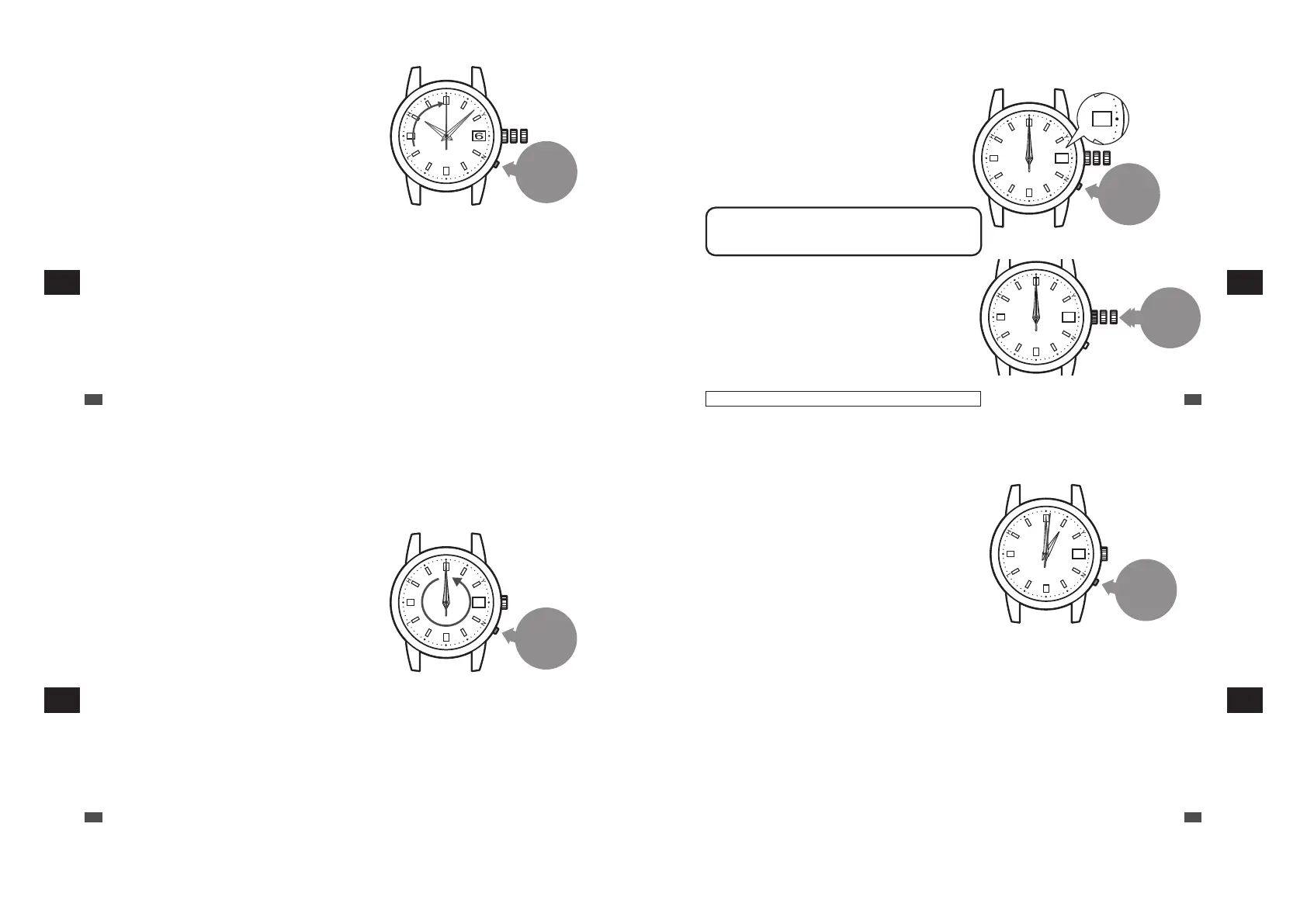
Press and hold the
button for 5 seconds
and then release it
For 1B21, go to procedure 4 (P.81)
For 1B22 / 1B32, go to procedure 3 (P.81)
2
Press and hold the button for 5 seconds
and then release it.
In five seconds after releasing the button, the hour
hand starts to move and stops at the 12 o’clock
position.
And then the minute hand and the seconds hand
start to move and stop at the zero second position.
* Press the button using an object with a long tapered
tip. → P.16
* The button cannot be operated until all the hands stop.
EN
80
7
TROUBLESHOOTING
■ Preliminary position adjustment of the date: adjust to “1 (first day)”
1
Pressing the
button
advances the
date by one day.
01 2
1
Push the
crown
back in
3
Press the button to set the date to “1”
Adjust the date so that the number “1” will be displayed in the
date window.
By pressing the button once, the hour hand makes two full
rotations and the watch advances the date by one day.
*
After the hour hand stops, press the button.
*
The number may be displayed out of the center of the date window.
After the preliminary position adjustment is finished, it is displayed
at the center the date window.
*
The date is not changed by turning the crown.
Do not continue to press the button.
Even if continuing to press the button, the date is not changed
consecutively.
*
Since continuous pressing returns the operation 2, do not continue
to press the button.
4
Push the crown back in.
When the crown is pushed back in, the watch starts to work from
00:00:00.
*
When the crown is a screw lock type, lock it. → P.17
EN
81
Only the 1B22 and 1B32 are date-displaying models.
7
TROUBLESHOOTING
■ How to set the time zone
After the system is reset, the time zone is set to London.
* If necessary, set the time zone.
1
Press and
hold the
button for
8 seconds
5
Continue to press the button (for 8 seconds),
and when the seconds hand starts to move
counterclockwise, release it.
The watch enters the time difference setting mode.
* Though the seconds hand may move to the 0-second
position after 3 seconds of pressing the button, keep
the button pressed.
* When a no movement state of the seconds hand is
kept for one minute or more, the watch automatically
switches to the time display mode. When the watch
switches to the time display mode, re-attempt
operation from 5.
EN
82
7
TROUBLESHOOTING
1
Press
the
button.
6
Press the button to set the seconds
hand to point at the time difference
index of the current location.
With each pressing of the button, the seconds hand
advances 1 second (+ 1 hour) in the clockwise
direction and the time advances 1 hour.
The position of the seconds hand shows the
difference. Please set it by referring to → P.35.
* Also while the watch is working, the seconds hand can
be moved.
EN
83
7
TROUBLESHOOTING



 To Next Page