EasyManua.ls Logo

Seiko Data-2000 - How to Input and Record Data (Continued); Cursor Navigation and Line Entry; Correcting Input Characters

Seiko Data-2000
18 pages
Print Icon
To Next Page IconTo Next Page
To Previous Page IconTo Previous Page
Loading...
5
6
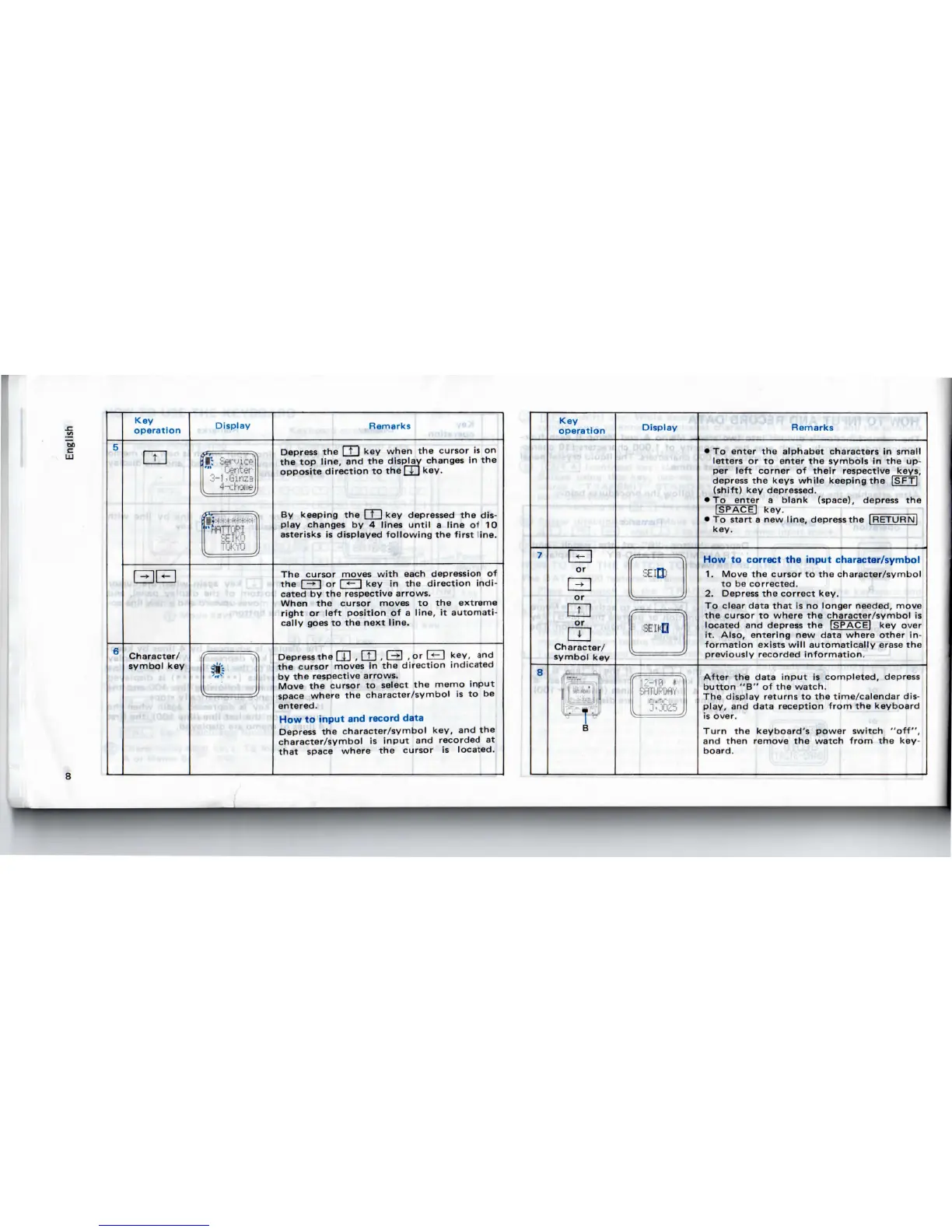
Key
operation
SB
Character/
symbol
key
Display
<rr
^
•":
Sennce
'"
Center
3-1,Ginza
4-cl
one
o-
'j
"rWTORl
SEIKO
Tfik'vn
I
91)
Remarks
Depress
the
1
t
1
key
when
the
cursor
is on
the top
line,
and the
display changes
in the
opposite
direction
to the
1
4-
1
key.
By
keeping
the
1
t
1
key
depressed
the
dis-
play changes
by 4
lines
until
a
line
of 10
asterisks
is
displayed
following
the
first
line.
The
cursor moves
with
each depression
of
the
F^n
or I
<-
I key in the
direction
indi-
cated
by the
respective arrows.
When
the
cursor moves
to the
extreme
right
or
left
position
of a
line,
it
automati-
cally
goes
to the
next
line.
Depress
the
Q]
,
CD
, E3
.or
GE]
key,
and
the
cursor moves
in the
direction indicated
by the
respective arrows.
Move
the
cursor
to
select
the
memo
input
space
where
the
character/symbol
is to be
entered.
How
to
input
and
record
data
Depress
the
character/symbol key,
and the
character/symbol
is
input
and
recorded
at
that
space
where
the
cursor
is
located.
7
8
Key
operation
Q
or
I
»
|
or
or
Character/
symbol
key
rfp5ra-'"1=**jfi
B
Display
SEIQJ
SEIHfl
ff
17-1
ft
(.
""
SFiTUPDfiY
!'Vii''ir
Remarks
To
enter
the
alphabet characters
in
small
letters
or to
enter
the
symbols
in the up-
per
left
corner
of
their
respective
keys,
depress
the
keys
while
keeping
the
|SFT|
(shift)
key
depressed.
To
enter
a
blank
(space),
depress
the
ISPACEI
key.
To
start
a new
line,
depress
the
[RETURN!
key.
How
to
correct
the
input
character/symbol
1.
Move
the
cursor
to the
character/symbol
to be
corrected.
2.
Depress
the
correct key.
To
clear data
that
is no
longer needed, move
the
cursor
to
where
the
character/symbol
is
located
and
depress
the
[SPACE]
key
over
it.
Also,
entering
new
data where
other
in-
formation
exists
will
automatically
erase
the
previously
recorded
information.
After
the
data
input
is
completed, depress
button
"B" of the
watch.
The
display returns
to the
time/calendar dis-
play,
and
data reception
from
the
keyboard
is
over.
Turn
the
keyboard's power
switch
"off",
and
then
remove
the
watch
from
the
key-
board.

Related product manuals