EasyManua.ls Logo

Seiko Data-2000 - How to Use the Calculator Function; Calculator Setup and Activation; Entering Numbers and Operations

Seiko Data-2000
18 pages
Print Icon
To Next Page IconTo Next Page
To Previous Page IconTo Previous Page
Loading...
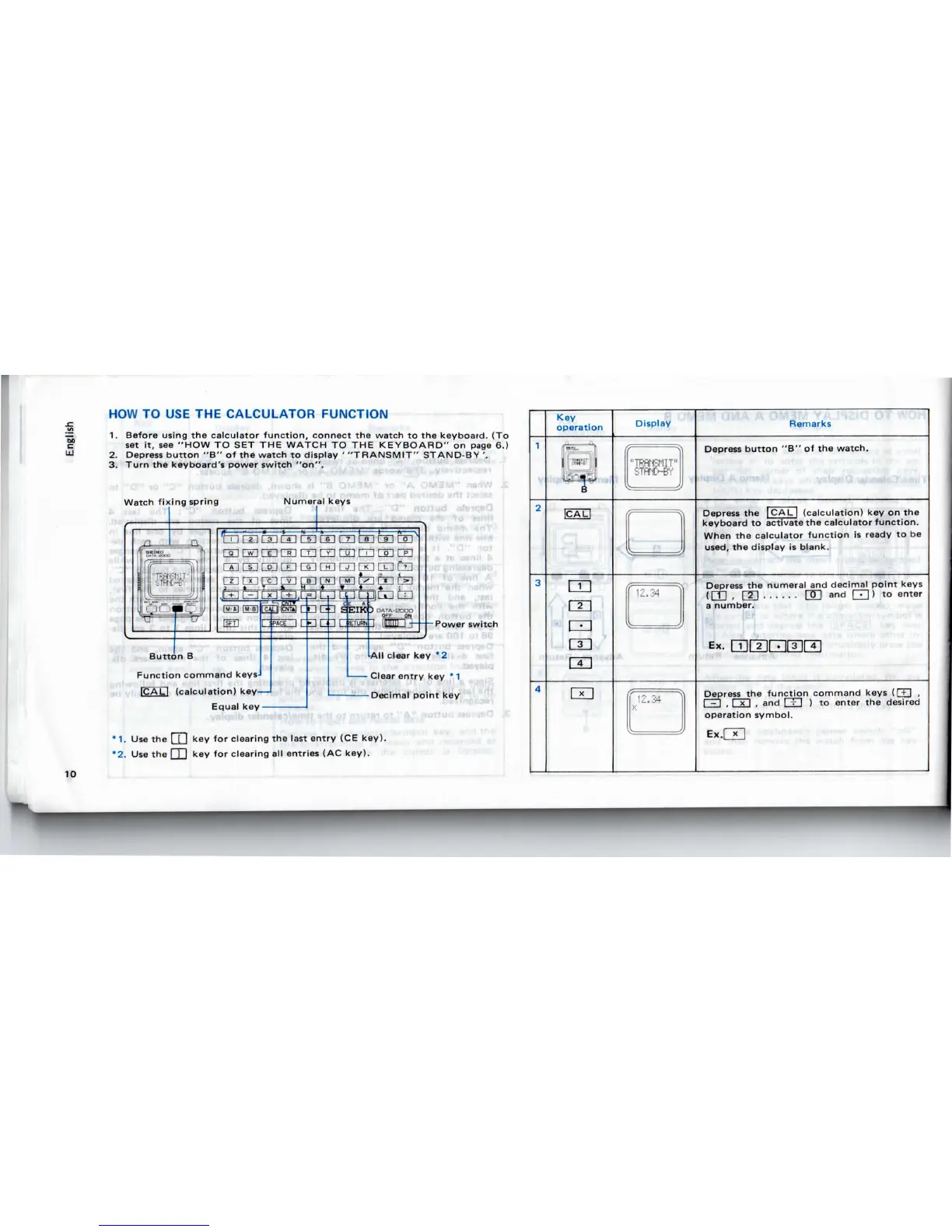
HOW
TO USE THE
CALCULATOR
FUNCTION
1.
Before using
the
calculator
function,
connect
the
watch
to the
keyboard.
{To
set
it, see
"HOW
TO SET THE
WATCH
TO THE
KEYBOARD"
on
page
6.)
2.
Depress
button
"B"
of the
watch
to
display
'
"TRANSMIT"
STAND-BY
'.
3.
Turn
the
keyboard's
power
switch
"on".
Watch
fixing spring
Numeral keys
•rlW
Power
switch
Button
B
Function
command keys
(calculation)
key—I
Equal
key
All
clear
key
*2
Clear
entry
key * 1
Decimal
point
key
*
1.
Use
the | [ | key for
clearing
the
last
entry
(CE
key).
*2.
Use
the I
I
I key for
clearing
all
entries
(AC
key).
10
Key
operation
m
CD
LXI
m
Display
Remarks
Depress
button
"B" of the
watch.
Depress
the
|
CAL
|
(calculation)
key on the
keyboard
to
activate
the
calculator
function.
When
the
calculator
function
is
ready
to be
used,
the
display
is
blank.
Depress
the
numeral
and
decimal
point
keys
(fTI
,
fin
QT]
and
Q
) to
enter
a
number.
Depress
the
function
command
keys
(RH
,
I - I , I x I , and I
'-
I ) to
enter
the
desired
operation symbol.
Ex.QT]

Related product manuals