EasyManua.ls Logo

Seiko Data-2000 - How to Set the Alarm; Alarm Setting Procedure; Alarm Test and Signal Engagement; Stopping the Alarm

Seiko Data-2000
18 pages
Print Icon
To Next Page IconTo Next Page
To Previous Page IconTo Previous Page
Loading...
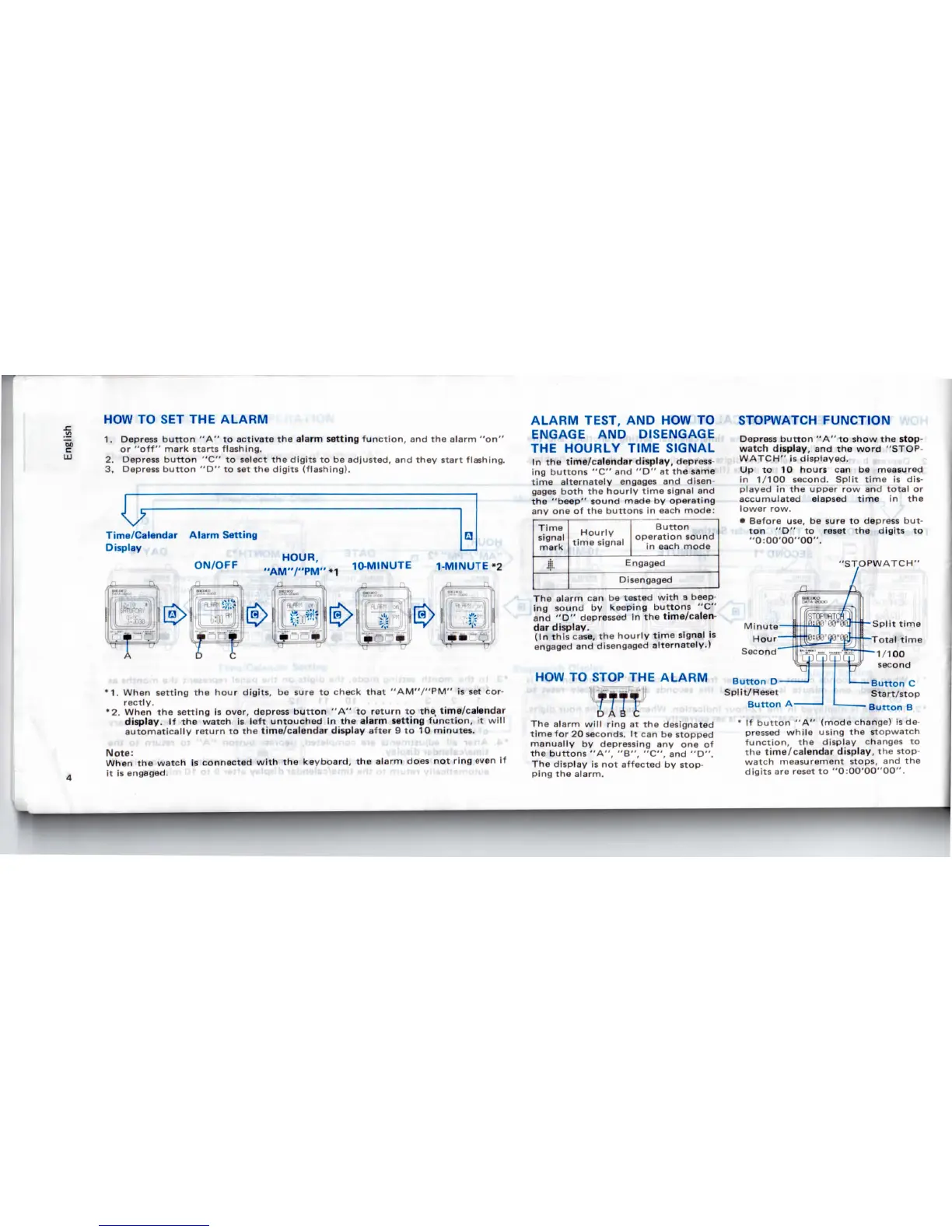
HOW
TO SET THE
ALARM
1.
Depress
button
"A" to
activate
the
alarm
setting
function,
and the
alarm "on"
or
"off" mark
starts
flashing.
2.
Depress
button
"C"
to
select
the
digits
to be
adjusted,
and
they
start flashing.
3.
Depress
button
"D"
to set the
digits
(flashing).
*1.
When
setting
the
hour digits,
be
sure
to
check
that
"AM'V'PM"
is set
cor-
rectly.
*2.
When
the
setting
is
over,
depress
button
"A" to
return
to the
time/calendar
display.
If the
watch
is
left
untouched
in the
alarm
setting
function,
it
will
automatically
return
to the
time/calendar display after
9 to 10
minutes.
Note:
When
the
watch
is
connected
with
the
keyboard,
the
alarm
does
not
ring
even
if
it is
engaged.
ALARM TEST,
AND HOW TO
ENGAGE
AND
DISENGAGE
THE
HOURLY TIME SIGNAL
In the
time/calendar
display,
depress-
ing
buttons
"C" and "D" at the
same
time
alternately
engages
and
disen-
gages
both
the
hourly
time
signal
and
the
"beep"
sound made
by
operating
any
one of the
buttons
in
each
mode:
Time
signal
mark
i.
Hourly
time
signal
Button
operation sound
in
each
mode
Engaged
Disengaged
The
alarm
can be
tested
with
a
beep
ing
sound
by
keeping buttons
"C"
and
"D"
depressed
in the
time/calen-
dar
display.
(In
this
case,
the
hourly
time
signal
is
engaged
and
disengaged
alternately.)
HOW
TO
STOP
THE
ALARM
I
The
alarm
will
ring
at the
designated
time
for 20
seconds.
It can be
stopped
manually
by
depressing
any one of
the
buttons
"A", "B", "C",
and
"D".
The
display
is not
affected
by
stop-
ping
the
alarm.
STOPWATCH
FUNCTION
Depress
button
"A" to
show
the
stop-
watch
display,
and the
word "STOP-
WATCH"
is
displayed.
Up to 10
hours
can be
measured
in
1/100 second. Split
time
is
dis-
played
in the
upper
row and
total
or
accumulated elapsed
time
in the
lower row.
Before use,
be
sure
to
depress
but-
ton "D" to
reset
the
digits
to
"0:OO'00"00".
"STOPWATCH"
Button
D
Split/Reset
Button
A
Button
C
Start/stop
Button
B
' If
button
"A"
(mode change)
is
de-
pressed
while
using
the
stopwatch
function,
the
display
changes
to
the
time/calendar display,
the
stop-
watch
measurement
stops,
and the
digits
are
reset
to
"0:00'00"00".

Related product manuals