EasyManua.ls Logo

Seiko Data-2000 - How to Display Memo A and Memo B; Selecting Memo Display; Navigating Memo Content

Seiko Data-2000
18 pages
Print Icon
To Next Page IconTo Next Page
To Previous Page IconTo Previous Page
Loading...
HOW
TO
DISPLAY
MEMO
A AND
MEMO
B
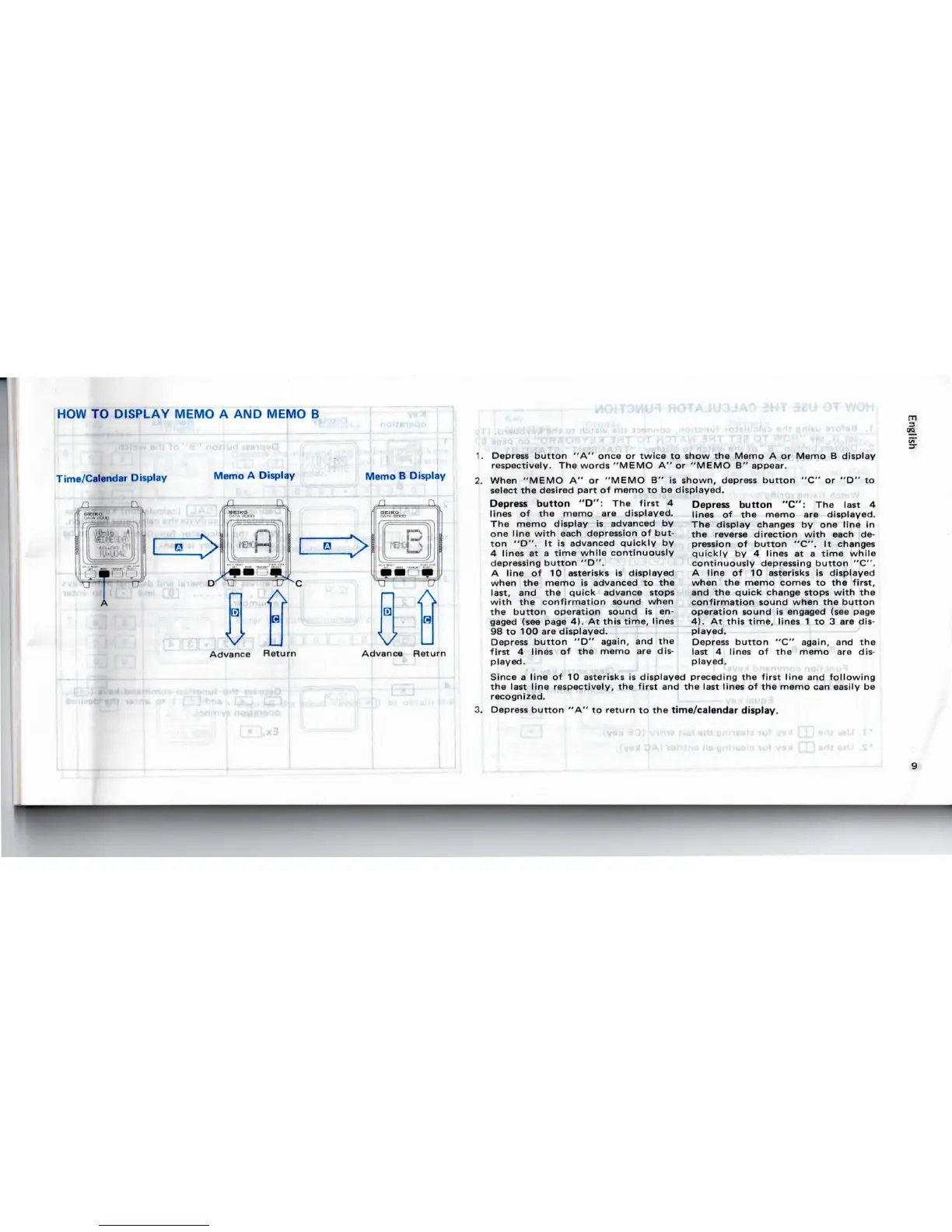
Time/Calendar Display
^
Memo
A
Display
Advance
Return
Memo
B
Display
Advance
Return
-
IrIC
AJUC
1.
Depress
button
"A"
once
or
twice
to
show
the
Memo
A or
Memo
B
display
respectively.
The
words
"MEMO
A" or
"MEMO
B"
appear.
2.
When
"MEMO
A" or
"MEMO
B" is
shown,
depress
button
"C" or "D" to
select
the
desired
part
of
memo
to be
displayed.
Depress
button
"D":
The
first
4
lines
of the
memo
are
displayed.
The
memo display
is
advanced
by
one
line
with
each
depression
of
but-
ton
"D".
It is
advanced quickly
by
4
lines
at a
time
while
continuously
depressing
button
"D".
A
line
of 10
asterisks
is
displayed
when
the
memo
is
advanced
to the
last,
and the
quick
advance stops
with
the
confirmation
sound when
the
button
operation sound
is en-
gaged
(see
page
4). At
this
time,
lines
98 to 100 are
displayed.
Depress
button
"D"
again,
and the
first
4
lines
of the
memo
are
dis-
played.
Depress
button
"C":
The
last
4
lines
of the
memo
are
displayed.
The
display
changes
by one
line
in
the
reverse
direction
with
each
de-
pression
of
button
"C".
It
changes
quickly
by 4
lines
at a
time
while
continuously depressing
button
"C".
A
line
of 10
asterisks
is
displayed
when
the
memo
comes
to the
first,
and
the
quick
change stops
with
the
confirmation
sound when
the
button
operation
sound
is
engaged (see
page
4). At
this
time,
lines
1 to 3 are
dis-
played.
Depress
button
"C"
again,
and the
last
4
lines
of the
memo
are
dis-
played.
Since
a
line
of 10
asterisks
is
displayed preceding
the
first
line
and
following
the
last line respectively,
the
first
and the
last lines
of the
memo
can
easily
be
recognized.
3.
Depress
button
"A" to
return
to the
time/calendar
display.
'

Related product manuals