EasyManua.ls Logo

Seiko Data-2000 - How to Set the Time and Calendar; Setting Seconds Digits; Calendar Month Representation; Auto Return to Display

Seiko Data-2000
18 pages
Print Icon
To Next Page IconTo Next Page
To Previous Page IconTo Previous Page
Loading...
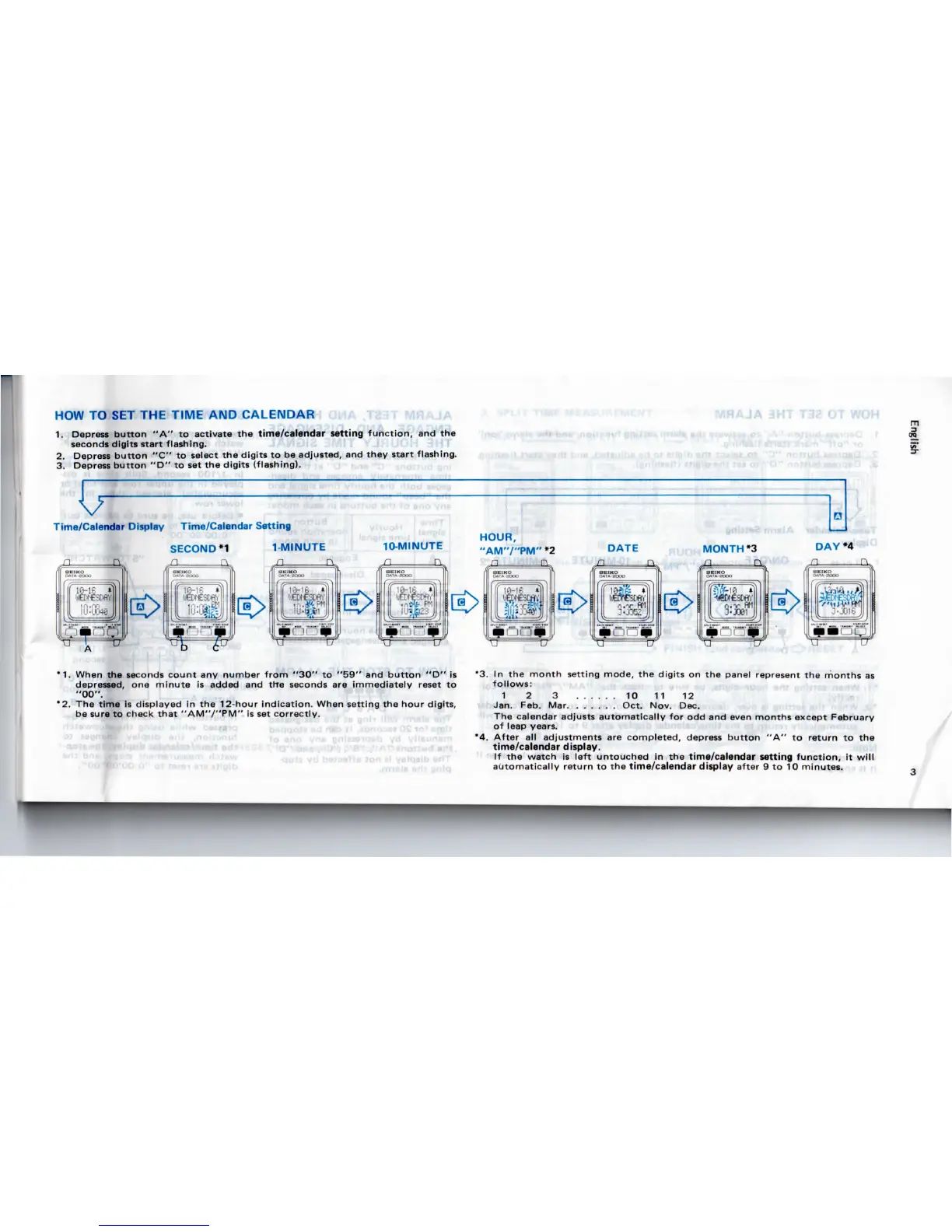
HOW
TO SET THE
TIME
AND
CALENDAR
1.
Depress
button
"A" to
activate
the
time/calendar
setting
function,
and the
seconds
digits start flashing.
2.
Depress
button
"C"
to
select
the
digits
to be
adjusted,
and
they
start flashing.
3.
Depress
button
"D"
to set the
digits
(flashing).
T32
Time/Calendar Display
Time/Calendar
Setting
SECOND
*1
n n
1
MINUTE
n
TV
10-MINUTE
_n
HOUR,
"AM'V'PM"
*2
n
MONTH'S
n
Q_
WOH
DAYM
m
a
*1.
When
the
seconds
count
any
number from
"30"
to
"59"
and
button
"D" is
depressed,
one
minute
is
added
and
trre
seconds
are
immediately
reset
to
"00".
*2.
The
time
is
displayed
in the
12-hour indication.
When
setting
the
hour
digits,
be
sure
to
check
that
"AM'V'PM"
is set
correctly.
*3. In the
month setting mode,
the
digits
on the
panel
represent
the
months
as
follows:
1
2 3 10 11 12
Jan.
Feb.
Mar
Oct. Nov. Dec.
The
calendar
adjusts
automatically
for odd and
even
months
except
February
of
leap
years.
*4.
After
all
adjustments
are
completed,
depress
button
"A" to
return
to the
time/calendar
display.
If the
watch
is
left
untouched
in the
time/calendar setting function,
it
will
automatically
return
to the
time/calendar display
after
9 to
10
minutes.

Related product manuals