WATCH BATTERY CHANGE
",3
•
Note:
When
the
battery runs
down,
all
data
in the
Memos
is
erased
and
the
memo display
is
cleared.
The
miniature
lithium
battery, Matsushita BR2325, which powers your watch
should
last
approximately
1.5
years.
However,
because
the
battery
in
your
watch
is
inserted
at the
factory,
its
actual life once
in
your
possession
may be
less
than
the
specified
period.
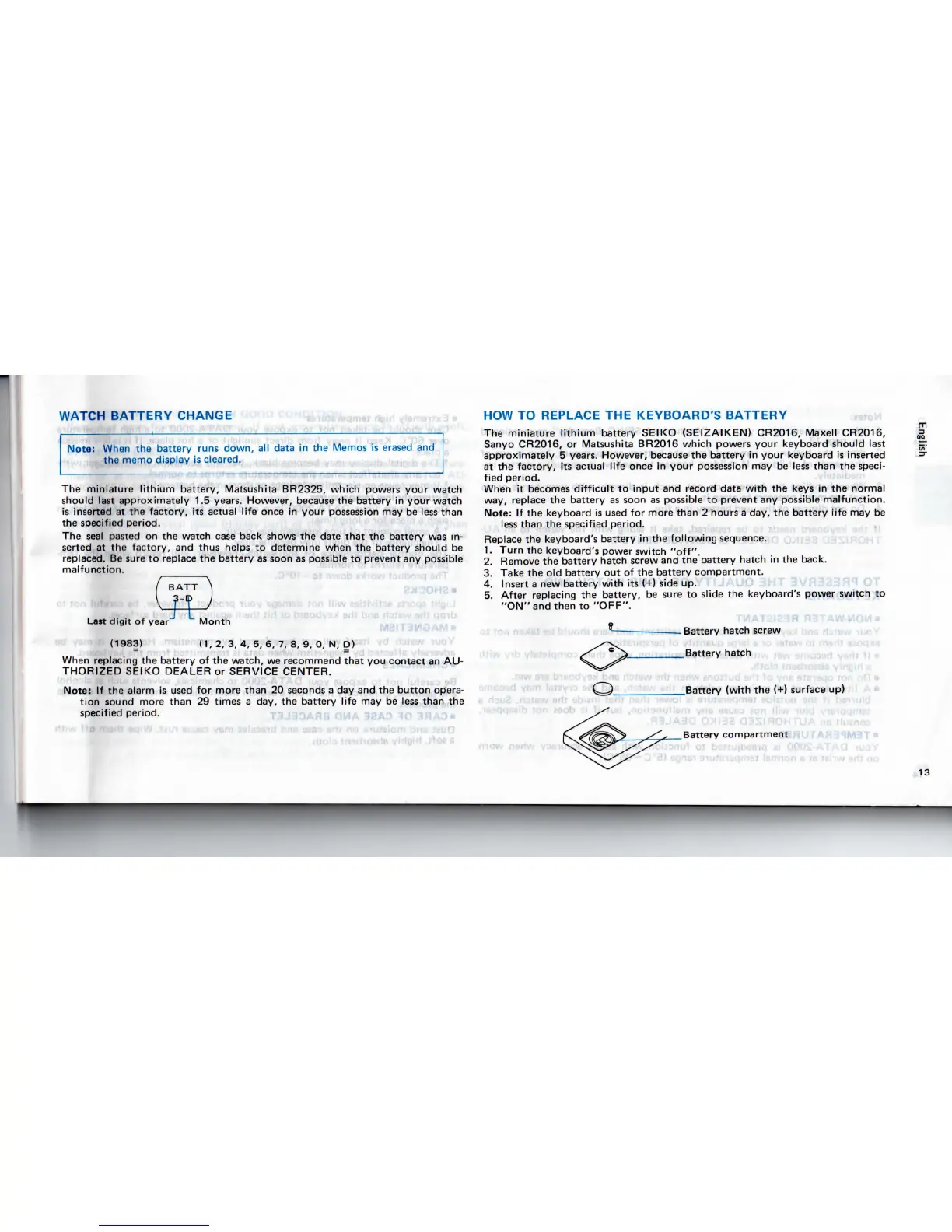
The
seal
pasted
on the
watch
case
back shows
the
date
that
the
battery
was in-
serted
at the
factory,
and
thus
helps
to
determine when
the
battery should
be
replaced.
Be
sure
to
replace
the
battery
as
soon
as
possible
to
prevent
any
possible
malfunction.
Last
digit
of
year
(1983)
Month
(1,
2, 3, 4, 5, 6, 7, 8, 9, 0, N, D)
When
replacing
the
battery
of the
watch,
we
recommend
that
you
contact
an AU-
THORIZED SEIKO DEALER
or
SERVICE CENTER.
Note:
If the
alarm
is
used
for
more than
20
seconds
a day and the
button
opera-
tion
sound more than
29
times
a
day,
the
battery life
may be
less
than
the
specified period.
HOW
TO
REPLACE
THE
KEYBOARD'S BATTERY
The
miniature
lithium
battery
SEIKO (SEIZAIKEN) CR2016, Maxell CR2016,
Sanyo
CR2016,
or
Matsushita BR2016 which powers your keyboard should
last
approximately
5
years.
However,
because
the
battery
in
your keyboard
is
inserted
at the
factory,
its
actual life once
in
your
possession
may be
less
than
the
speci-
fied period.
When
it
becomes
difficult
to
input
and
record data
with
the
keys
in the
normal
way, replace
the
battery
as
soon
as
possible
to
prevent
any
possible
malfunction.
Note:
If the
keyboard
is
used
for
more than
2
hours
a
day,
the
battery
life
may be
less
than
the
specified period.
Replace
the
keyboard's
battery
in the
following
sequence.
1.
Turn
the
keyboard's power switch
"off".
2.
Remove
the
battery hatch
screw
and
the
oattery
hatch
in the
back.
3.
Take
the old
battery
out of the
battery compartment.
4.
Insert
a new
battery
with
its (+)
side
up.
5.
After replacing
the
battery,
be
sure
to
slide
the
keyboard's power switch
to
"ON"
and
then
to
"OFF".
Battery hatch
screw
Battery hatch
Battery
(with
the (+}
surface
up)
Battery
compartment
13


 To Next Page