EasyManua.ls Logo

Seiko Data-2000 - How to Input and Record Data; Memo A and Memo B Input; Displaying Memo Lines

Seiko Data-2000
18 pages
Print Icon
To Next Page IconTo Next Page
To Previous Page IconTo Previous Page
Loading...
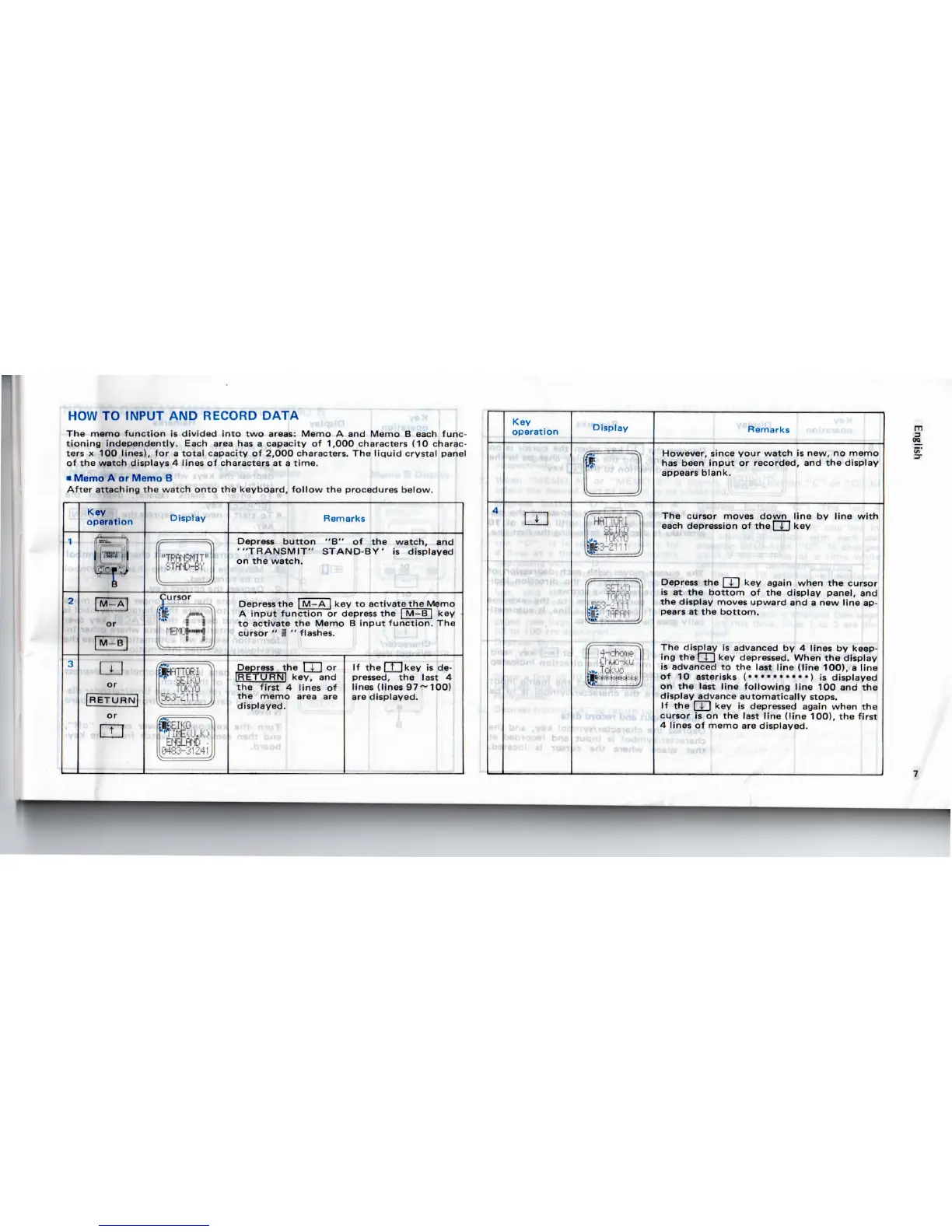
HOW
TO
INPUT
AND
RECORD
DATA
J^.,ri
)
»
1 I
The
memo function
is
divided
into
two
areas:
Memo
A and
Memo
B
each
func-
tioning
independently.
Each
area
has a
capacity
of
1,000.characters
(10
charac-
ters
x 100
lines),
for a
total
capacity
of
2,000
characters.
The
liquid
crystal panel
of the
watch displays
4
lines
of
characters
at a
time.
Memo
A or
Memo
B
After
attaching
the
watch
onto
the
keyboard, follow
the
procedures below.
Key
operation
-*n
»'
ii
QJ
or
RETURN
Display
Remarks
Depress
button
"B" of the
watch,
and
'"TRANSMIT"
STAND-BY'
is
displayed
on
the
watch.
Depress
the |
M—A
[
key
to
activate
the
Memo
A
input
function
or
depress
the I
M-B
| key
to
activate
the
Memo
B
input
function.
The
cursor
"
i
"
flashes.
Depress
the I
I
I or
IRETURNl
key,
and
the
first
4
lines
of
the
memo
area
are
displayed.
If the I t
I
key
is de-
pressed,
the
last
4
lines
(lines
97
10O)
are
displayed.
4
Key
operation
m
Display
no
I
ICirJJ
I
L*8E3-£m
|K"
.•'¥"'•'
Jj
If
4-chofrieJl
,
TokMP
tlV
t::+::|:**:t:*:J:
I
^"'
JJ
Remarks
However,
since your watch
is
new,
no
memo
has
been
input
or
recorded,
and the
display
appears
blank.
The
cursor
moves
down line
by
line
with
each
depression
of the I
\,
\y
Depress
the I \ key
again
when
the
cursor
is
at the
bottom
of the
display panel,
and
the
display moves upward
and a new
line
ap-
pears
at the
bottom.
The
display
is
advanced
by 4
lines
by
keep-
ing
the
| I
|
key
depressed.
When
the
display
is
advanced
to the
last line (line 100),
a
line
of 10
asterisks
(••••••»•••)
is
displayed
on
the
last
line
following
line
100 and the
display
advance
automatically stops.
If the I
I
I key is
depressed
again
when
the
cursor
is on the
last
line
(line 100),
the
first
4
lines
of
memo
are
displayed.

Related product manuals