9
8
• The unit will automatically
TURN OFF
when not used for approxi-
mately 3 minutes.
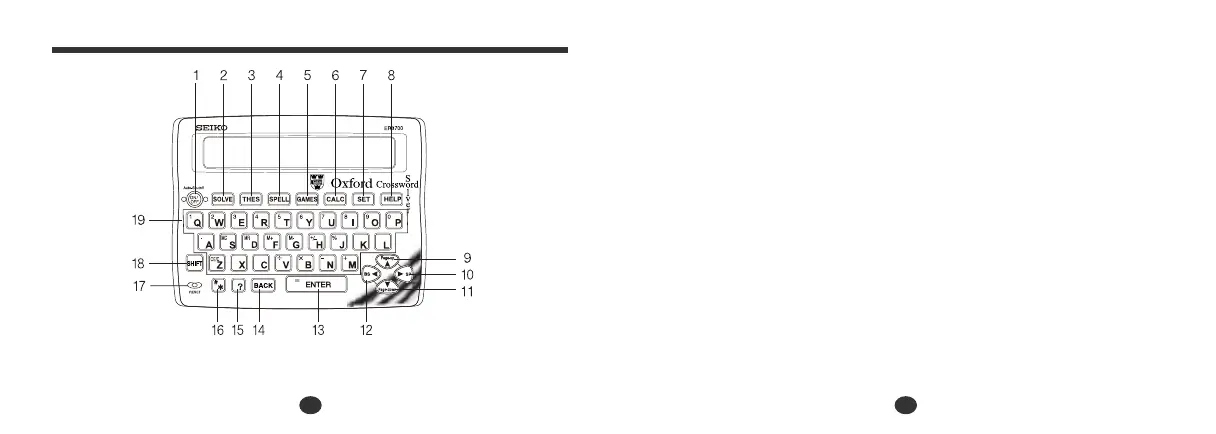
The Keys and their Functions
1 Turns the power ON and OFF.
2 Selects Solver mode.
3 Selects Thesaurus mode.
4 Selects Spellchecker mode.
5 Selects Game mode.
6 Selects Calculator mode,
Currency, Metric/Imperial and
Clothing Size Converters.
7 Activates Setting function.
8 Activates Help function.
9 For scrolling back through the lists
in memory. / For selecting the
menu in the Converter mode.
10 Enters a single blank space when
pressed once. / For shifting the
display to the right.
11 For scrolling down through the
lists in memory. / For selecting the
menu in the Converter mode.
12 For deleting the last input
character. / For shifting the display
to the left.
13 Executes the functions.
14 For deleting the last input
character. / Returns to the previous
screen.
15 Substitutes for a single letter
when
you are uncertain of a spelling.
16 Used instead of one or more letters
if you don’t know how to spell a
word.
17 RESET button.
18 Shift Key.
19 Letter, numeral and symbol input
keys.


 To Next Page