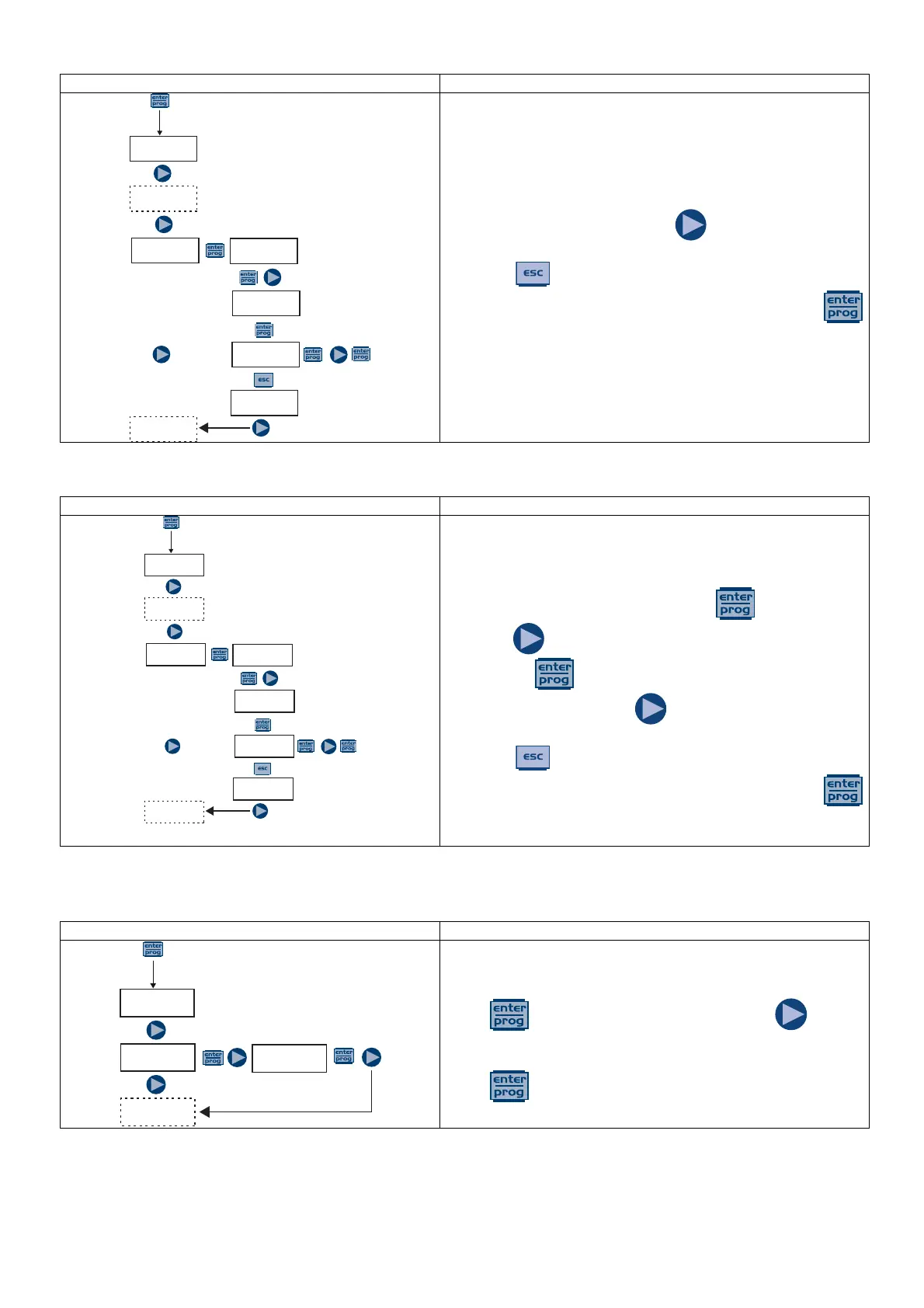
This allows you to activate (deactivate) the flow sensor.
When activated (On), press the key to set the sensor
as N. Open or N. Closed.
Press the key to return to the main menu.
Confirm and return to the main menu by pressing the
key.
Paragraph 10 – Level Alarm
This allows you to activate the level sensor alarm, which
means that you can decide whether to stop the dosage
(Stop) or simply activate the alarm signal without stopping
the dosage.
Changes can be made by pressing the key, then
using the key to set the alarm type. Confirm by
pressing the key.
When activated, press the key to set the sensor as N.
Open or N. Closed.
Press the key to return to the main menu
Confirm and return to the main menu by pressing the
key.
Paragraph 11 – Setting the Pause
Remote input to pause the pump.
By default, the system is set to Normally Open.
Press to access the item, and then press to set
the value (N. OPEN or N. CLOSED).
Press to confirm and return to the main menu.
PROG
Config.
Alarms
Flow
Flow
Off
Flow
On
FlowConf
N.Open
Alarms
Flow
PROG
Config.
Alarms
Flow
Flow
Off
Flow
On
FlowConf
N.Open
Alarms
Flow
PROG
Config.
Paus
N.Open
Paus
N.Closed



 To Next Page