15
Date Code 20131015 SEL-735 Quick-Start Guide
Factory Support
VII. Factory Support
We appreciate your interest in SEL metering products and services. If you have questions or comments, please
contact us at:
Direct meter support line: +1.509.334.8793
Meter support email: metersupport@selinc.com
Metering website: www.selmeters.com
B. Changing Passwords
To prevent unauthorized access, set strong passwords as described in the steps below. For example, the
password OTTER is weak because it is a six-character word found in the dictionary. The password
O#h”pVw& is strong because it is random, undefined, and contains eight characters.
Step 1. Access
ACSELERATOR QuickSet
HMI as previously discussed in
Human-Machine Interface (HMI)
on page 12.
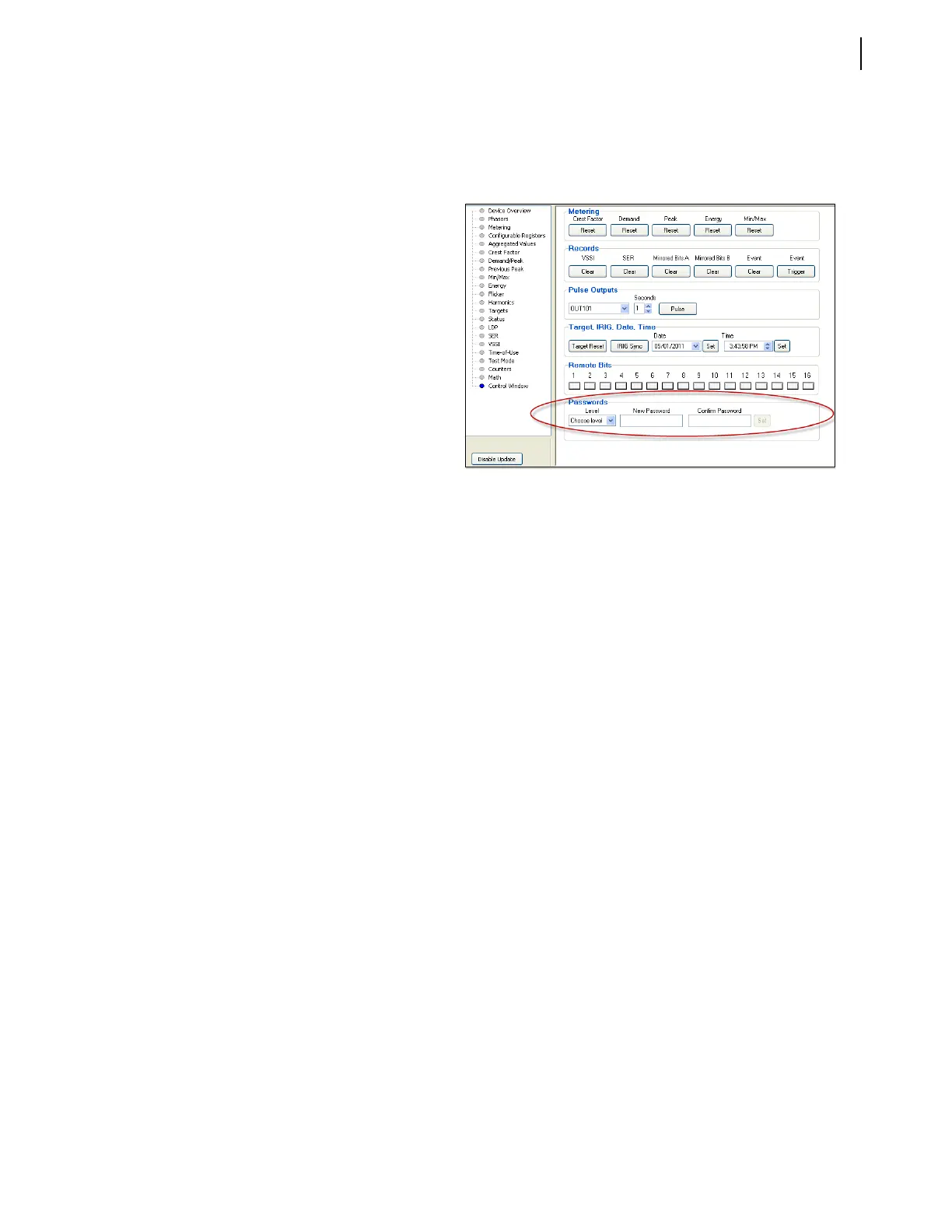
Step 2. Click on Control Window in the
tree-view to display the Control
window.
Step 3. Select the Level in the Passwords
section for the Access Level that
you want to change (see Figure 26).
Step 4. Type the new password in the New
Password and Confirm Password
text boxes.
Step 5. Click Set next to the Confirm
Password text box.
Figure 26 Control Window
A message will appear confirming that the meter accepted the new password.


 To Next Page